 on 5 September 2026
 Dolibarr + DoliPlus SEPA Mandate Management
The Dolibarr SEPA payment management interface, combined with DoliPlus, now offers even more features.
Indeed, since 1 February 2014, the authorisation and direct debit request have changed. They have been replaced by the SEPA direct debit mandate.
This mandate includes the following information:
- The RUM: Unique Mandate Reference.
- The ICS: SEPA Creditor Identifier.
In practice, your customer fills in and signs the form called “SEPA Direct Debit Mandate”.
Then, you keep this mandate as the creditor. Consequently, you no longer need to send this form to your bank.
The Dolibarr SEPA Payment Management Interface
First, you need to activate and configure the module that manages the SEPA Direct Debit.
Here is a preview of this interface.
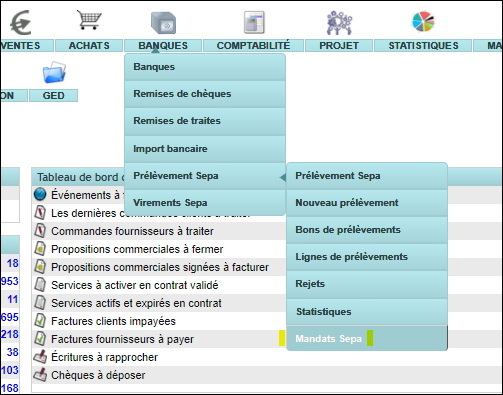
Thanks to it, you can:
- Generate your new Dolibarr SEPA mandates in PDF format,
- Manage your RUMs,
- Store a copy in the customer or supplier’s document library, which you can then print or email,
- Activate or deactivate your mandates.
List of Mandates
First, here is the list of your mandates.
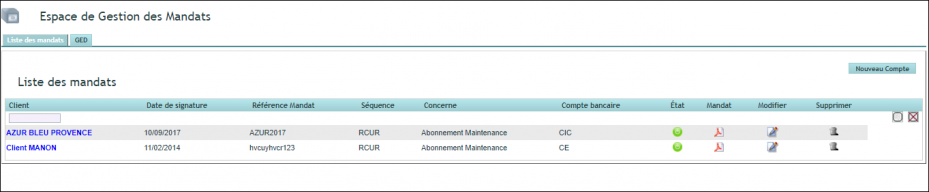
The PDF icon generates two files in the customer or supplier’s document library. It uses the Word template stored in the document library and customised with your logo.
On the one hand, you get an editable and pre-filled Word file. On the other hand, you receive the same document in PDF format.
Furthermore, if the customer’s IBAN is provided, it appears in the document. In other words, it replaces the input form.
Entering a New Dolibarr SEPA Mandate
Finally, here is the screen for entering a new mandate.
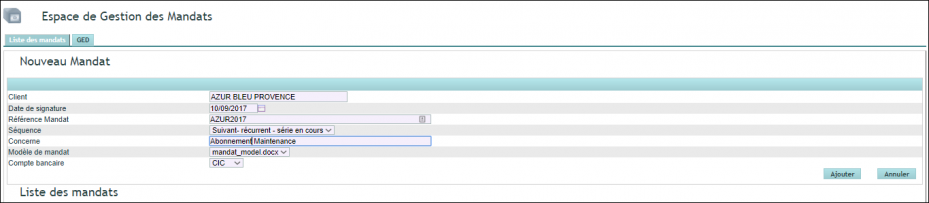
Remember the customer’s address
Since November 2026, your bank expects the address of every customer you collect from inside the direct debit file — at least their town and country. However, a single incomplete record is enough to get the whole batch rejected, not just the line concerned.
Therefore, use the moment you create the mandate to check the customer record: it is the natural time to do it, since you are already there. Afterwards, DoliPlus reuses that address on its own for every collection. Moreover, a dashboard card permanently flags the mandates whose address still needs completing.
Everything about SEPA direct debit and the November 2026 deadline