 on 5 September 2026
 Navigation in DoliPlus
Navigating DoliPlus efficiently means quickly finding the right page among hundreds of management screens. Business software indeed includes many modules: quotes, invoices, stock, projects, calendar. Without clear landmarks, you get lost and waste time. That’s why the interface has been redesigned to get straight to the point, whether on desktop or mobile.
You gain daily comfort as a result. Plus, each employee finds their way alone, without lengthy training. Let’s see how the interface guides you, step by step.
On PC and Mac
The main menu appears at the top of the screen in a single line. Hovering over a section opens a mega-drop-down menu, displaying all sub-sections at a glance. You see the entire module content before even clicking. The display automatically adjusts to never overflow the screen edge.
You can also switch the menu to a vertical sidebar. This mode frees up vertical space and works well for large tables. Icons remain readable, whichever option you choose.
On smartphone and tablet
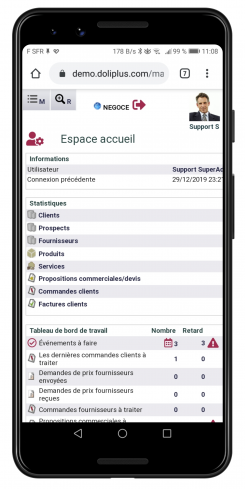
The software automatically detects your device. It then displays small icons to make finger navigation simpler. A single tap opens the menu hierarchy; a double tap reveals the top menu. Everything remains accessible, even on small screens.
An interface that adapts to your screen
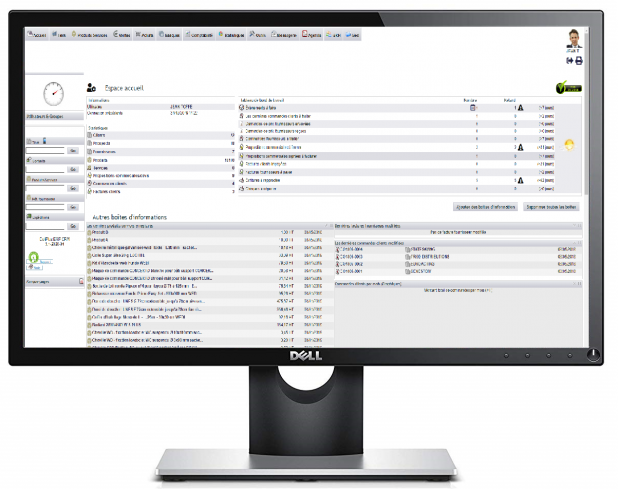
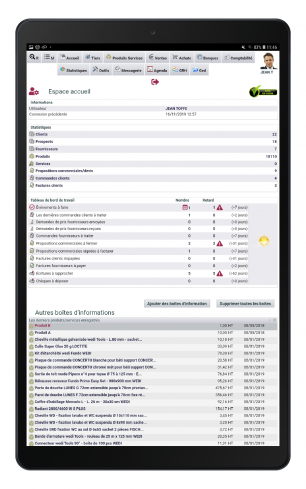
A single interface follows you everywhere, at the office or on the go. The display reorganises itself automatically based on screen size. Large tables, for example, fold into stacked blocks. You avoid painful horizontal scrolling and read the essentials effortlessly.
Colours and a dark mode to your taste
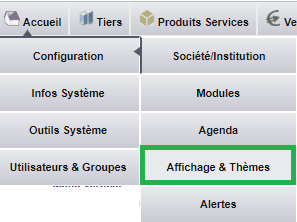
You customise the interface in a few clicks. A dozen pastel themes are ready to use, and you can also choose your own colours to match your company’s branding. A dark mode eases eye strain in the evening or low light. Finally, three display densities—compact, normal, or spacious—adjust the space to your preferences.
A dedicated mobile app for on-the-go use
In the field, a mobile app complements the web interface. You install it on your smartphone like a real app, without going through an app store. It even works offline, which is reassuring when travelling. Your technicians can thus manage interventions, photos, and expense reports directly from the site.
Clear lists for your data
A management software handles a lot of information. The DoliPlus interface presents it in the form of dynamic tables. Learn more… You sort, filter, and find each piece of data in seconds.
Quotes, orders, invoices… interface
A DoliPlus interface with its specific features for easy use Learn more…
