 on 5 September 2026
 Payment terms and methods in DoliPlus
Payment terms set the deadline for your customers to pay an invoice, while the payment method specifies the means used: bank transfer, cheque, card or direct debit. When properly configured, these two settings speed up your collections and protect your cash flow. DoliPlus lets you fully customise both lists, then apply default values tailored to your business and each customer.
How to edit the list of payment terms or methods?
To change default payment terms and methods, go to the admin menu:
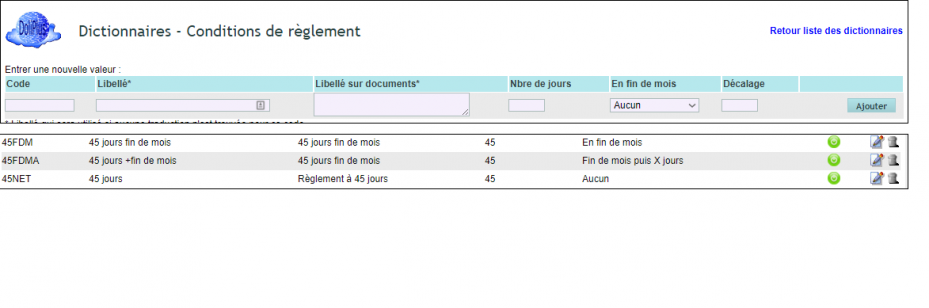
- Home > Configuration > Dictionaries > Payment terms
- Home > Configuration > Dictionaries > Payment methods
How to set default payment terms or methods?
Navigate to:
- Home > Configuration > PDF/interface settings > General settings

How to understand the 45 days end-of-month calculation method?
Source (https://www.economie.gouv.fr/cepc/delais-payment-sur-computation-des-delais#q23)
One approach is to count 45 days from the invoice date, with the payment deadline falling at the end of the calendar month in which these 45 days expire. However, it’s also possible to calculate the deadline differently, by adding 45 days to the end of the month in which the invoice was issued.
In DoliPlus dictionaries, apply the option: End of month then X days
Example invoice dated 25/09 —> due date 14/11 or 30/11 depending on the chosen method.
Customise payment terms per customer
Beyond default values, you can set specific terms for each customer in their record. DoliPlus automatically applies these when creating quotes, orders and invoices. This lets you effortlessly manage different commercial agreements: immediate payment for new customers, 30 or 45-day terms for trusted accounts.
Each due date is calculated based on your chosen rule – invoice date, end of month, or end of month plus days. This setup improves cash flow forecasting, as each invoice carries a clear due date. Your payment chases also become more relevant, triggering at the right time without manual tracking.
