 on 5 September 2026
 Send a Mailing by Post and Mail Merge
Mail merge lets you send the same personalised letter to multiple customers. It combines your DoliPlus data with your usual word processor, eliminating manual re-entry.
Why use mail merge?
In today’s digital world, postal mail might seem outdated. Yet mail merge remains essential for certain communications: official summons, payment chases, or regulatory correspondence.
To perform a mail merge with DoliPlus, use your preferred word processor like OpenOffice or Microsoft Word. Numerous online tutorials exist, such as for OpenOffice or for Word.
Extract your data for mail merge
Mail merge starts with a data file. Your word processor can merge from .csv or .xls files to personalise each letter.
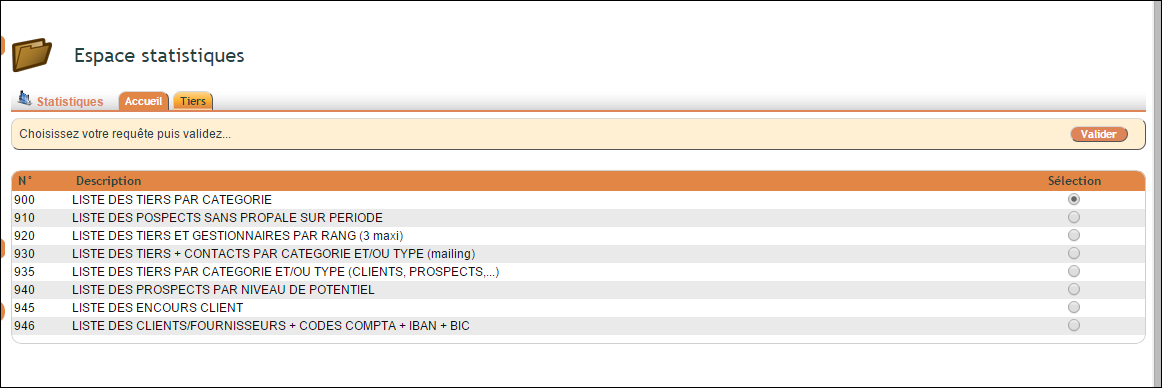
Download this file directly from DoliPlus. Navigate to the statistics menu, series 900, then select query 930 (customers/suppliers) or 935 (contacts with email). You can also filter by categories. Once extracted, you can further sort the file as needed.
Why choose this method?
Manually copying recipient details would be time-consuming and error-prone. Mail merge instead leverages your up-to-date DoliPlus records.
You benefit in three key ways:
- Time savings: one template for all recipients
- Reliable data: addresses come straight from your CRM
- Precise targeting: category filters refine your mailing
Learn more about email marketing with Brevo
Ultimately, mail merge remains a valuable tool even in our digital age. It combines your current DoliPlus data with familiar word processing, merging CRM reliability with office software flexibility.
Next steps
