 on 5 September 2026
 Dynamic Tables and Lists in Dolibarr
DoliPlus’ dynamic tables make your lists faster and more readable. This way, you process your data — customers, quotes, orders, invoices, shipments — without reloading the page for each search. Plus, each team member customises the display for their role, and the software remembers their preferences.
Dynamic tables across your entire ERP
This list generation improves daily comfort. Each user adapts the display to their needs, and DoliPlus saves their settings from one session to the next.
In practice, you filter, sort, select your columns, and export your data all from the same page. As a result, you save time on all your lists.
Daily benefits
Here’s a quick overview of what these lists offer:
- real-time multi-criteria filters: results appear instantly, without reloading the page;
- sorting on any column, with a single click on its header;
- selecting displayed columns, including custom fields;
- reordering columns by drag-and-drop;
- freezing a column and the header, so you never lose track;
- export to PDF, CSV, or Excel, plus printing;
- saving all these settings, tailored to each user.
Sorting your dynamic tables in one click
Each list opens in a default order. For instance, both the quote list and the invoice list are sorted by document date, the most recent first.
Want another order? Simply click a column title. For example, one click on “Ref.” sorts your quotes by ascending number, then a second click reverses the order. Likewise, you can sort by customer, by amount or by reminder date.
The sort applies instantly, without any setup. However, it only lasts for the current visit: the next time you open the list, it returns to its default order. Your columns and their order, on the other hand, stay saved.
Selecting columns to display
Each list includes a “Other columns” button. First, you open it. Then, you tick the useful columns and untick those you don’t need.
This way, you display additional data, as well as your custom fields and their filters. Consequently, you only keep the information that matters to you on screen.
Reordering columns
You can also change the column order. Simply grab a column header and drag it to the desired position.
This new order is saved automatically. This way, you can place the most important column first, such as the reference or customer name.
Freeze a column and header
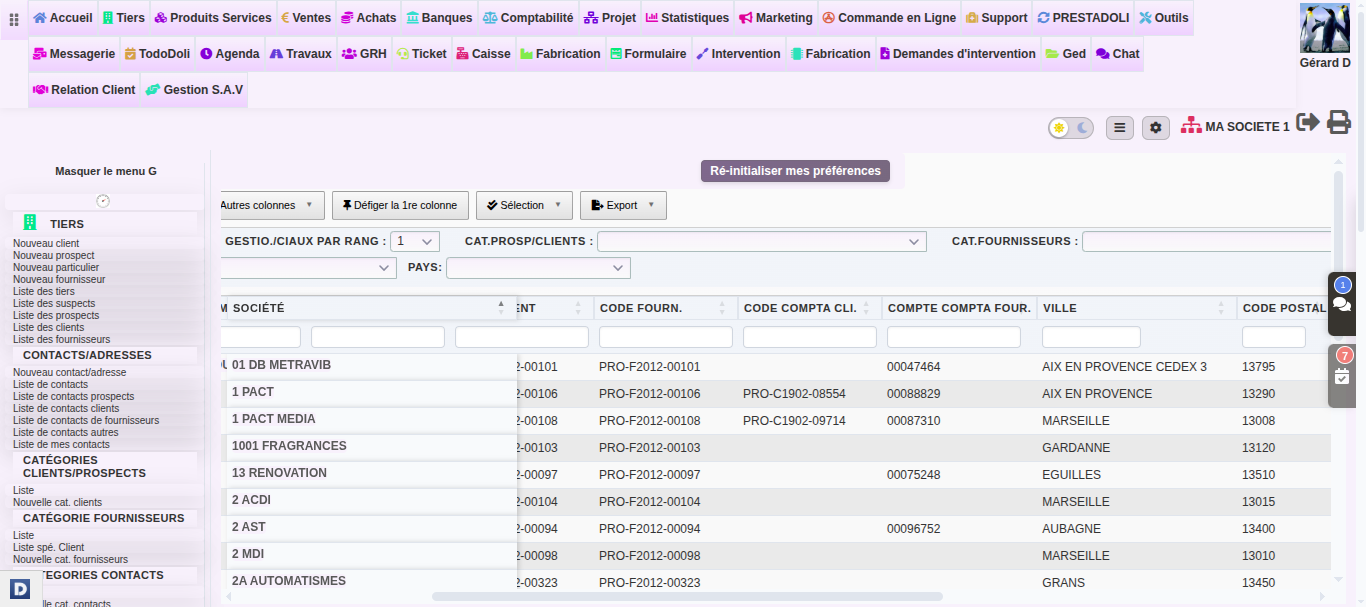
Wide lists often require extensive scrolling. As a result, you lose sight of the row you’re reading. To prevent this, DoliPlus freezes the first column and header row.
On computers, a “Freeze 1st column” button appears in the toolbar. When activated, the first column remains visible when scrolling right. Similarly, the header row stays visible when scrolling down. To return to normal view, click “Unfreeze 1st column”.
This setting is saved per list and per user. In other words, everyone can freeze their preferred views without affecting colleagues. To choose which column stays visible, simply move it to the first position.
Export and print your lists
Your data can also leave the screen with one click. Using the “Export” button, you get a PDF, CSV or Excel file, or a direct printout.
You can also select specific rows on screen first. Then, only export this selection. This is handy for preparing mailings or meetings.
Your saved preferences
All these choices follow you. Indeed, DoliPlus saves for each user:
- displayed and hidden columns;
- column order;
- number of rows per page;
- frozen column and header.
As a result, you’ll find your lists exactly as you left them upon each login.
A recognisable interface
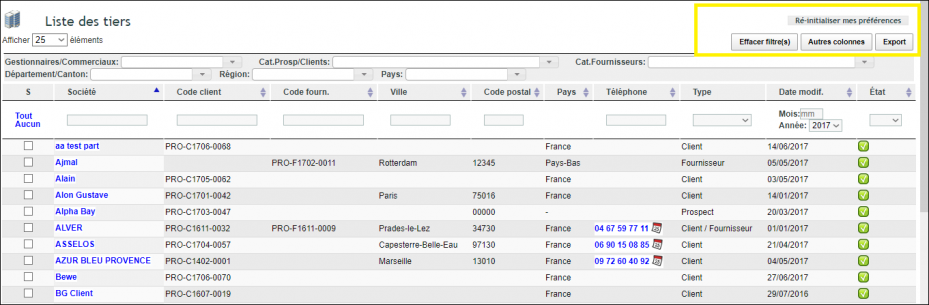
For easy navigation, these lists feature a distinct appearance. The framed buttons below indicate when a list is dynamic.
Custom lists on request
Sometimes, standard lists aren’t enough. For example, you might want one-click filtered lists, or to split a large list into more readable sub-tables.
In this case, we can add tailor-made lists to suit your needs. Just open a support ticket to outline your requirements.
On smartphones and tablets
Dynamic tables also work on mobile. On tablets, you can scroll through all columns while the first column and headers stay fixed. So you get the same comfort as in the office, right in your pocket.
On smartphones, you confirm entries to apply a filter. And if a filter displays incorrectly, a simple page refresh will fix it.
Going further
