 on 5 September 2026
 Standardise contact roles with a dropdown list
Standardising contact roles ensures your team uses a common list of job titles. This creates consistency in terminology and makes your targeting more reliable.
Why standardise contact roles?
In your CRM contact records, you can freely enter a contact’s job title. However, this flexibility quickly becomes problematic – the same role can be written in ten different ways.
This is why standardising contact roles is often useful. You define a list of approved job titles, and everyone selects from this consistent set.
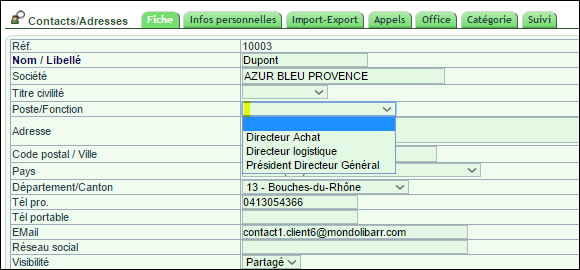
Remember that email filters can target contacts by job title. Standardised roles make this targeting much more accurate.

How to set up this list
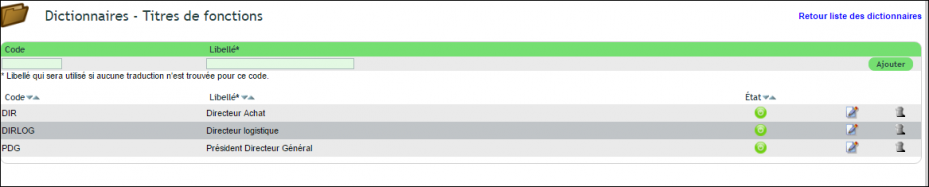
Setup happens in two stages. First, open the dictionary and select the “Job Titles” list (llx_c_job table). Here you create your standardised role titles.
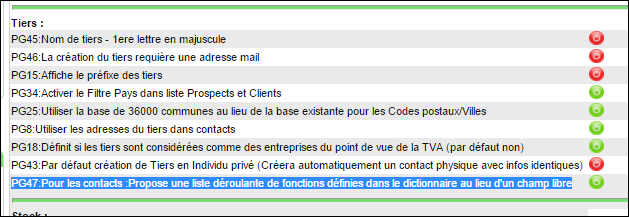
Then in PDF/Interface Settings, enable option PG47. This replaces free text entry with a dropdown selection.
Note: Any existing roles not in your standard list will remain visible. However, when editing, you’ll need to update these using the dropdown selection.
The benefits of standardised roles
Standardised roles improve all aspects of CRM usage. You can filter, group and target contacts without ambiguity.
You gain in three key areas:
- Clean data: each role is always written consistently
- Precise campaigns: your emails reach the right contacts
- Guided entry: the list prevents errors and duplicates
Learn more about the general dictionary
In summary, standardising contact roles requires a small setup effort that quickly pays off. Once implemented, your team enters data faster while maintaining data quality. Your targeting gains lasting precision.
Further reading
