 on 5 September 2026
 General dictionary
The general dictionary lets you customise a wide range of dropdown lists in DoliPlus. This way, your forms offer exactly the right options for your business, with no unnecessary choices.
What is the general dictionary for?
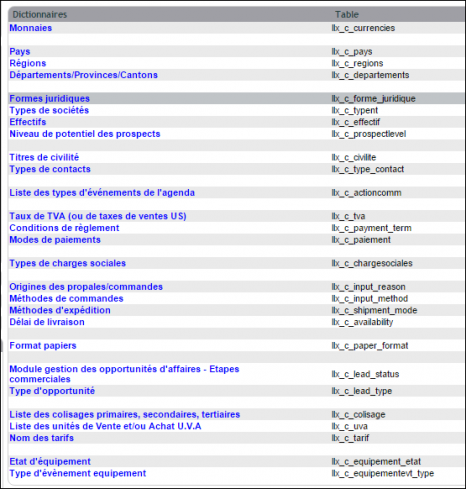
In DoliPlus, many fields rely on dropdown lists: countries, currencies, contact types, payment methods, payment terms… The general dictionary centralises all these lists. You can add, edit, or deactivate values as needed.
This ensures your teams enter consistent data. It also helps avoid duplicates and vague labels.
Accessing the general dictionary
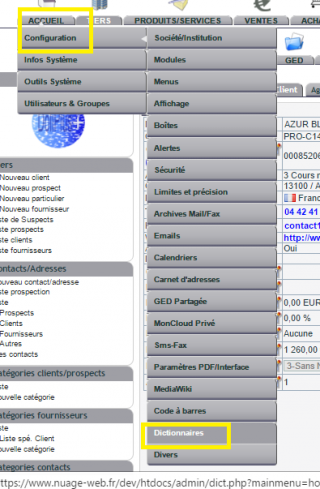
To access the general dictionary, open DoliPlus’ configuration menu, then go to the Dictionaries section.
The list below is not exhaustive. It evolves with module activations or software updates.
 Note: for some modules, specific dictionaries remain accessible from their own admin console.
Using the general dictionary effectively
Before creating a new value, first check if it already exists. Then, deactivate rather than delete a value still used in old documents. This keeps your history clean while simplifying user choices.
In short, a well-maintained general dictionary speeds up data entry and makes your data more reliable. Learn more about category management
Lists tailored to your business
Every company has its own ways: payment methods, event types, contact categories. With the general dictionary, you align these lists with your actual organisation.
For example, you can remove currencies you never use, or add a payment method specific to your industry. This way, users only see relevant options, so they enter data faster and make fewer mistakes.
Going further
