 auf 5 September 2026
 Kontaktfunktionen mit einer Dropdown-Liste normalisieren
Wenn Sie die Funktionsbezeichnungen normalisieren, arbeitet Ihr Team mit einer gemeinsamen Liste von Funktionen. So verwenden alle dieselben Begriffe, und Ihre Zielgruppenauswahl wird zuverlässig.
Warum Funktionsbezeichnungen normalisieren?
Beim Qualifizieren von Kontakten im CRM können Sie die Funktion Ihres Ansprechpartners frei eingeben. Diese Freiheit wird jedoch schnell zum Problem: Dieselbe Funktion wird auf zehn verschiedene Arten geschrieben.
Deshalb lohnt es sich oft, die Funktionsbezeichnungen zu normalisieren. Sie legen eine Liste von Funktionen fest, und alle verwenden dieselben Begriffe.
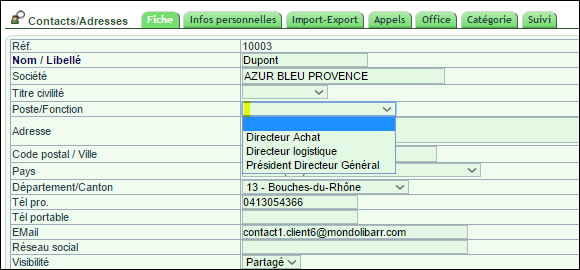
Beachten Sie, dass Sie Kontakte im E-Mailing über einen Filter nach ihrer Funktion auswählen können. Normalisierte Funktionen machen diese Auswahl daher deutlich präziser.

Wie richten Sie diese Liste ein?
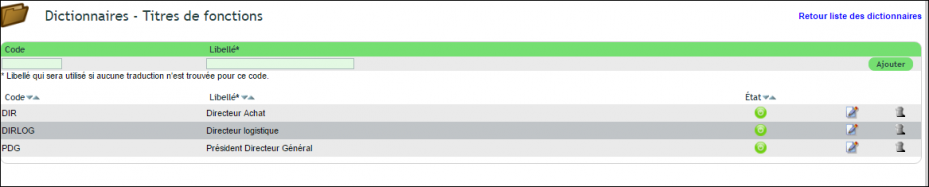
Die Einrichtung erfolgt in zwei Schritten. Öffnen Sie zuerst das Wörterbuch und wählen Sie die Liste „Funktionsbezeichnungen“ (Tabelle llx_c_job). Dort legen Sie Ihre Funktionsbezeichnungen an.
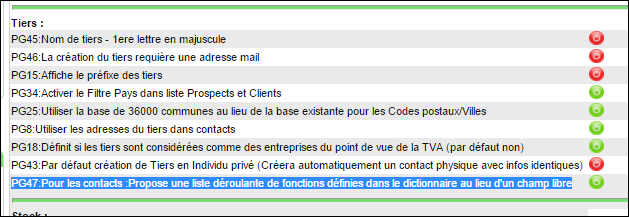
Aktivieren Sie anschließend in den PDF/Interface-Einstellungen die Option PG47. Ab dann ersetzt die Dropdown-Liste die freie Eingabe.
Hinweis: Enthält Ihre Datenbank bereits Funktionen, die nicht in der Liste stehen, werden sie weiterhin angezeigt. Im Bearbeitungsmodus müssen Sie die Funktion jedoch über die Dropdown-Liste aktualisieren.
Die Vorteile einer Liste von Funktionsbezeichnungen
Normalisierte Funktionen verbessern Ihre gesamte Arbeit im CRM: Sie filtern, gruppieren und wählen Zielgruppen ohne Ungenauigkeiten aus.
Sie profitieren dreifach:
- saubere Daten: Eine Funktion wird immer gleich geschrieben;
- präzise Kampagnen: Ihre E-Mailings erreichen die richtigen Kontakte;
- geführte Eingabe: Die Liste vermeidet Fehler und Dubletten.
Mehr zum allgemeinen Wörterbuch
Letztlich erfordert die Normalisierung der Funktionsbezeichnungen nur einen kleinen Konfigurationsaufwand, der sich schnell bezahlt macht. Sobald die Liste eingerichtet ist, erfassen Ihre Teams schneller und Ihre Daten bleiben sauber. Ihre Zielgruppenauswahl gewinnt dauerhaft an Präzision.
Weiterführende Informationen
