 on 25 October 2026
 ECM Tab for Monthly and Overdue Invoices
Monthly invoice batches let you group all your invoices for a month into a single document. DoliPlus also generates unpaid invoice batches, all from the Sales menu.
Generate monthly and unpaid invoice batches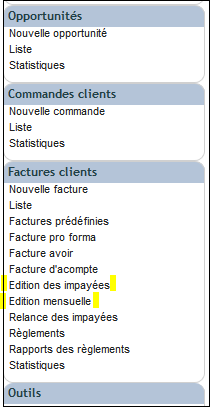
In the Sales menu, two submenus produce consolidated batches:
- invoices by month;
- unpaid invoices.
This gives you a single PDF combining multiple invoices, saving time on sending and follow-up.
A document library tab to avoid downloads
A document library tab accompanies these monthly invoice batches, eliminating the need to download PDFs locally. You can also drag these documents to another location, for example to email them. Learn more about the document library
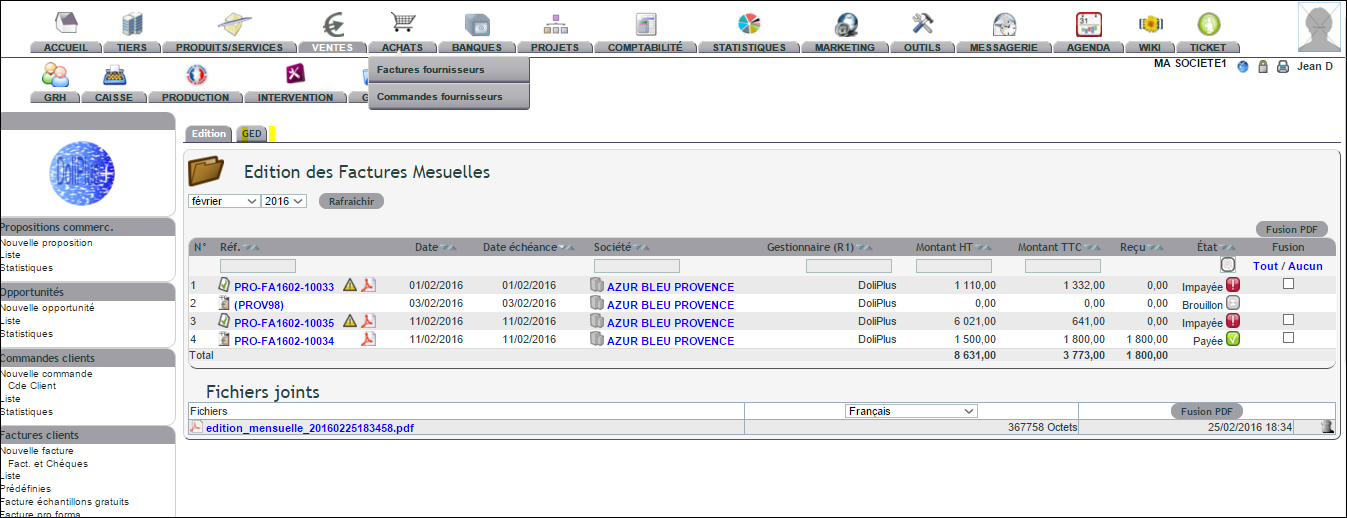
Gathering a month’s invoices into a single PDF, step by step
- Customer invoices menu › “Monthly edition”: the list of a month’s invoices, ready to be printed in one go. “Unpaid invoices printout”, just above it, does the same with unsettled invoices.
- Choose the month and the year, then click “Refresh”: the list shows the invoices dated that month.
- Tick the invoices to gather (“All / None” at the top of the column). A greyed-out box marks an invoice without a PDF: first generate its PDF from its record.
- Click “Start PDF merge” and confirm with “OK”: the PDFs of the ticked invoices are assembled into a single file. Nothing is sent to the customer.
- “Liste Factures … vers GED” also files the month’s invoice list (references, type, excl. tax, VAT, incl. tax) as a spreadsheet; it opens in a new tab.
- Click the “ECM” tab of the list: the file “monthly_edition_…” contains all the ticked invoices, one after the other. Double-click it to open and print it, or use “Download” to send it to your accountant. Delete old editions once you no longer need them.
The same action and the same filing apply to “Unpaid invoices printout”, the monthly edition of supplier invoices (Purchases menu) and the due dates of template invoices: each has its own “ECM” tab.
What are these batch features for?
In daily use, monthly invoice batches simplify two common tasks. First, you archive a month’s worth of invoices in one go. Second, you track unpaid invoices without reopening each one individually.
This makes chasing payments faster and simplifies sharing accounting records. Learn more about chasing unpaid invoices
Better monthly billing tracking
For many businesses, tracking happens monthly. Monthly invoice batches naturally fit this rhythm. You generate a full month’s batch, then send it to your accountant or archive it.
Since documents remain in the library, you can retrieve them anytime. Nothing gets downloaded then lost on a workstation – everything stays in DoliPlus, accessible to your team.
This consolidation also reduces manual handling. Instead of opening each invoice separately, you get one ready-to-share document. This saves valuable time at month-end when administrative workload peaks.
Next steps
