 on 25 October 2026
 Loan Management in DoliPlus
Loan management in DoliPlus
DoliPlus’s loan management lets you record, track and account for all your business loans in one place. Whenever a company finances a vehicle, equipment or property, it needs to monitor the outstanding capital, interest and insurance.
DoliPlus centralises loan management within your business software, alongside your cash flow and accounting. This gives you a clear view of your debt. Plus, you can anticipate each repayment without re-entering data in a separate spreadsheet.
Why track loans in your business software?
A bank loan commits your business for several years. You therefore need reliable, up-to-date visibility. With loan management integrated into your ERP, you always know where you stand.
- capital already repaid and outstanding capital;
- amount of the next instalment;
- interest and insurance portions of each repayment.
In short, you manage your cash flow with real figures. These figures also feed directly into your accounting, eliminating duplicate data entry.
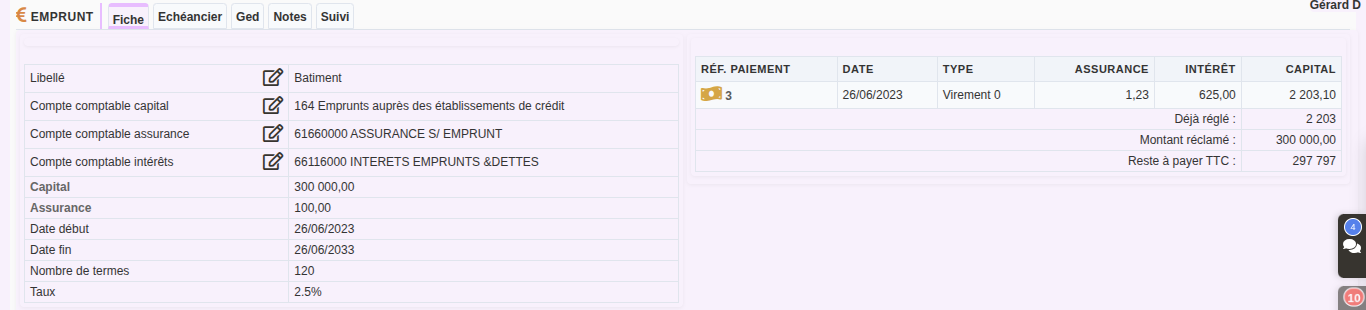
Recording a loan: capital, rate and term
First, create a loan record via the Banking menu. Then enter the loan details:
- the label, e.g. “Vehicle loan” or “Property credit”;
- borrowed capital and interest rate;
- term length in number of instalments;
- insurance amount and start/end dates.
Finally, link three accounting accounts: capital, interest and insurance. DoliPlus provides default accounts, which you can adapt to your chart of accounts.
Recording a loan and its payment schedule, step by step
- Menu Banks › Loans › “New loan”. Give it a meaningful name: the item financed, the bank.
- Choose the bank account from which the instalments will be debited.
- Enter the borrowed capital, the number of terms (the number of monthly instalments, e.g. 48 for 4 years) and the annual rate in %.
- The start date is that of the first instalment; the following ones fall on the same day each month. The end date is that of the last one.
- Optional: the TOTAL cost of insurance, spread equally across the instalments. The capital, insurance and interest accounts are prefilled from your settings.
- Click “Add”: the loan record opens. Open the “Payment schedule” tab: DoliPlus calculates each instalment (insurance, interest, amount, remaining capital). If your bank states a different amount, correct it: the following instalments are recalculated when you leave the field.
- Click “Create” at the bottom of the table to save the schedule. Later, the same button (“Save”) saves your corrections to upcoming instalments.
Repayment schedule and instalment calculation
Based on the principal, interest rate and term, DoliPlus generates the repayment schedule. You can view each instalment, showing the principal and interest portions.
The schedule can be corrected line by line: if your bank states a different amount for an instalment, the following ones are recalculated immediately. For reference, this detailed schedule is also called an amortisation table.
Recording repayments and outstanding principal
Each month, you record the instalment payment. DoliPlus then automatically allocates the payment between principal, interest and insurance.
Result: the record always shows the amount already paid and the remaining balance. Plus, you can easily reconcile these repayments with your bank statements.
Paying an instalment, step by step
- Menu Banks › Loans: one line per loan, with its capital, dates and status (red dot = no payment, orange = payments started, green = repaid). Click the loan reference.
- In the “Payment schedule” tab, the “Issue payment” button is on the first instalment not yet paid: instalments are paid in order.
- Check the date, the payment method (choose “Debit” if the bank debits the instalment) and the account debited. Capital, insurance and interest are taken from the schedule: only correct them if the bank debited a different amount.
- Click “Save”: DoliPlus creates the payment and the entry debiting the bank account, and the instalment changes to “Paid”.
- On the loan record, on the right: the list of payments, then “Already paid” and “Remaining amount due (incl. VAT)”. A payment number opens its record and its bank entry, ready to be reconciled with the statement. Made a mistake? “Delete” removes the payment and its entry, and the instalment becomes due again.
The loan record also offers “Edit”, the button that marks it as paid, and “Delete”; its “Notes” and “ECM” tabs (your contracts and bank schedules) and the record of who created or modified it complete the file.

Automatic accounting for your loans
Since each repayment is already split, accounting becomes automatic. The principal, interest and insurance are posted to the correct chart of accounts. As a result, your accountant gets clean entries with no manual reworking. In short, loan management always stays consistent with your accounts.
Further reading
- Pre-accounting and financial tools in DoliPlus
- Automated bank statement imports
- Analytical accounting
