 on 26 August 2026
 Shipping label software: your parcels ready to go, at their true cost
The Chronopost integration turns DoliPlus into shipping label software that works straight from your orders:
- carrier labels printed from the shipment itself, with no retyping;
- tracking numbers coming back into DoliPlus on their own;
- the true cost of the parcel carried onto the order, surcharges included;
- fresh and frozen goods handled through Chronofresh.
DoliPlus is the enhanced cloud edition of Dolibarr, so you keep an open-source foundation while gaining the carrier connection.
What this shipping label software does
The module prints your labels and transport notes from the shipment screens, through the official Chronopost web services. You need a contract with the carrier first.
In practice, it lets you:
- record the shipping cost on the order, surcharges included;
- collect the tracking number and offer a tracking link;
- print labels ahead of time — on Friday for Monday, for example;
- ship chilled goods through Chronofresh;
- insure parcels according to your contract;
- list every shipment over a period, for management review.
Moreover, it works across several companies and alongside the DoliPlus PrestaShop connector.
This module is not enabled by default. Please contact our sales team.
Setting up your carrier contract
First, open the module configuration and replace the demo contract with your own credentials. The password is your Chronotrace code, sent in your welcome email and tied to your contract number.
Then set your options: Ad Valorem insurance with its minimum trigger amount, the weight unit, and the Saturday and home-delivery options you actually use.
A shipping cost that matches your carrier invoice
The freight rate is only part of the bill. Carriers add surcharges, and they change several times a year. Carried onto the order, those surcharges protect your margin; left out, they eat into it on every single parcel.
DoliPlus folds them into the cost it works out for each shipment. You keep control of every figure in the module settings:
- the security fee, per parcel;
- the zone surcharge, per parcel, now based on the recipient postcode;
- the hard-to-reach area surcharge — islands and mountains — added on top of the previous one;
- the eco-responsible contribution, per parcel;
- the monthly fuel surcharge, as a percentage.
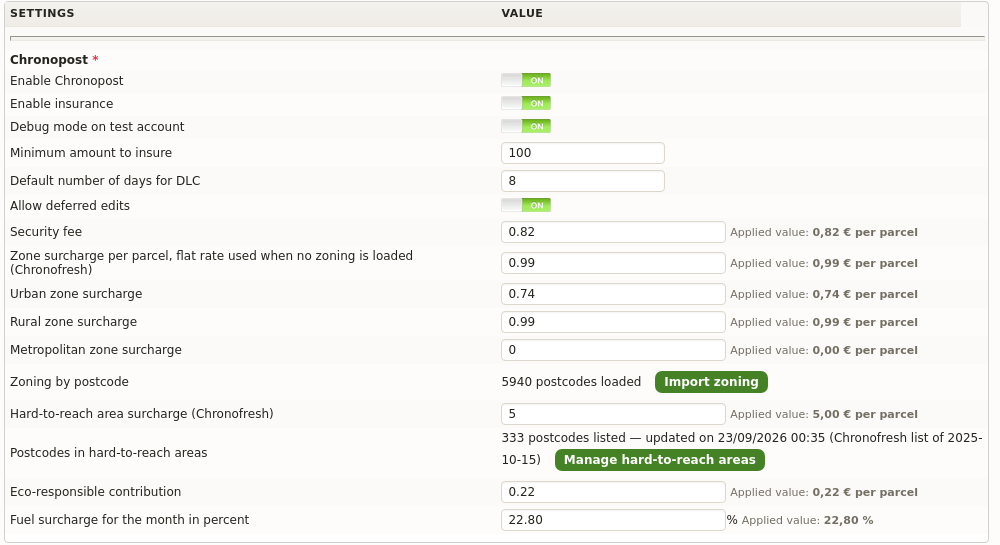
Each figure takes seconds to enter, and the value actually kept is shown back to you in plain sight. Therefore, when your carrier publishes a new rate card, you pass the change on yourself, on the day it takes effect.
The same parcel does not cost the same in a city and up a valley
Carriers charge more for addresses they reach less easily. First comes density: a rural delivery costs more than a metropolitan one. Then comes access: an island or a mountain village adds a second surcharge, worth several euros per parcel this time.
For a long time, those gaps disappeared into the average. The cost carried onto the order stayed the same everywhere, and the difference only surfaced on the invoice a month later, with no way of telling which shipment had caused it.
Now, your Chronopost shipping cost follows the delivery address. DoliPlus reads the recipient postcode, applies the surcharge for its category — urban, rural or metropolitan — then adds the hard-to-reach one whenever that postcode is on the list. Both add up, exactly as they do on your invoice.
A rate grid you keep up to date yourself
The postcode zoning is imported from the workbook your carrier sends you: you upload it, and DoliPlus tells you how many postcodes are loaded and, on every new import, what changed since the previous one — additions, removals, categories moved. That helps, because these grids change without notice.
The hard-to-reach list ships with the module itself: one click loads it. As a result, you have nothing to retype. And when the carrier announces new towns by email, you simply paste the postcodes into the screen, in whatever layout they arrive: DoliPlus only keeps the five-digit sequences.
This finer calculation is switched on for you on request: tell us you ship with Chronopost or Chronofresh, and we open it on your own installation.
Finally, the detail is stored with the shipment: the transport list shows you, parcel by parcel, what was applied under each heading. You can then check your carrier invoices line by line.
Printing a transport label
From a shipment, a window lets you adjust the parameters. DoliPlus estimates the weight from the product records, then you pick the contract and the Chronopost product.
Printing updates the transaction history, writes the shipping cost onto the order, and files the label in the shipment’s document folder. However, you are not limited to one at a time: you can print in bulk by ticking the deferred shipments in the list.
Tracking your Chronopost parcels
Tracking then takes care of itself, without leaving your shipping label software. A dedicated report lists every shipment over a period, so you can check your carrier invoices. Furthermore, the shipment list gains a tracking column, refreshed every half hour between 6 am and 11 pm.
Why connect Chronopost to DoliPlus?
Retyping shipments on the carrier website costs time and invites mistakes. This integration links your orders to your parcels directly.
You gain on three fronts:
- time saved: the label prints from the shipment;
- tracking built in: the parcel number comes back into DoliPlus;
- margin protected: what the carrier charges you lands on the order.
Have your real shipping costs worked out
Do you ship with Chronopost or Chronofresh, and wonder what your parcels really cost you, town by town? Tell us: we open the Chronopost module on your installation and load your rate grid with you. Your current figures stay untouched until you decide otherwise.
Going further
