 on 7 July 2026
 Shipping management software: deliveries and delivery notes in DoliPlus
Why shipping management software changes your warehouse days
Your DoliPlus solution includes shipping management software that carries an order from the shelf to the customer signature:
- shipments created straight from the sales order, warehouse by warehouse;
- picking done on a phone, barcode in hand, without a single keystroke;
- the customer signing the delivery note on the driver screen;
- batch numbers, expiry dates, parcel counts, weights and tracking numbers printed on the document;
- every validated shipment writing the stock movement for you.
As a result, your stock stays true and your proof of delivery lands in the file the same day. DoliPlus is the enhanced cloud edition of Dolibarr, the open-source ERP & CRM used across Europe.
Turning on the shipments module
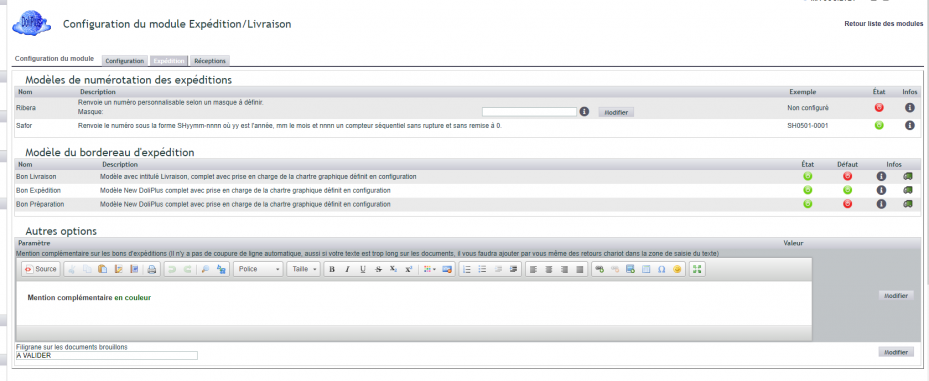
The Shipments module handles everything you send to customers. First, switch it on: log in with an administrator account, then go to “Home → Setup → Modules”. Pick the module tab and click “Activate”.
A small icon then appears at the end of the line. Click it to open the module settings.

Note that delivery PDFs are produced directly from the shipments, customer signature included. Moreover, if you run stock management, remember to switch on the physical stock decrement option.
Ship a customer order
Everything starts from the order. A “Ship product” button takes you to the Shipment tab. Then select the source warehouse and create a new shipment.
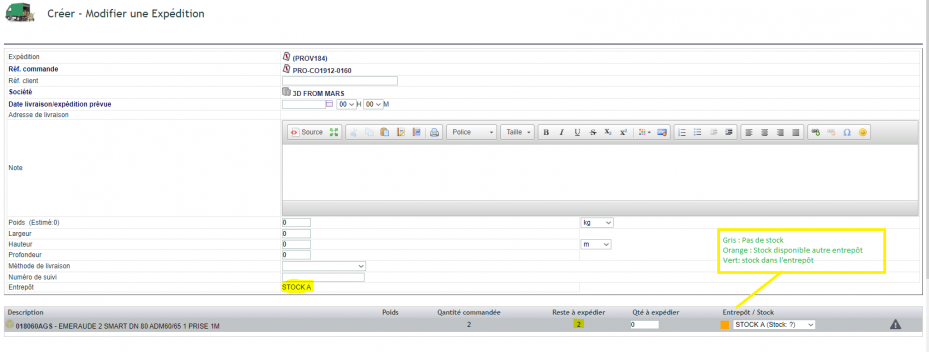
When stock management is active, you name a warehouse and DoliPlus works out what is left to ship from it. Moreover, a colour code shows availability in your other warehouses. Therefore you can pick elsewhere, or run a stock transfer first. Finally, you may add an item that is not invoiced — a pallet, for example.
Ship from a phone: from the scanned parcel to the signed note
Out in the warehouse, your picker works straight from the DoliPlusMobi mobile app. Consequently, an order leaves the building without ever going back to a desk.
Pick the order by scanning
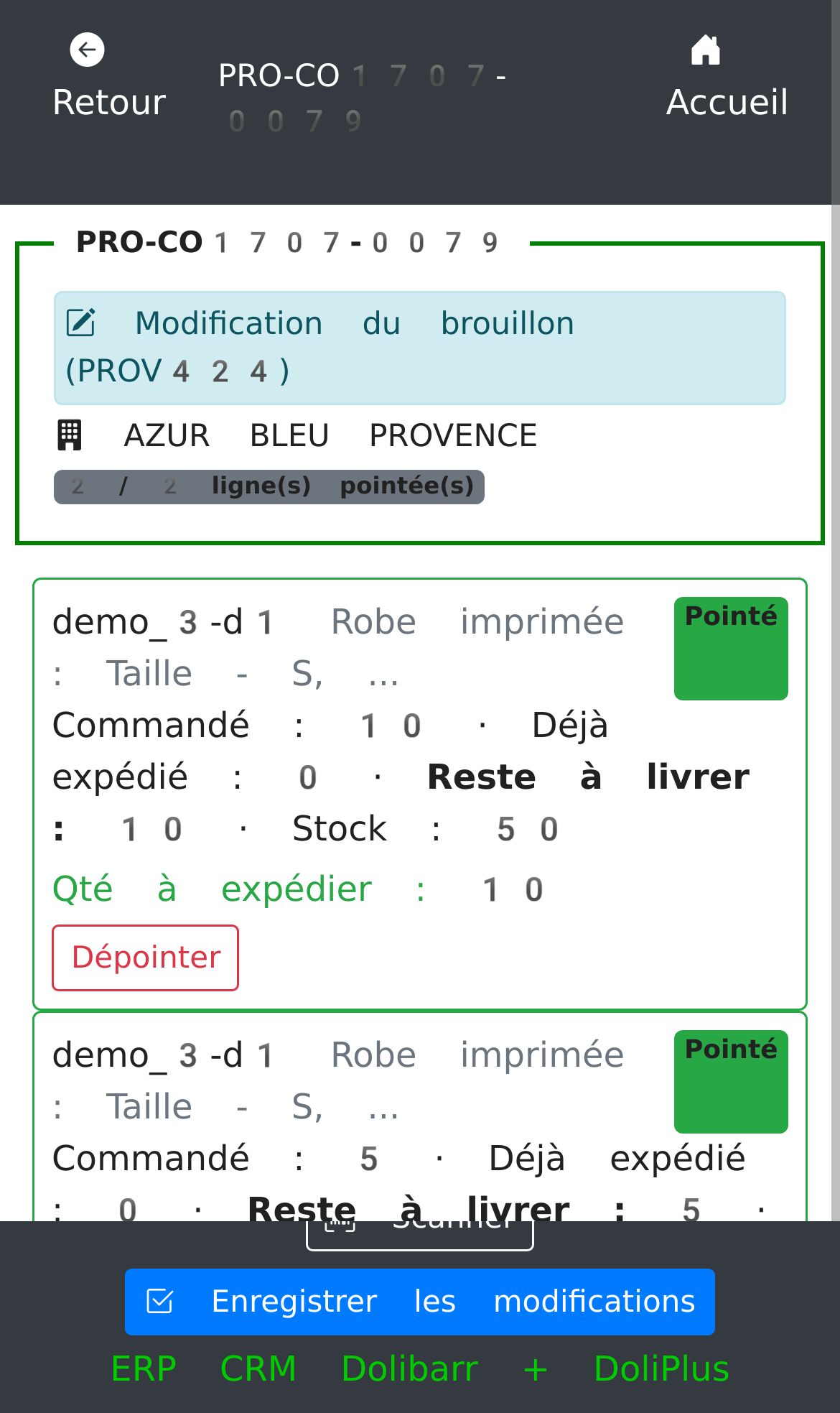
First, the picker opens the order to prepare. Then they scan each product as it goes into the parcel. DoliPlus ticks off the quantities as they go, and the batch numbers whenever the product carries them.
Picking and barcode shipping therefore happen without a keyboard, which removes copying mistakes entirely.
Fix the picking before validating
As long as the shipment stays a draft, it can be corrected in one gesture. Indeed, an item is missing, a quantity changes, a parcel stays on the dock: the picker simply taps the pencil on the draft. The screen reopens exactly as they left it.
They can therefore:
- correct a picked quantity;
- remove a line that was not loaded after all;
- add a forgotten item, batch number included.
Moreover, your stock does not move while the draft is still a draft. In other words, this correction carries no consequence: the stock movement waits for validation.
Have the customer sign on screen
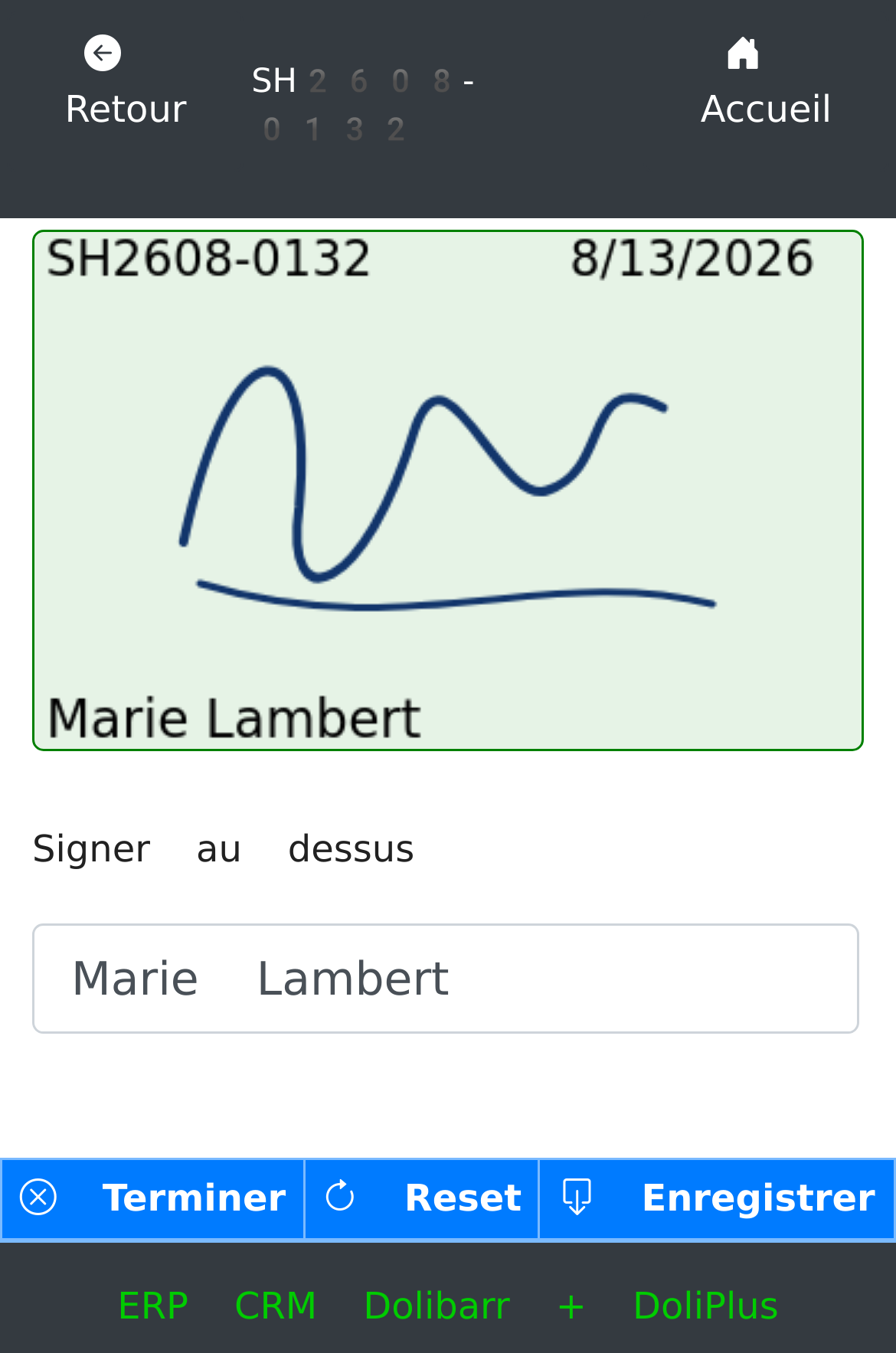
Finally, once the shipment is validated, your customer signs directly on the driver phone. The delivery note is then regenerated with that signature, in its usual place in the “For the customer” box.
The proof of delivery therefore joins the shipment file the same day. Consequently, there is no paper note left to bring back, scan and file.
The three documents of a shipment
One shipment can produce three complementary documents. You generate them from the “Documents” tab of the shipment record:
- the picking list: the picker route sheet, before packing;
- the packing slip: the summary of what leaves the warehouse;
- the delivery note: the document handed to the customer, signature included.
You set the default template in the module settings. However, you can also produce each document on demand, whenever you need it.
What your documents carry
A delivery note is far more than a product list. Indeed, good shipping management software adds several details that serve your customer and your own logistics.
Batches and expiry dates
For each line, the document prints the batch number along with the use-by or best-before date. That matters enormously in food supply: your customer receives traceability evidence, batch by batch.
Packing and parcel count
DoliPlus shows the packaging of each product. Moreover, it works out the number of parcels in the shipment. You therefore know how many boxes are leaving, without counting them by hand.
Weight and dimensions
The shipment adds up the weight of the goods automatically. Besides, you can enter the real weighed value and the parcel dimensions. Those figures then feed your carrier labels and your shipping cost calculation.
Parcel tracking number
Finally, enter the tracking number your carrier sends back. DoliPlus prints it on the document with a direct link to follow the parcel online. Your customer therefore tracks the delivery in one click.
Signing delivery notes on screen
You can also have delivery notes signed on a desktop screen. First, go to “Home → Setup → PDF/Interface parameters”. Then switch on option PG70, which adds the signature pad to the shipment.
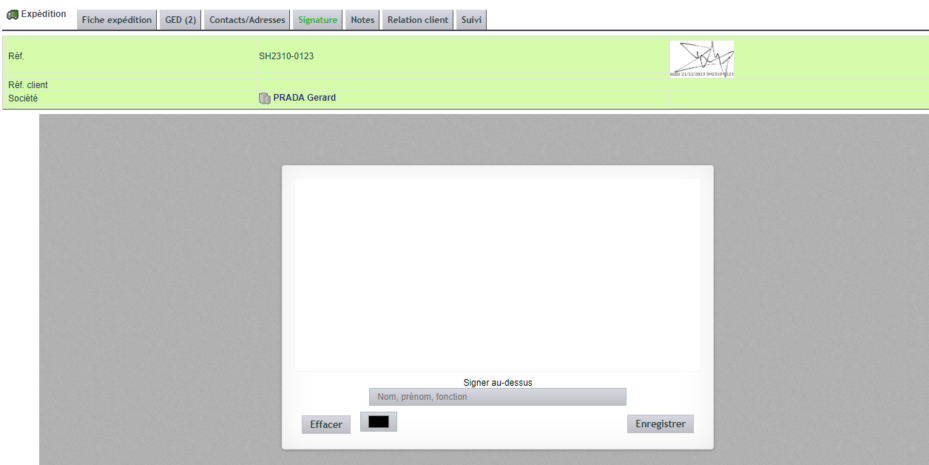
From then on, generating the document again includes the customer signature. Besides, out in the field, that same note is signed straight on the driver phone.
Going further with shipments
Your shipping management software works together with several other tools:
- batch and serial numbers to trace every item;
- EAN barcodes to fill delivery notes with a scanner;
- orders awaiting shipment to launch your shipments in bulk;
- shipments awaiting invoicing to invoice deliveries by batch;
- Chronopost transport for your carrier waybills.
Interface and behaviour options
| Ref. | Description |
|---|---|
| PG69 | Allow a quantity higher than the order (turns off the quantity check) |
| PG70 | Enable the electronic signature pad on the shipment |
| PG73 | Enable the 3-column PDF: ordered unit / sales unit / delivered quantity |
| PG79 | Carry the public note of the order over to the delivery note |
| PG81 | Remove the company signature box from the shipment PDF |
| PG82 | Print the barcode under each item in the shipment PDF |
| PG89 | Give priority to the stock figure when it falls short of the quantities to ship |
| PG103 | Show ordered but undelivered products (delivered quantity 0) on the delivery note of the last shipment |
Shipment PDF options
| No. | Description |
|---|---|
| 123 | Show the shipping date instead of the delivery date |
| 148 | Hide phone and fax for the shipment recipient |
| 158 | Enable the separator between lines on the shipment document |
| 159 | Show only the lines with a shipped quantity above zero |
| 160 | Add the “Left to deliver” column on the shipment document |
For the full list, see the PDF/Interface parameters chapter.
Never hide a product forgotten during picking
A picker sometimes forgets to scan a product. Until now, that product simply vanished from the delivery note: nobody could see it was missing.
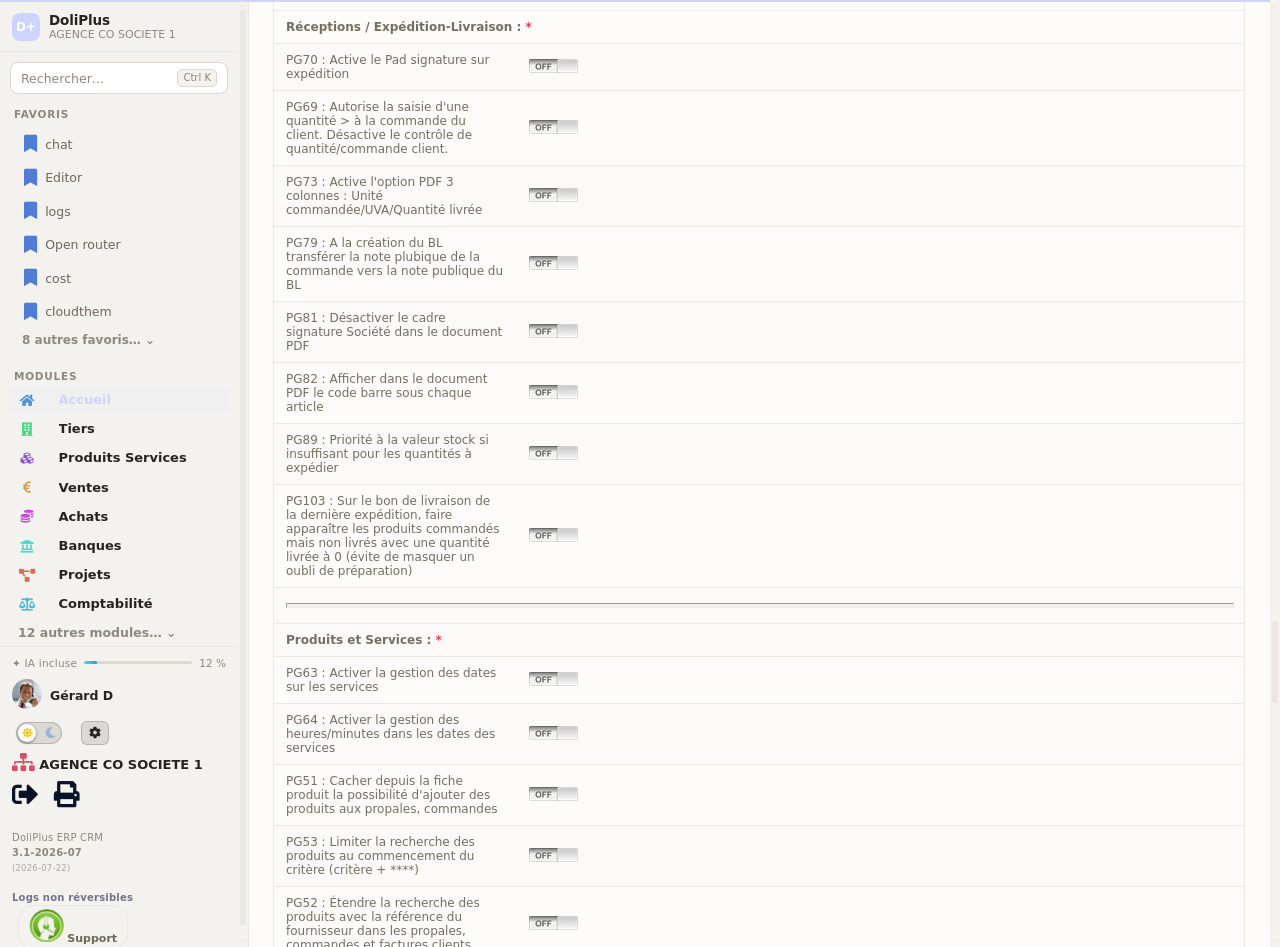
An option now fixes that. On the last delivery of an order, DoliPlus shows the ordered but undelivered products with a delivered quantity of “0”. The oversight therefore jumps out, and you react at once: either you deliver the rest later, or you take it off the invoice.
To switch it on, go to “Home → Setup”, section “Receipts / Shipping-Delivery”, then toggle the matching option. It stays off by default: your shipping management software only changes if you decide it should.
What about goods receipts?
The settings screen gathers “Receipts” and “Shipping-Delivery” under one roof, because they are the two faces of the same flow. Receipts handle goods arriving from your suppliers, while shipments handle goods leaving towards your customers. The principle stays identical: a note, a check, then a stock update. Your teams also receive goods by scanning, from that very same phone.
Why structure your shipments?
A badly tracked shipment means a badly served customer and a false stock figure. Shipping management software makes that whole step reliable.
In short, you gain on three fronts:
- a true stock: every departure decrements the right warehouse;
- a proof of delivery: the customer signature sits inside the PDF;
- full traceability: batches, serial numbers and barcodes follow every item.
Related Entrées
