 on 7 July 2026
 Mobile ERP app — DoliPlusMobi, the companion app for DoliPlus
Why add a mobile ERP app to your DoliPlus?
DoliPlusMobi is the mobile ERP app that complements your DoliPlus online solution on Android and iOS:
- your calendar, contacts, email and documents in your pocket;
- an offline mode to read and enter data without any network;
- field features: job management, entry forms, photos and expense reports;
- installation in seconds, straight from your browser, with no app store;
- file sharing from your phone directly into your document space.
As a result, your teams on the road keep working even without coverage, and every entry lands in your ERP. DoliPlus is the enhanced cloud edition of Dolibarr, the open-source ERP & CRM used across Europe.
DoliPlusMobi, a companion to your online DoliPlus
First of all, remember that the DoliPlus online solution is designed for connected use.
Indeed, on a PC, Mac, tablet or smartphone with a screen above 5 inches, your application runs your business. Thus, you manage sales, purchases, stock and projects.
In addition, business modules complete the picture — for example job management, equipment fleet management or manufacturing.
Here is DoliPlusMobi displayed on a smartphone.
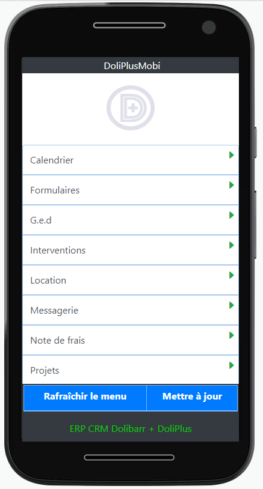
So why a mobile ERP app on Android and iOS?
Mainly because DoliPlusMobi adds an offline mode.
Admittedly, the spread of fibre and mobile networks brings fast progress. However, the offline mode remains truly useful.
In practice, it helps to:
- first, keep certain information available offline;
- then, enter data without any network connection.
However, DoliPlusMobi does not reproduce every feature of the DoliPlus web application. Indeed, that is not its purpose.
Besides, your DoliPlus solution remains responsive. In other words, it adapts to your devices, especially mobiles.
Therefore, you enjoy all the features of your software while on the move.
Finally, in April 2021, DoliPlusMobi replaced an Android application that had become obsolete.
An app that installs from the browser, with no app store
DoliPlusMobi is a modern web application — often called a progressive web app — that looks like a classic website. Moreover, it installs on a tablet or a smartphone just like a native application.
Indeed, this technology works across platforms (iOS, Android…). Thus, once installed, the app opens directly from its icon, like any native application.
Here are the main advantages of this approach:
- first, compatible whatever the version of the phone;
- then, very little memory used: about 200 times less than a classic Android or iOS application;
- moreover, no submission to the app stores;
- besides, compatible with iOS, Android and Windows, without a separate development per platform;
- in addition, usable without a connection;
- also, easily shared through a simple link;
- finally, installable directly from a website.
How do I install DoliPlusMobi on Android or iOS?
First, type the address of your DoliPlus session in Chrome, Edge or Opera, using the following shortcut:
https://the_name_of_my_doliplus_session.doliplus.com/pwa
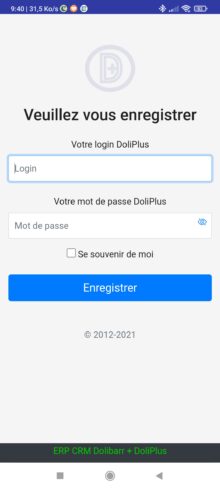
Next, the following screen appears. Then you enter your DoliPlus credentials.
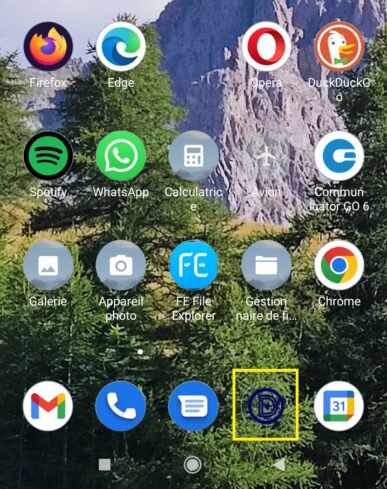
Finally, the application should offer to install itself, with its icon, on your home screen.
Here is the DoliPlusMobi sign-in screen.
Furthermore, here is DoliPlusMobi installed on an Android home screen.
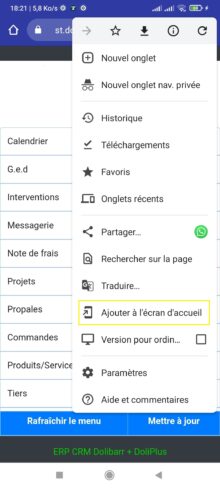
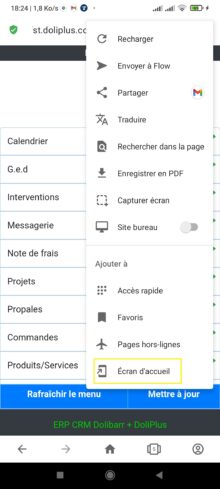
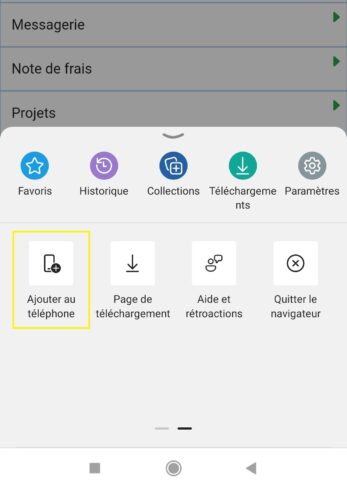
However, the automatic installation prompt does not always appear. In that case, force the installation as follows.
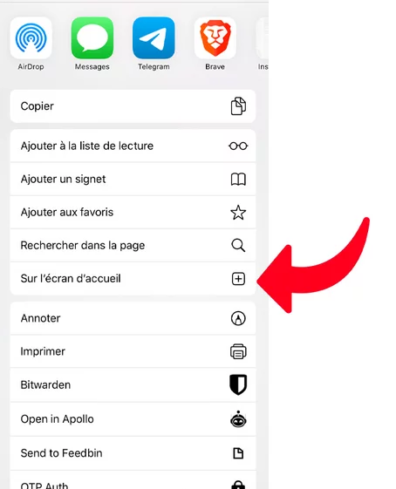
A) Adding the icon to the iOS home screen
This way, you reach the app quickly from your iPhone. To do so, follow these steps:
- first, open the DoliPlusMobi site on your iPhone;
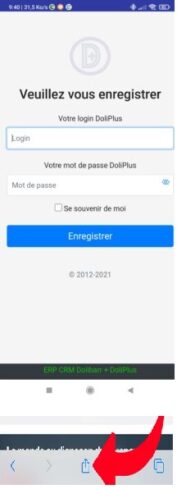
- then, tap the share button, and tap “Add to Home Screen”
 ;
; - finally, the icon appears only on the device concerned.
Here are the corresponding screens on iPhone.
B) Adding the icon on Android
To install a shortcut on your phone, follow these examples instead.
Example with Chrome
First, here is the procedure with Chrome.
Example with Opera
Then, here is the procedure with Opera.
Example with Edge
Finally, here is the procedure with Edge.
Security management
Of course, security remains a priority. Here are the guarantees provided:
- first, your password travels over a secure, encrypted connection to your DoliPlus session;
- moreover, the password is not stored on the phone: a set of keys handles identification;
- then, every request is logged;
- besides, user registrations are either open or subject to approval, depending on the configured option;
- finally, the rights on the menus and features of DoliPlusMobi are adjusted from the administration console of your DoliPlus session.
DoliPlusMobi now speaks each user’s own language
Your teams do not all work in French. From now on, DoliPlusMobi displays in the language of each user, and English covers the day-to-day screens.
Until now, only the menus followed the chosen language. Therefore, an English-speaking colleague fell back to French as soon as they opened a job or entered an expense claim. That is no longer the case on the following journeys:
- the schedule and the shared calendar,
- field jobs and closing them on site,
- expense claims and receipt photos,
- quotes, equipment rental and works tracking,
- finally, document management and file sharing.
However, a few highly specialised inspection forms remain in French for now. We are translating them gradually, screen by screen.
Nothing to set up on the phone
The language comes from the user’s DoliPlus profile, the very one they already use at the office. Consequently, you have no device-by-device setting to make: each person picks their language once, from the “User interface” tab of their record, and their phone follows.
This matters especially when several profiles share the same fleet of devices. Indeed, two technicians logging in one after the other on the same tablet each get their own display.
Translation works offline too
This point genuinely counts in the field: the language and its vocabulary travel inside the device, just like your working data. In other words, a basement site or a round through a mobile dead zone changes nothing — the app stays in the right language, without a single bar of signal.
Main features available
First, note that the features grow and expand regularly.
Here are the standard features:
- list of third parties and contacts — customers, prospects, suppliers;
- calendar — following the DoliPlus agenda view;
- email;
- expense reports;
- document manager;
- third parties;
- quotes — list of open proposals;
- products and stock.
Then, here are the business-oriented features:
- forms — list of field entry forms;
- job management (documentation);
- equipment rental;
- site work follow-up;
- …
Why email and the calendar?
These features serve a precise goal. Indeed, they offer a zero-configuration solution for the mobile fleet of your staff.
In practice, simply installing the mobile ERP app gives access to the daily information. Thus, no other setup is needed.
Moreover, these features carry data linked to the ERP:
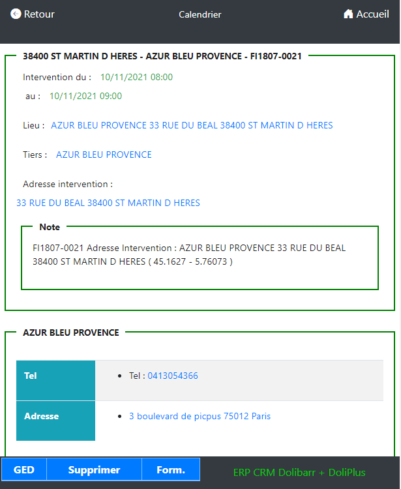
- for example, for the calendar: event type, phone number of the third party or contact, documents of the event, address, reassignment to a colleague…
Here is a preview of the calendar in DoliPlusMobi.
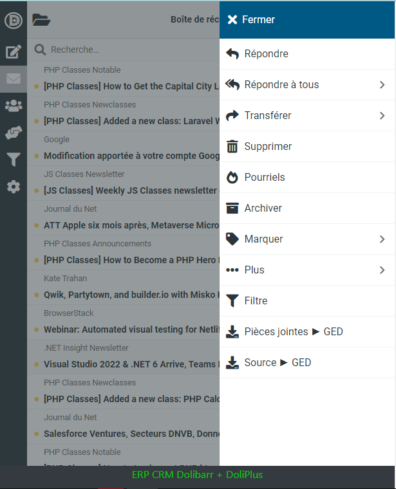
Furthermore, you find features close to your ERP. Here is the example of email below:
- contacts linked to the CRM, document links, attachment downloads, adding a document from the document manager, personalised messages…
New: sharing files from your phone to MonCloud
From now on, DoliPlusMobi can receive the files you share from your phone. Thus, a photo or a document reaches your MonCloud space in a single gesture, through the usual “Share” button.
In practice, you select your files, you tap “Share”, then you choose DoliPlusMobi. The upload to your document space starts immediately, all by itself.
Moreover, the feature accepts photos, videos, PDFs and office documents. Consequently, your field receipts arrive directly in the right place.
Read the chapter: sharing files from your phoneEvery job has its own detailed chapter
You will find the essentials of the app here. Each area then has its own chapter, with the full step-by-step and the screenshots:
- Shipping and deliveries — pick by scanning, correct a draft before validating, then have the delivery note signed on screen: read the shipping and deliveries chapter;
- Supplier receipts — scan what arrives, batches and expiry dates included: read the mobile receiving chapter;
- Expense reports — photograph the receipt, the line fills itself in: read the mobile expense report chapter;
- Field service — job sheet, photos and the customer signature on site: read the mobile field service chapter;
- Technical knowledge base — the solution already found, readable in front of the machine: read the knowledge base chapter;
- Documents — send a photo or a PDF to your cloud space with the usual “Share” button: read the file sharing chapter;
- Field entry forms — your custom fields, identical to those on the desktop: read the custom fields chapter;
- Email — write, reply to, archive or delete an email from the top of the screen, without scrolling: read the email chapter;
- Notifications — appointments, chat messages and now every new e-mail shown on your phone: read the notifications chapter.
FAQ — frequent questions
First, is the app multilingual?
- Not yet. However, it is planned.
Then, does the app work without a network connection?
- Partly. Indeed, some features need the network to fetch the data from your DoliPlus web application. On the other hand, others work in hybrid mode. For example, job management and field entry forms use the network to load the data, then switch to autonomous mode for data entry and photo taking.
Related Entrées
