 on 5 September 2026
 Technical knowledge base: capitalise on your technicians’ know-how with DoliPlus
Why a technical knowledge base in DoliPlus?
A technical knowledge base gathers all the solutions your technicians discover daily in one place. Every resolved issue represents valuable expertise – you just need to find it when the problem recurs.
Too often, this knowledge stays in one person’s head or in a forgotten file. As a result, the same issue gets diagnosed repeatedly, and new hires take weeks to get up to speed.
With DoliPlus, you capture this expertise directly in your management software. This saves your teams time, improves response quality, and keeps your service reliable even when an expert is away.
Simple records for your technicians to create
First and foremost, simplicity is key: a busy technician should be able to create a record in just a few minutes. Each record includes a clear title, keywords, and a freely written solution.
The editor works like a standard word processor. For example, you can bold text, create step-by-step lists, or insert links – no technical skills required.
Each record then follows a clear lifecycle:
- Draft: the record is still being written and is not visible to the rest of the team.
- Published: the record is validated and available to everyone.
- Obsolete: the solution is no longer current but remains archived.
Additionally, keywords are added as tags, making sorting and filtering quick even as the base grows.
Smart search that understands meaning
This is where the real difference lies. The search goes beyond exact words – it understands the meaning of your query.
For example, you can type “connect a new photocopier” and find the record “Set up a network printer”. Each result also shows a relevance score, from most to least useful.
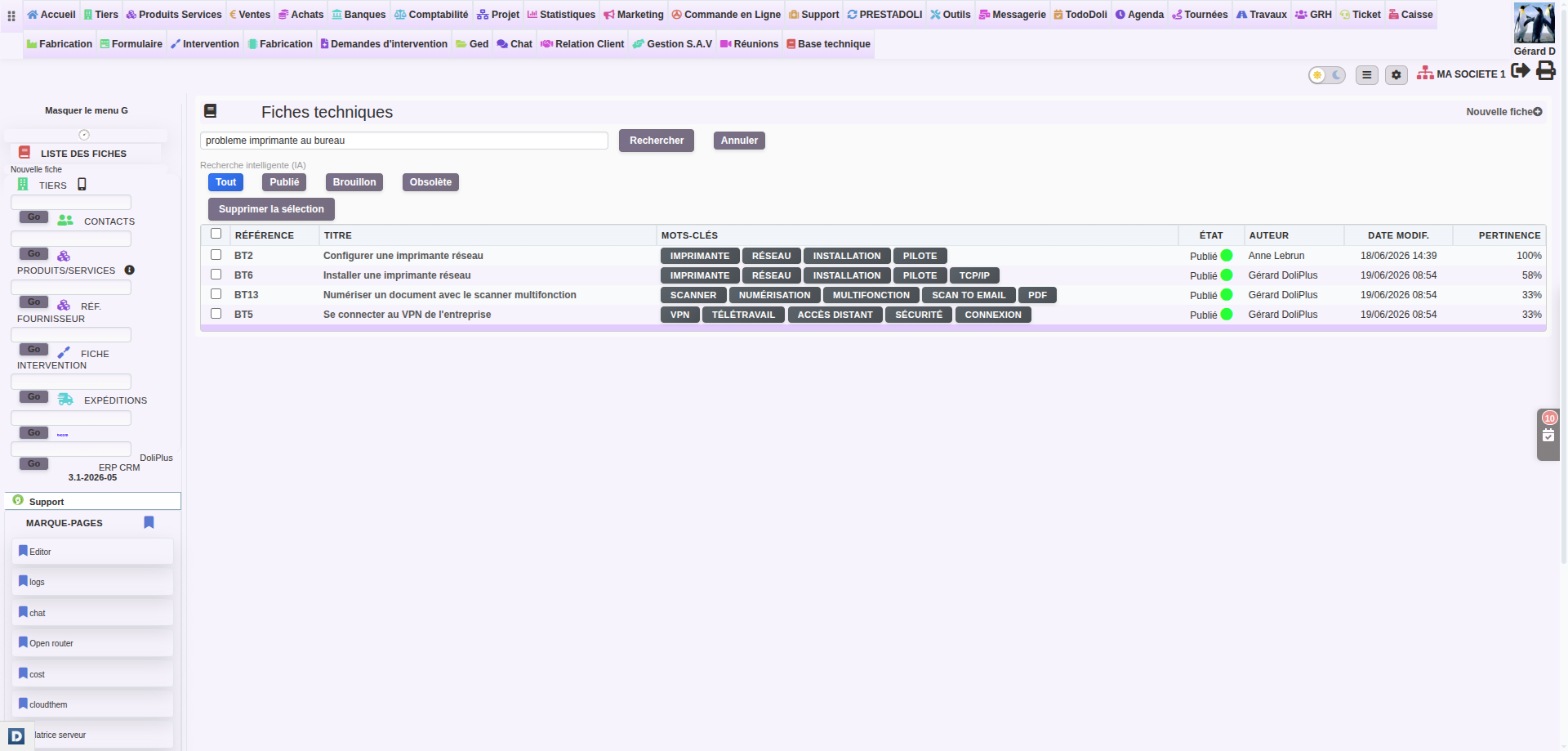
Result: your technicians find the right answer even if they don’t know the exact terminology used in the record. That’s why this technical knowledge base remains useful for the entire team, from experts to new hires.
Relevant records suggested directly on the ticket
Even better, knowledge comes to you at the right time. When a customer opens a support ticket, DoliPlus analyses the subject and message, then instantly suggests the most relevant records.
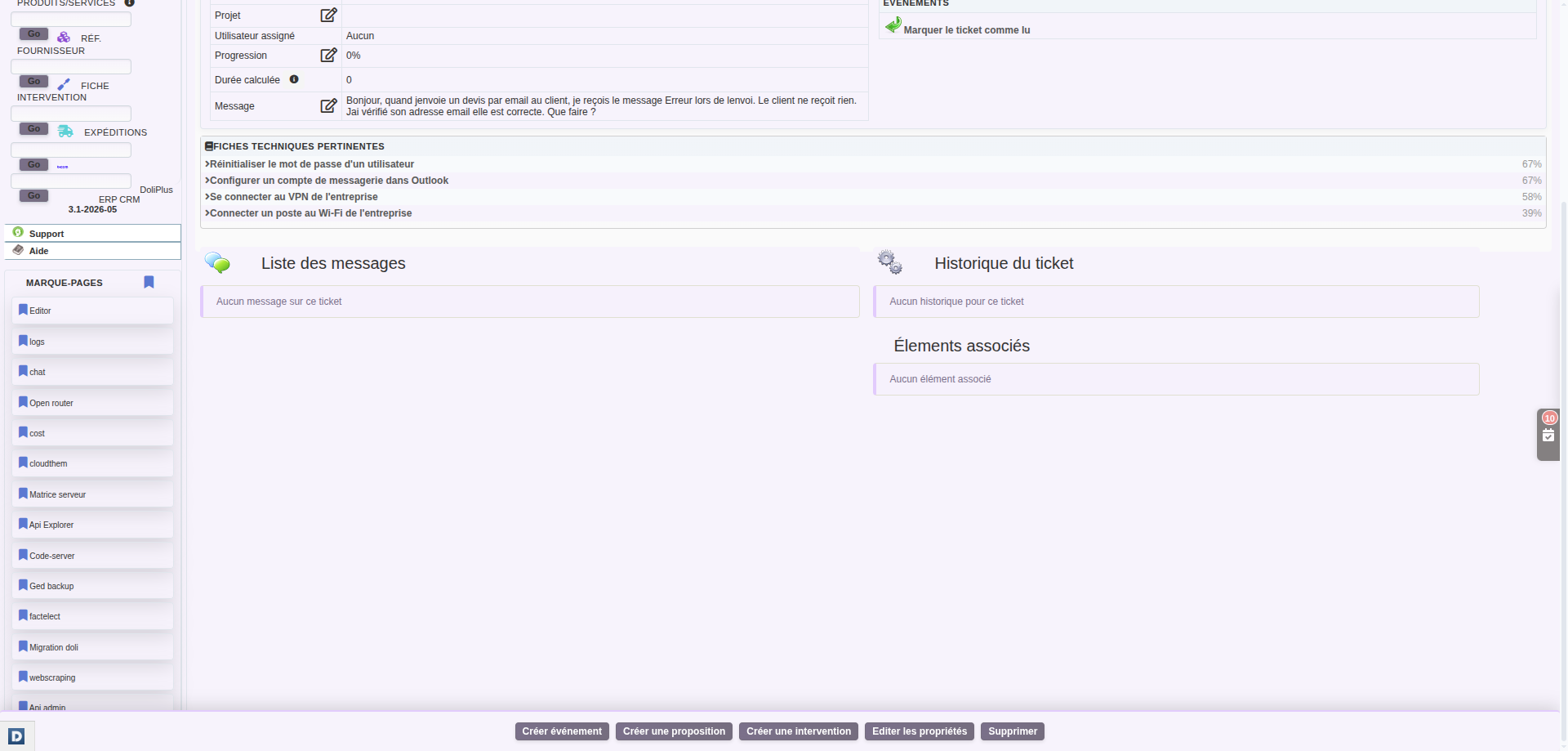
For example, on a ticket about “error when sending an email”, DoliPlus highlights the email configuration record, ranked by relevance. This way, the technician responds faster, without leaving the ticket record.
In practice, this habit reduces processing time and standardises responses. Plus, it finally gives value to the records written by your teams.
Your technical knowledge base also available on mobile
In the field, your technicians don’t always have a computer to hand. That’s why this technical knowledge base is now directly accessible from DoliPlusMobi, the mobile companion app for DoliPlus.
From their phone, your teams can:
- Search for a record in seconds, with the same smart search as on desktop.
- View the full content of a record, including formatting.
- Create a new record on the spot, between interventions, by simply dictating the solution out loud.
- Publish or archive a record with a single gesture.
Result: a tip discovered at a customer’s site no longer gets lost in a notebook or the technician’s memory. It joins the technical knowledge base the same day, for the benefit of the whole team.
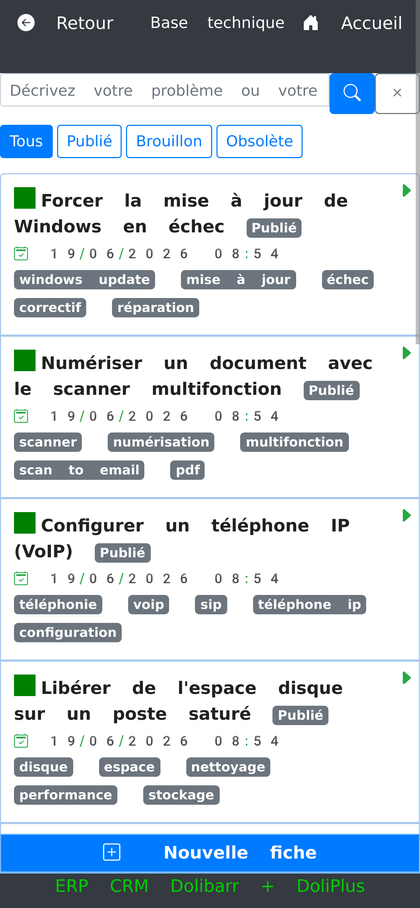
This feature relies on the DoliPlusMobi app, which your teams already use daily for their interventions.
Setup and access rights
Setup is straightforward. First, your administrator enables the feature, then assigns the appropriate permissions to each user profile.
You retain full control over access rights:
- Read : view and search records.
- Create and edit : create and manage records.
- Delete : remove unnecessary records, including in bulk.
However, a user without write permissions cannot create records: they can only view them. This role separation helps maintain the quality of your technical knowledge base.
Learn more
- Managing support requests in DoliPlus
- After-sales service and customer support
- Using the knowledge base
- AI at your team’s service
