 on 5 September 2026
 Artificial Intelligence in DoliPlus Webmail — AI Writing and Proofreading
DoliPlus: AI-Powered Services on the Horizon
Artificial intelligence is gradually integrating into every aspect of your management software. Following the document generation assistant, enhanced SIREN search, and chat assistant, your DoliPlus integrated email now benefits from AI power — right where you draft your emails, without switching tools or interfaces.
This evolution reflects DoliPlus’ vision: delivering immediate, tangible productivity gains to every user by embedding AI where it matters most. Email — often time-consuming — becomes smoother, more polished, and faster to handle.
Two New AI Features in the Webmail
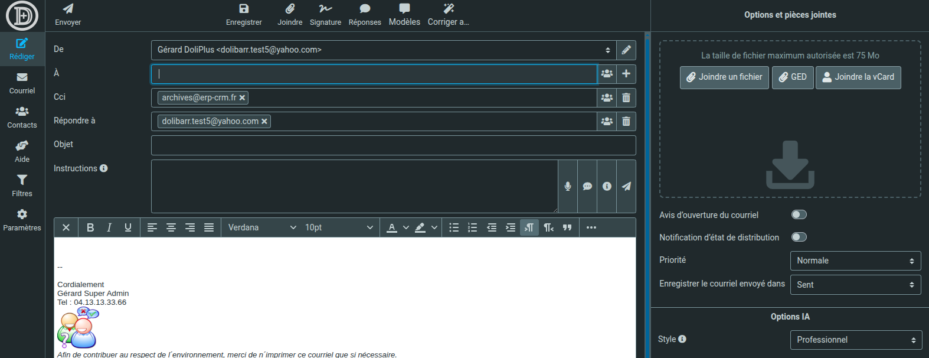
The webmail integrated in DoliPlus now includes two AI-powered features: email drafting assistance and automatic spell-checking. These tools activate directly from the composition window, without leaving your usual interface.
These features rely on AI preconfigured in DoliPlus. They activate automatically, with no installation or technical setup required — you get the assistance as soon as you start composing.
Drafting an Email with AI Assistance
The Templates button (star icon) in the composition toolbar gives access to the AI drafting assistant. It lets you generate a complete email from a simple intent.
How to Use It
- Open a new composition in DoliPlus email
- Enter your instructions in the dedicated field (e.g., “say hello and suggest a meeting”), then select your recipient (e.g., François-Denis) for personalised messaging
- Click Templates, then choose your preferred style, length, and language
- The AI generates the message body in the editor — you can then edit it freely
Available Options
- Style: professional, friendly, neutral, formal…
- Length: short, medium, long
- Language: French, English, Spanish, German…
To save time daily, DoliPlus lets you save your recurring instructions as reusable templates. This way, with one click, you pre-fill the instruction field without retyping the same text. Best of all, these templates are now centralised in DoliPlus: you can share them with your entire team, not just keep them to yourself.
Personal or company-wide templates
Each user creates their own templates based on their permissions. You also choose their scope: a personal template (visible only to you), a shared template for the whole company, or a template targeted to specific colleagues. This is why a single catalogue of best instructions benefits everyone: responses become more consistent, and everyone starts from a proven base.
Managing templates in DoliPlus
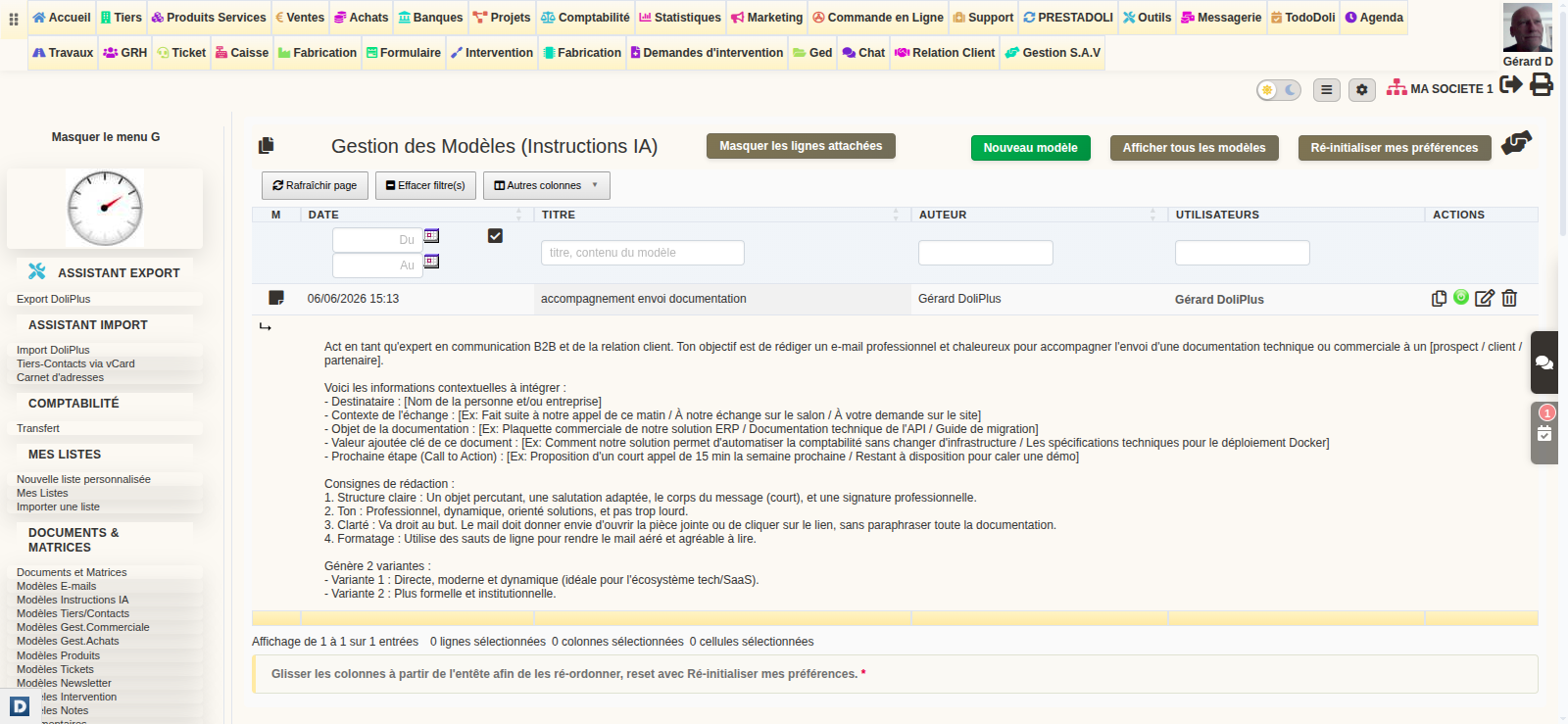
Management is done in the same place as your other templates (email, quote…). In the menu Tools -> Documents and Matrices->AI Instruction Templates. Here, you’ll find the full list; then, you can create, edit, duplicate, or deactivate a template.
- Click New Template
- Enter a short, memorable title (e.g. “Formal business response”)
- Write the instruction content sent to the AI (e.g. “Write a professional and concise response in French, with a polite closing tailored to the construction sector”)
- Choose the scope of the template (personal, shared, or for specific users), then click Save
Quick access from your inbox
You can also manage your templates without leaving your email. In the compose window, open the AI panel and click Manage my templates: the DoliPlus page opens in a new tab, and your draft remains untouched.
Using a template to write an email with AI
When you want to write an email with AI, open the AI panel and scroll through the list of templates. As soon as you select one, the “Instructions” field auto-fills instantly. You can then adjust it before generating the content.
Correct spelling and grammar with AI
The Correct with AI button (wand icon ✨) in the toolbar analyses your text and automatically fixes spelling and grammar errors, without altering the formatting of your email.
Two correction modes
- Entire message: if no text is selected, the checker analyses and corrects the full email body
- Selection only: highlight a passage with your mouse, then click the button — only the selected text is sent to the AI
What’s preserved
The checker is designed to fully respect your email’s structure:
- Formatting: bold, italic, underlines
- Structure: paragraphs, line breaks, lists
- Automatic signature and contact details
- Content generated by the AI writing assistant
A pre-configured AI, with a demo credit to get started
Great news: to write an email with AI, you have nothing to install or configure. Indeed, the artificial intelligence is delivered pre-configured in DoliPlus, with a demo credit that lets you try it right away. This way, the support buttons automatically appear in your email client.
In practice, you open a draft, click the support button, and that’s it. Plus, this demo credit lets you freely test writing and editing — with no technical steps on your part.
Continuing after the demo: the DoliPlus AI subscription
The demo credit is for discovering the service. To keep writing emails with AI, you subscribe to a DoliPlus AI subscription tailored to your needs. Again, no technical setup: from the DoliPlus AI Configuration page, a “Subscribe to an AI plan” button sends your request to support, who then handle everything.
Related articles
- AI-powered spell-checking in DoliPlus documents — CKEditor
- Your integrated email client — DoliPlus Webmail
- DoliPlus Chat Assistant
