 on 5 September 2026
 Multi-company management in DoliPlus: multiple businesses, one single software
DoliPlus multi-company management consolidates all your businesses in one system:
- each company = a separate environment with its own name, logo, currency and language;
- two scenarios covered: distinct legal entities (multiple SIREN) or one company with multiple branches (multiple SIRET);
- customisable shared data that evolves with your needs (customers, products, stock, calendar…);
- users isolated per company, except for cross-functional roles (accounting, management);
- simplified access management: one single permissions checklist per user;
- implementation supported by our team.
Result: you manage a group of companies as easily as a single one, without multiplying software or duplicate data entry.
Why choose multi-company management
Many businesses operate through multiple legal entities. Whether it’s a holding company, family business group or branch network, they often juggle several companies. Without the right tool, each entity requires separate software, backups and manual data re-entry.
Multi-company management solves this challenge. It consolidates all your entities in one place, saving time, reducing errors and maintaining complete visibility across your group’s activity.
Each company becomes its own environment
In DoliPlus, each company operates as a separate environment (also called entity). First, each environment maintains its own identity: trading name, logo, address, country, currency, language and colour coding. Second, its documents, numbering sequences and settings remain completely separate from other companies.
A simple dropdown at the top of your screen lets you switch between companies during your session. No need to log out or open additional software.
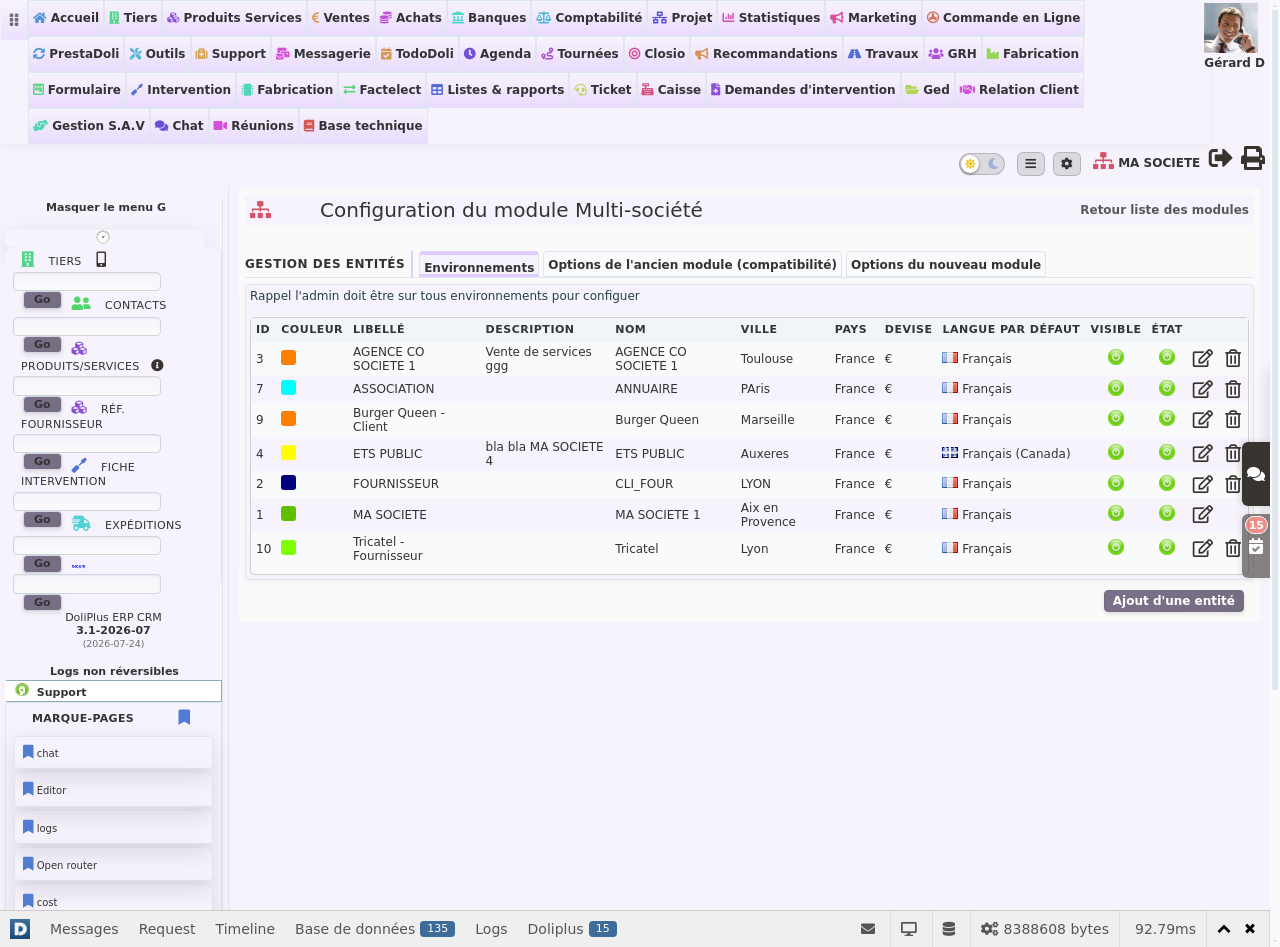
Two typical use cases
Multiple legal entities, multiple SIREN
First scenario: your group consists of legally separate companies, each with its own SIREN number. Each company then becomes an autonomous environment. This means its invoicing, accounting and statistics remain completely segregated.
One company, multiple branches (SIRET)
Second scenario: you manage a single company (one SIREN) but multiple branches, each with its own SIRET. You then create one environment per branch. This way, each site displays its own logo, contact details and documents, while remaining linked to the same company.
Separating companies is useful. However, you often want to share certain information.
This is why DoliPlus offers à la carte sharing: you activate each element independently, according to your needs.
Currently, you can notably share:
- customers, prospects, suppliers and their contacts;
- products and services, along with their purchase prices;
- stock and warehouses;
- the calendar, categories and projects;
- bank accounts and the chart of accounts;
- documents stored in the document library;
- certain add-on modules (rentals, resources, e-invoicing, custom fields).
One company serves as the reference: it hosts the shared database. For example, you enter a customer record just once, then access it in other authorised companies.
Managing user access in multi-company mode
By default, each user remains confined to their company. In other words, they can’t see data or activity from other environments. This segregation protects confidentiality between your entities.
However, some roles work across the entire group. An accountant, manager or executive assistant, for example, operate across multiple companies. For them, DoliPlus offers cross-company mode.
A single dashboard to grant access
Configuration has been simplified. Now, everything is managed from the user record, in a single table. First, their role is defined once via their groups (sales, technician, accountant…). Then, you simply tick the companies they can access.
As a result, this collaborator retains the exact same role across all their companies, with no need for repeated settings. This access management remains clear, even with multiple entities.
To learn more about creating accounts, refer to the chapter User Management in DoliPlus. Additionally, the article User Access Rights explains who sees what and who does what, and the user record details each setting in full.
A setup supported by our team
Multi-company configuration is not a simple self-service setting. It affects legal partitioning, data sharing, and access rights—all sensitive aspects.
That’s why our teams implement it with you, as part of a dedicated, billed service. This way, we validate the scope, useful shares, and permissions together, then activate everything without risking your existing data.
To set up a new company faster, DoliPlus can also duplicate a complete environment. In other words, you reuse the modules, settings, and document templates from an existing company.
