 on 5 September 2026
 Using the knowledge base
The knowledge base of DoliPlus gathers all the software documentation, accessible directly from your workspace. This way, you find an answer without leaving the application.
How to search in the knowledge base?
A search engine is always available in the right margin. This knowledge base offers two search methods, depending on your needs.
Autocomplete search
This first method suggests, as you type, direct or related terms from the lexicon. Clickable links then redirect you to other terms in the lexicon. In this mode, the “Search” button is not needed.
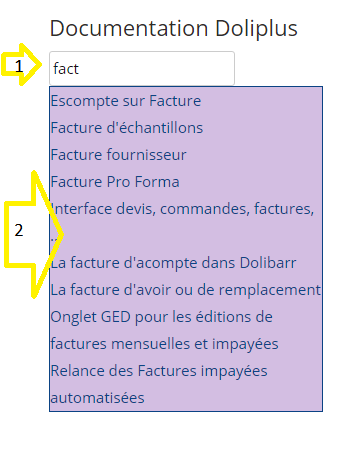
Forced search
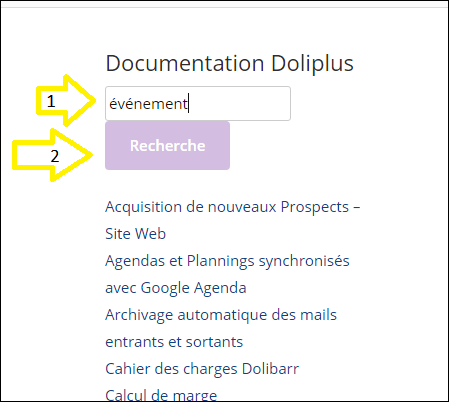
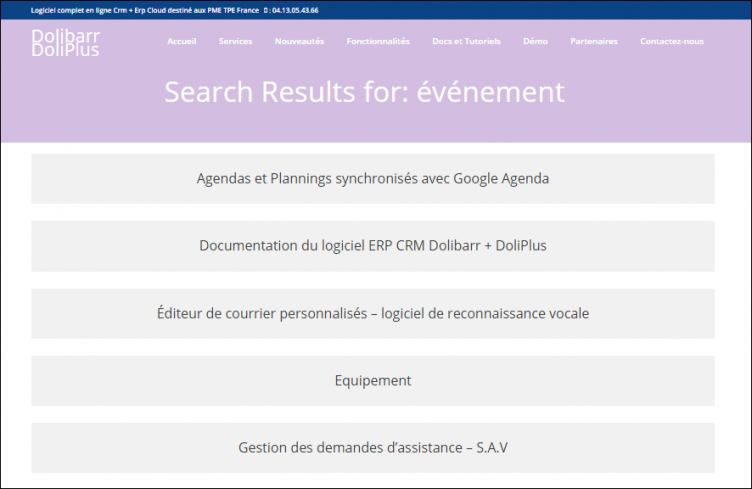
If no results appear in the window, force the search using the “Search” button. A page then opens with the matches found.
Why use the knowledge base?
Looking for an answer outside your software wastes time. The built-in help solves this issue: it’s just a click away.
You benefit in three ways:
- increased autonomy: you find the answer yourself, immediately;
- time savings: no need to open another tool or website;
- skill development: you discover features as you search.
This help supports your daily use of DoliPlus. Additionally, a chat assistant now complements it. You can also contact the DoliPlus chat assistant.
Choosing the right search method
In practice, always start with autocomplete. It suggests terms as you type, which is enough in most cases. If nothing appears, switch to forced search.
This way, you quickly find the right page. You stay focused on your work, without opening another tool or interrupting your current task.
