 on 5 September 2026
 How to request support in my Dolibarr + DoliPlus application?
Opening a support request in DoliPlus lets you contact support in just a few clicks and track your ticket’s progress. Every query gets a traceable response.
How to open a support request?
The process is simple. First, go to the left-hand menu and click the green “Support” icon.
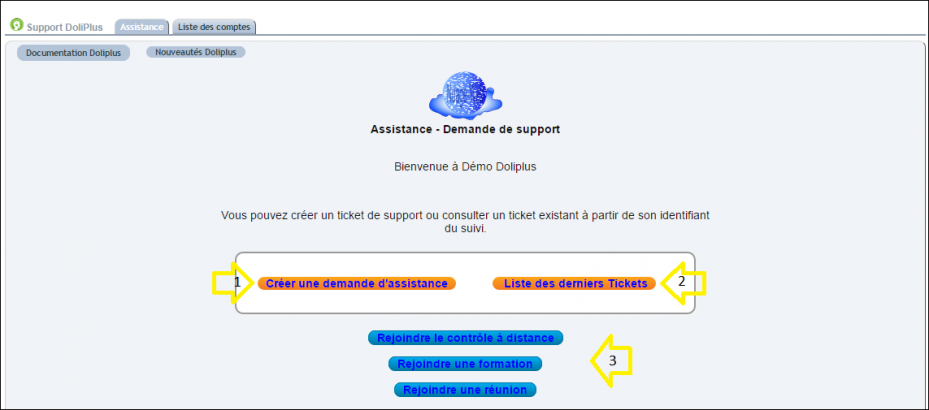
Then, click “Create a support request”. Good to know:
- To view your tickets, click “List of recent tickets”;
- Support may ask you to click specific buttons during the process.
Finally, complete the request form:
- Select your name;
- Choose the request type, category and severity level;
- Enter a clear subject;
- Provide detailed information about your request.
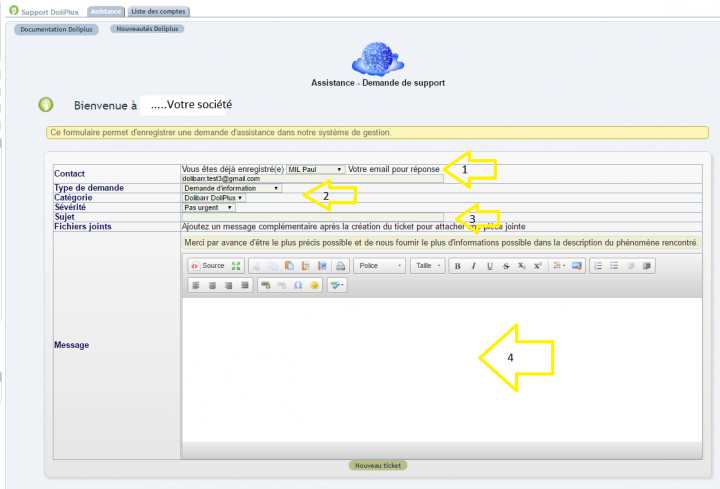
Tip: If your request relates to a specific page, copy its URL and paste it into the message. This helps support go straight to the right place.
How do I track my support request?
Upon submission, you’ll immediately receive a confirmation with a tracking number. Support may later request additional information, and you’ll be notified by email.
In all cases, you’ll receive prompt email updates on progress. You can also check the status at any time in your ticket list.
Why use the built-in support system?
Informal email exchanges get lost easily. A support request, however, remains tracked from first message to resolution. This gives you clarity and faster responses.
You benefit in three ways:
- Reliable tracking: Each request has a number and status;
- Targeted responses: Shared context speeds up resolution;
- Kept history: You can revisit past requests.
Learn more about the knowledge base
What support covers, and when
Support is included in your DoliPlus subscription. The support team is available Monday to Friday, 9am to 12pm and 2pm to 6pm, excluding public holidays.
It covers:
- Software anomalies and bugs;
- Security updates;
- Help with normal service use as installed and configured at setup.
Three types of requests require a quote as they involve chargeable work:
- User or administrator training;
- Additional configuration beyond initial setup;
- Custom development work.
This isn’t refusal of support – it’s work that gets quoted, so you know costs upfront. Details are in the terms and conditions.
How your request is prioritised
Not all requests carry the same weight for your business. Support therefore classifies each request based on its impact, with each level corresponding to a target first response time:
| P1 | Critical impact — service is unusable in production | 4 hours |
| P2 | Major impact — service usage is severely disrupted | 24 hours |
| P3 | Moderate impact — service usage is partially disrupted | 72 hours |
| P4 | Minor impact — service remains fully usable | 72 hours |
The severity level you provide in the form initiates this classification; support then adjusts it based on diagnosis.
Two actions on your part significantly reduce response time: first checking whether the issue stems from your workstation, hardware or internet connection, and describing what you were doing, what you expected and what you actually got.
What’s included with support
- You’re always up to date, effortlessly. We handle DoliPlus updates on your server: no versions to choose, no migrations to trigger.
- Your data is backed up daily, and restoration procedures are tested regularly.
- Recovering accidentally deleted data goes through a ticket like everything else: on-demand restoration is part of support.
Next steps
