on 15 October 2026
 Team chat software built into your ERP — the DoliPlus Chat module
Why choose team chat software built into your ERP?
Your DoliPlus solution includes complete team chat software, right inside your management application:
- direct messages between two colleagues, like a private internal conversation;
- group channels for your sales, support or management teams;
- discussions attached to your business records — quotes, orders, invoices, projects, jobs and more;
- instant alerts on your smartphone, even when the app is closed;
- Doli AI, a built-in artificial intelligence assistant that answers your questions.
As a result, your teams talk in the right context, without a third-party tool, and every conversation stays saved next to the record it concerns. DoliPlus is the enhanced cloud edition of Dolibarr, the open-source ERP & CRM used across Europe.
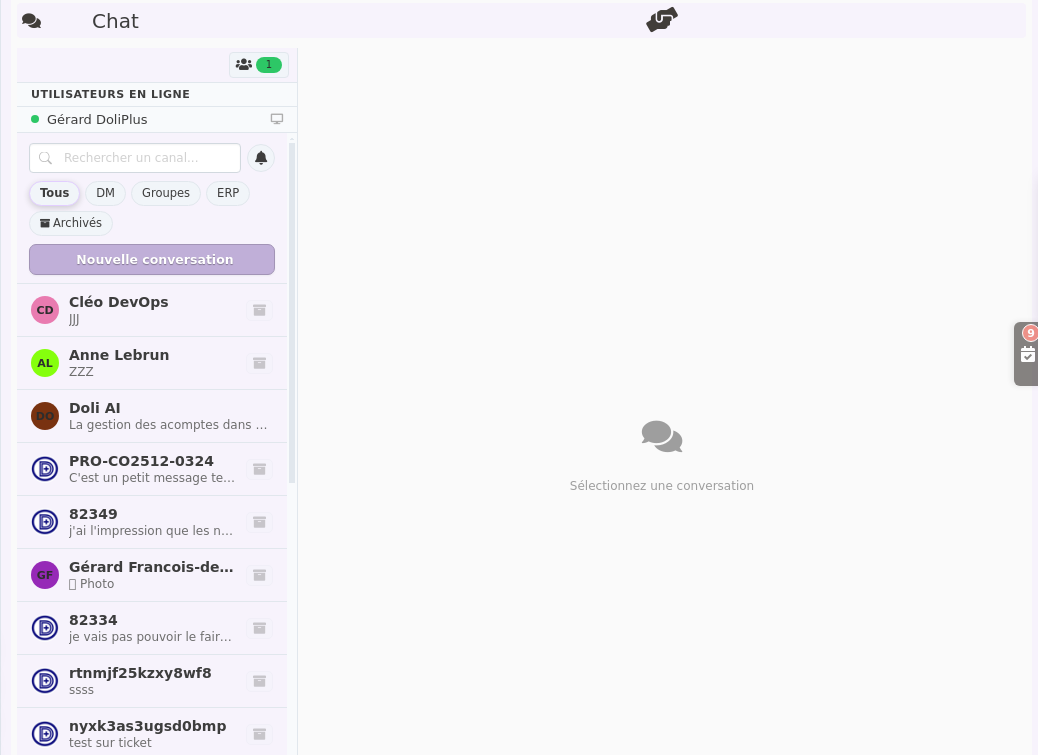
Moreover, you can chat from your desktop browser as well as from the DoliPlusMobi mobile app — the same conversations follow you everywhere.
Three types of conversations
The Chat module offers three ways to communicate, depending on your need.
Direct messages
A private thread between two colleagues, like an internal text message. Only one thread exists per pair — no duplicates. From the Chat side panel, simply click New conversation to start a private exchange.
Group channels
Shared discussion spaces that you name freely: Sales, Support, Management… They are ideal for keeping a whole team’s exchanges in one place, instead of multiplying emails. In addition, the administrator decides which user groups have access to this feature.
Business channels — discussions linked to a record
This is one of the flagship features of the module: a Start a chat button appears directly on every DoliPlus card — quote, order, invoice, project, service job. Therefore, everyone involved in a file can join the discussion and find the complete history, attached to the document itself.
Here are two concrete examples of business channels available in DoliPlus.
Chat on a task (TodoDoli module)
From your Kanban task board (TodoDoli module), each card shows two buttons in the bottom right corner: a tick to complete the task, and a Chat button to open a discussion directly linked to that task.
One click opens the Chat panel with a channel pre-filled with the task name. You can then invite colleagues immediately and start talking — moreover, the channel stays attached to the task, so the context is never lost.
Chat on a support ticket (TicketSup module)
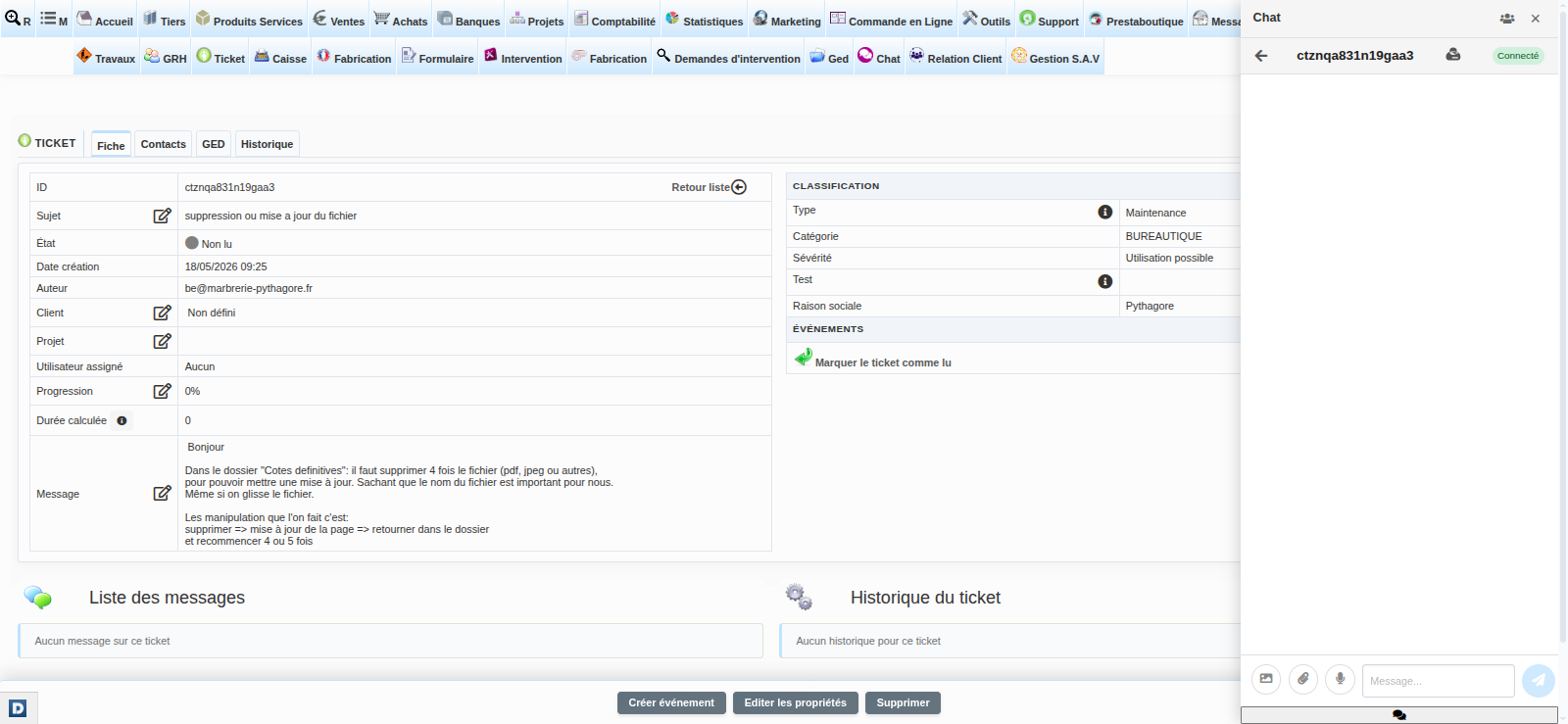
On a ticket card (TicketSup module), the Chat panel opens with a channel linked to the ticket number. Consequently, the whole support team can discuss the ticket without leaving the card, and the history remains available even weeks later.
Business channels available in DoliPlus
A discussion button is now available on almost all your business cards — many object types covering the whole sales, purchasing and customer relationship cycle.
Sales cycle
- Quote — internal discussion about a commercial proposal
- Customer order — exchange about the processing of an order
- Customer invoice — follow-up of discussions linked to an invoice
- Business opportunity — coordinate prospecting around an ongoing deal
Purchasing cycle
- Supplier price request — compare and discuss supplier consultations
- Supplier order — coordination around a purchase
- Supplier invoice — follow-up of the checking and payment of a received invoice
Projects, service jobs and after-sales
- Project — a dedicated channel for a project, open to the whole team
- Service job card — field discussion linked to a job
- Maintenance job — follow-up of a repair or a planned operation
- Calendar event — exchanges around an appointment or a sales action
- Shipment — coordination of preparation and delivery
- Service contract — exchanges around a contract and its deadlines
- Task (TodoDoli module) — discussion about a task from the Kanban board
- Support ticket (TicketSup module) — internal thread on a ticket — requires the TicketSup module
Customer relationship and catalogue
- Third party (customer, prospect or supplier) — one discussion thread per account
- Contact — exchanges about a specific person
- Product / Service — discussion linked to a catalogue item
A record summary at the top of every channel
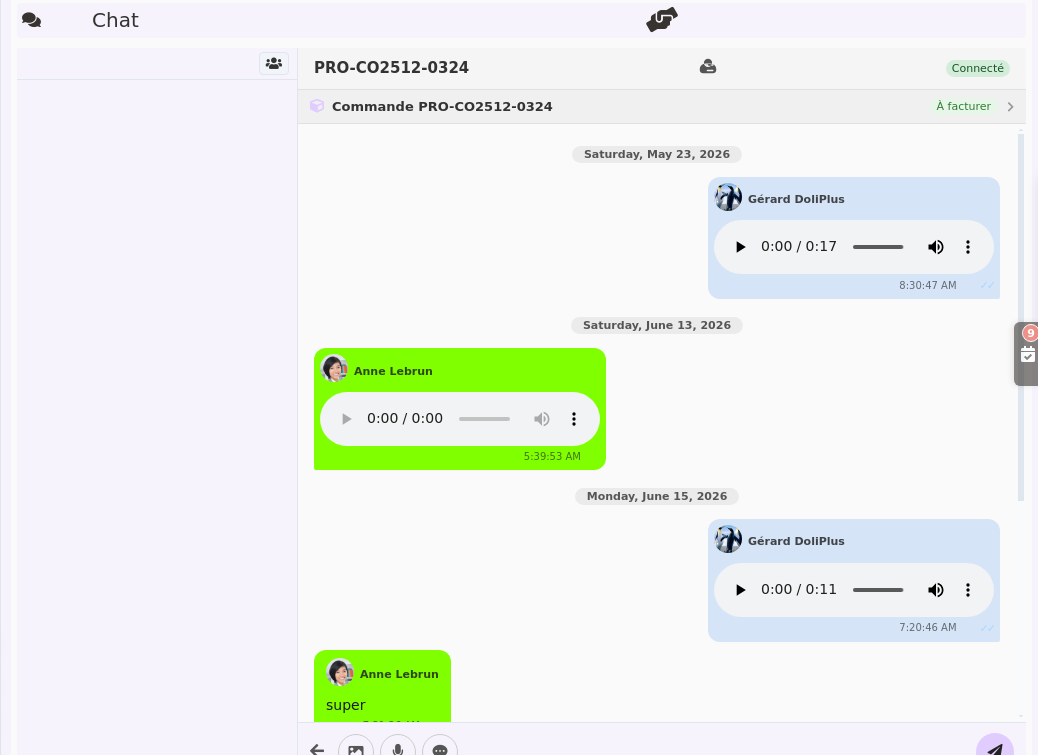
Whatever the object, a summary box appears at the top of the channel, so you can situate the discussion at a glance: reference, status, customer and amounts. Moreover, it adapts to the card type — for a business opportunity, you see the amount, the probability and the follow-up date; for a third party or a contact, the contact details; for a product, its price. A link opens the full card in one click, along with the PDF document when it exists.
To go further: Business opportunities, Third parties and contacts in DoliPlus and Service contracts.
Where and how to open the chat
The Chat side panel
On every DoliPlus page, a Chat icon is available in the interface. One click opens the side panel with your conversation list and the unread message badges — without leaving your current page.
The Chat page
Accessible from the Chat menu, it displays all your conversations on the left and the active message thread on the right, in full screen. In addition, the online users panel opens from the button at the top of the list — it shows who is connected from a desktop browser and who is using the mobile app.
DoliPlusMobi mobile app
The chat is natively built into DoliPlusMobi. Therefore, your technicians and sales people on the road find the same conversations on their smartphone, with a touch-friendly interface.
Learn more about DoliPlusMobiFeatures in detail
Real-time messaging
Messages arrive instantly, without reloading your page. You have nothing to do: as soon as a colleague writes to you, the message appears.
Who is online right now?
A glance at the presence panel shows you, in real time, which colleagues are currently connected to DoliPlus — and whether each one is using a desktop browser or the mobile app.
Sending files and voice messages
Beyond text, you can also send file attachments, record a voice message directly from your browser, or share an image. A preview then appears directly in the conversation.
A screenshot pastes straight into the message. Copy an image — a screenshot, a photo, a visual from a website — then press Ctrl+V in the input box: the image shows as a preview, you confirm, and off it goes. No need to save it to your desktop first just to attach it afterwards. Handy for showing a colleague a screen instead of describing it.
Managing your messages like on WhatsApp
A right click (or a long press on mobile) on any message opens an action menu:
- Reply — answers while quoting the original message
- Delete for me — removes the message from your view only
- Delete for everyone — erases the message for all participants
- Save — keeps the content
Adding or removing participants
In a group conversation or a record-linked discussion, you can invite or remove colleagues at any time, by searching for them by name or by group.
Alerts on your phone — even when the app is closed
As soon as a colleague sends you a message, a notification appears on the lock screen of your smartphone, whether you are in another app or your phone is lying on your desk. Furthermore, you do not need to keep DoliPlusMobi open.
The notification shows:
- the sender’s name as the title — you immediately know who is writing to you;
- the channel name for group discussions — you know in which context the question is asked;
- a message preview, often long enough to understand the content without opening the app.
A simple tap on the notification opens DoliPlusMobi directly on the right conversation. On Android, an Open chat button even appears inside the notification itself.
Organising and archiving your conversations
Over time, your conversation list can grow long. Therefore, DoliPlus provides tools to keep it readable and to find the right channel quickly.
Search and filters
A search bar at the top of your conversation list instantly filters the channels by name. In addition, quick filter buttons show only the direct messages, the group discussions, the business channels (linked to a record) or the archived conversations.
Archiving
A finished or quiet channel can be archived in one click from its context menu. It disappears from your main list, but the history is kept and the channel remains available through the “Archived” filter. Of course, you can unarchive it at any time to bring it back to your active list.
Chat with colleagues from the other companies in your group
When your DoliPlus runs several companies, each one works in its own space, with its own customers, invoices and users. That is the whole point of a multi-company setup, and it is what keeps each structure’s data protected. Your people, however, often work together: an assistant attached to a subsidiary needs to reach accounting at head office, a salesperson at one branch wants an answer from the technical manager of another.
You can now let the chat cross the companies you choose. The people concerned appear in each other’s contact list, write and reply like any other colleague, with no need to switch sessions or juggle two accounts. Every other boundary stays in place: only the companies you explicitly name can see each other.
How to turn it on
The setting sits exactly where the other cross-company sharing options live — products, customers, projects, bank accounts:
- Open Configuration then Multi-company, and switch on Chat sharing.
- Then open each company’s record and select the companies whose users may talk to its own.
One important point: a conversation takes two, so the setting is declared in both companies. If head office allows the subsidiary but the subsidiary does not allow head office, only one side will see the conversation — and the other side’s messages will go unanswered. Name each other, and the exchange works both ways.
What your teams see
Nothing changes in their habits: same conversation list, same way to start an exchange. When a contact belongs to another company, their name shows it in brackets — useful when two people share the same name in two structures of the group. Voice messages, files, mobile notifications and history all behave identically.
Finally, as long as you turn nothing on, nothing changes: each company stays strictly within its own scope, exactly as before. Opening up is a deliberate choice, company by company.
Artificial intelligence in the team chat software — Doli AI
This is one of the major innovations of DoliPlus: artificial intelligence joins your conversations. A dedicated Doli AI channel is available directly in your discussion list. Ask it questions about your software, and it answers instantly.
For now, Doli AI answers your questions about the DoliPlus documentation — a precious help to quickly find how to perform an action, without searching through the help pages.
Moreover, new capabilities will enrich this assistant in the coming releases.
Activation and configuration
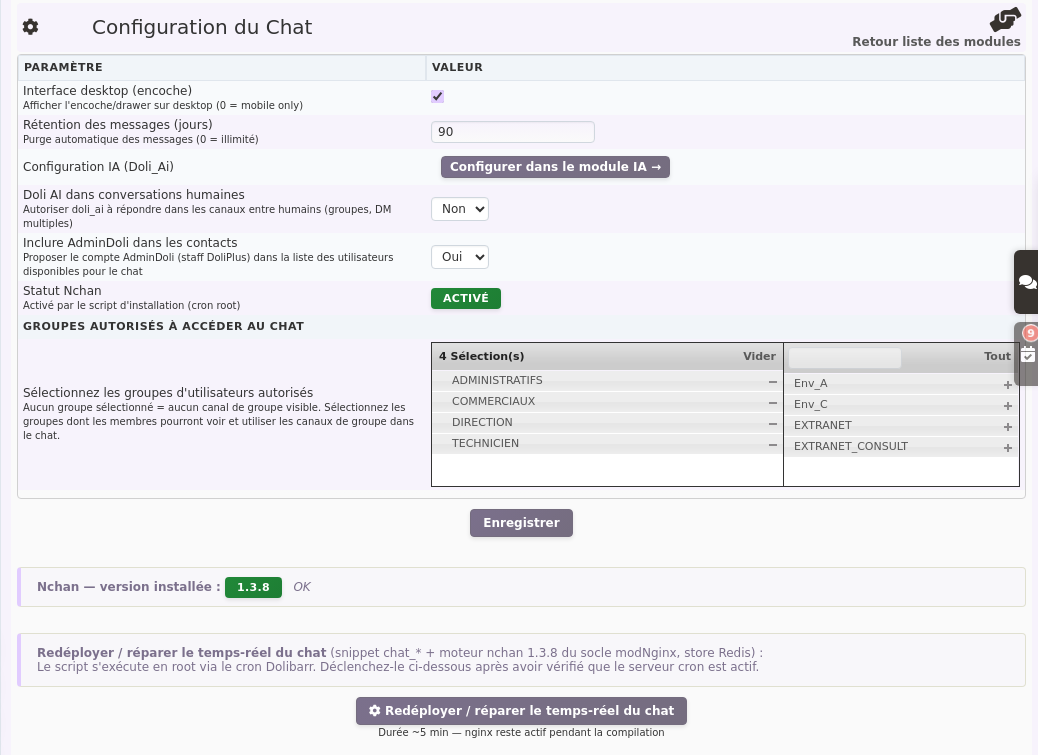
The Chat module is enabled from Setup → Modules in DoliPlus. Once active, the configuration page lets you:
- enable or disable the Chat side panel shown on every page;
- choose which user groups have access to group channels;
- configure Doli AI.
Finally, access rights are set per user from Setup → Users, exactly like for every other DoliPlus module.