 on 19 August 2026
 Contact management software: one customer file, shared by everyone
DoliPlus includes contact management software that keeps every business relationship in one file, shared by your whole team. At a glance:
- customers, prospects and suppliers side by side, with their contacts and addresses;
- each salesperson finds their own portfolio, and the manager sees the whole team’s;
- the full customer history on one card: meetings, purchases, notes, documents;
- one-click actions: check a VAT number, clone a card or merge two duplicates.
As a result, your quotes, invoices and emails always reach the right person, and nobody types the same company twice. DoliPlus is the enhanced cloud edition of Dolibarr, the open-source ERP & CRM used across Europe.
Companies and contacts: what the difference changes for you
A company (a “third party”) stands for a business or a private individual you work with. A contact, meanwhile, stands for a person or an address attached to that company: billing contact, accountant, delivery address…
Most other features build on top of your contact management software: quotes, orders, invoices, contracts. Therefore, a clean company file feeds your whole business.
Each company carries two key pieces of information:
- its sales status: prospect, customer, both prospect and customer, or neither;
- its supplier role: yes or no.
The same company can therefore be both a customer and a supplier. Besides, a company only has two states: open or closed.
Create a company in a few clicks
The Third parties → New menu offers several starting points. Each one pre-fills the card for you:
- “New prospect”: the company arrives as a Prospect, with Supplier set to “no”;
- “New customer”: it arrives directly as a Customer;
- “New supplier”: it arrives as “Neither customer nor prospect”, with Supplier set to “yes”;
- “New individual”: a customer who is a private person, with a simplified form.
Of course, you can still change these choices later. Moreover, DoliPlus can generate the customer or supplier code automatically, so every record keeps a unique reference.
Finally, the company card has a “Logo” field. Upload the company’s logo there, and it shows on the card straight away.
Add the contacts who really receive your documents
Contacts complete the picture. Create as many as you need: billing contact, treasurer, delivery address. Two routes exist:
- from the company card, with the “Create contact/address” button in the Contacts block (shown on the Card, Prospect, Customer and Supplier tabs): the contact then belongs to that company;
- from the Third parties → Contacts/Addresses → New contact/address menu: the contact may stay independent.
Afterwards, these contacts become the recipients of your emails, quotes and invoices. Already have a file elsewhere? Import your contacts in a single step.
Find and follow up your companies
The third-party area of your contact management software opens on a clear home page: statistics about your file and the latest companies recorded.
The company list, for its part, filters in one click:
- customers, prospects or suspects (leads not yet qualified);
- suppliers;
- “my third parties”, in other words the ones you are in charge of.
You also choose which columns to display, and charts sum up your file at a glance.
Above all, everyone sees what concerns them. A salesperson only sees their own portfolio, whereas the manager sees the whole team’s. Organise your sales force
The tabs of the company card: the whole customer history
A company card gathers, tab by tab, everything you know about that customer. So there is no need to dig through several tools before you call them.
Calendar, Referrers, Notifications, Notes
- Calendar: the customer’s meetings and calls, both to do and done;
- Referrers: what the customer bought from you, or what the supplier delivered, over the last 12 months;
- Notifications: an automatic email goes to the right contact at each step (order validated, invoice…);
- Notes: a public note and a private note kept for your team;
- Info: who created or changed the card, and when.
Bank account, Parent company, Sales representatives
Just below the card header, a sub-banner opens three useful extras:
- Bank account: IBAN and BIC checked as you type, with a link to the SEPA direct debit mandate;
- Parent company: link a subsidiary to its group, then find every subsidiary from the parent company;
- Sales representatives: the salespeople assigned to the company, and their order.
Quick actions from the company card
Some tasks usually take several minutes. From the card, they take one click:
- check an EU VAT number with the European VAT validation service (VIES);
- with the GDPR module enabled, send the company and its contacts the message about their personal data;
- turn the company into a prospect;
- clone a card to create a similar company in seconds;
- merge two duplicate companies: Merging third parties;
- sync the company with your PrestaShop store: PrestaShop connector.
Company documents, filed in the right place
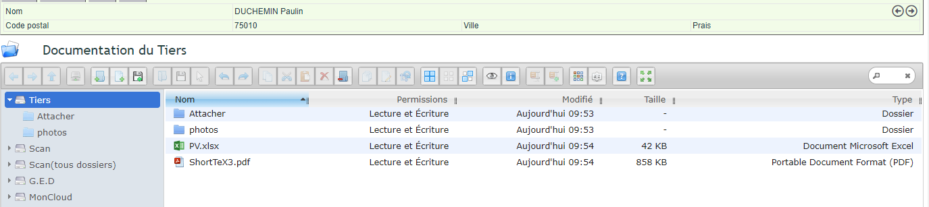
Every document dropped into the company’s file drive stays attached to that company only. In addition, the photos folder of the document space works as an image gallery for the company. Discover document management software
Print a document straight from a company card
You can also generate a document directly from a company card, using your own template. Templates use the .odt (word processing) or .ods (spreadsheet) format.
To upload them, open the Tools → Documents and Templates menu, then the “Document templates” folder. All about document templates

When the multilingual option is enabled, the card also carries a Default language field. Fill it in: from then on, that customer’s documents come out in their language, product names included if your catalogue is translated. Translate your product catalogue
Delete or close a company
First, deleting requires the permission to delete third parties. Then, deletion stays blocked as soon as the company has a quote, an order, an invoice, a contract, a supplier invoice or a supplier order.
In that case, simply set the company to “closed”. Its history stays intact, yet it no longer clutters your daily work.
Access rights that follow your teams
You set permissions by group first, then user by user when needed. In addition, thanks to the hierarchy defined in user management, the contact management software lets a manager reach the companies and documents of their own team. Set user access rights

The module setup, for its part, rules the company codes and the format of the accounting codes.
What good contact management software brings you
A messy customer file slows down the whole company. On the contrary, well-kept companies and contacts become a reliable reference that everyone shares.
In short, you gain on three fronts:
- one single database: customers, prospects and suppliers in the same place;
- targeted exchanges: the right contact receives the right document;
- a foundation for your whole business: quotes, orders and invoices all rely on it.
Above all, contact management software only pays off when your team trusts the data. Therefore, take the time to set your codes and rights once — you will keep the benefit for years.
Further reading
- Importing contacts into your CRM
- Automatic archiving of incoming and outgoing emails
- Standardise contact job titles with a drop-down list
- Multilingual product catalogue — so that documents for a foreign customer stay translated down to the product names
Related Entrées
