 on 15 October 2026
 PrestaShop 9 connector: your orders reach your back office on their own
PrestaShop 9 connector: your shop and your back office finally in sync
The PrestaShop 9 connector links your online shop to your DoliPlus management software and puts an end to double entry. In practice, it brings you:
- automatic synchronisation of products, stock, prices and orders;
- stock that is always right, updated on both sides in real time;
- selling by weight handled natively (ideal for food retail);
- a simple installation on your shop, compatible with PrestaShop 9.1.
Your online sales therefore feed your sales management directly, without retyping a single line. You save time and you remove errors.
DoliPlus is the enhanced cloud edition of Dolibarr, extended with modules built for daily business use.
Why connect your online shop to your management software
Without a connection, every order received on your website has to be copied by hand into your software. Moreover, the stock shown in the shop quickly drifts away from your real stock. As a result, you risk selling an item that is out of stock, or forgetting an order.
The PrestaShop 9 connector removes this repetitive work. Indeed, it moves the information between the two tools automatically. In other words, your shop and your back office finally speak the same language.
What the connector keeps in sync automatically
The connector covers the whole sales cycle. Here is, in particular, what it keeps up to date on its own:
Products and catalogue
First, your product records go from DoliPlus to your shop: label, description, price and availability. You therefore manage your catalogue in one single place.
Stock in real time
Next, every shipment or receipt updates the quantity shown online. Thanks to this, your shop never displays wrong stock.
Orders and customers
Finally, every order placed on the website automatically creates the customer, the order and the invoice in DoliPlus. As a result, your sales follow-up and your accounting stay complete without effort.
Selling by weight: the right price, worked out for you
Butcher, cheesemonger, fishmonger, delicatessen: in these trades, no two pieces ever weigh the same. Selling online then becomes a headache, because the price depends on the actual weight of each item. The connector solves this problem for you.
Take a rib of beef. One weighs 1.150 kg, another 1.320 kg. Without a suitable tool, you would have to weigh it, recalculate the price by hand, then correct the stock. With the connector, on the contrary, everything happens automatically.
What you actually gain
- An always exact price: the amount is calculated from the actual weight of the piece. So your customer pays no more and no less.
- Reliable stock, piece by piece: your shop displays the number of pieces really available, never phantom stock.
- No retyping: the order, the invoice and the delivery note are created on their own in DoliPlus.
- No more overselling: as soon as a piece is sold, it disappears from the shop in real time.
How it works, simply
First, you enter an average supply weight for each item. Next, the connector converts your stock in kilos into a number of pieces that can be sold in the shop. Finally, with each order, it adjusts the weight and the price to the piece actually prepared.
The result: you sell by weight online as easily as at the counter. Moreover, you save precious time and you remove invoicing errors. Very few PrestaShop connectors can really offer this.
Selling by the piece, from stock or to order
Do you sell items by the unit, sometimes out of stock? The connector handles this case from start to finish and avoids bad surprises. First, it automatically tells apart a piece that is available from a piece that must be restocked:
- Piece in stock: it is reserved at once by a delivery note, and the shop stock is updated straight away.
- Piece out of stock: the sale remains possible, then the order goes to awaiting restock — this is selling to order.
- Each order shows a clear status (“awaiting shipment”), for unambiguous follow-up.
So you never sell the same piece twice, and your customers know exactly what to expect. You therefore secure your sales while keeping the flexibility to sell to order.
Selling during restocking, if your business suits it
Some businesses sell from incoming stock: the goods have not arrived yet, but the order can already be taken. The connector can support this way of selling. However, it is a set-up specific to your organisation, put in place case by case — not a behaviour applied to every shop by default.
The principle rests on two elements. First, each product record carries a field that accepts or refuses orders on PrestaShop, and it decides what your shop does when the item is no longer available:
- Accept orders: your customer still buys, as a pre-order.
- Refuse orders: the item temporarily cannot be ordered.
- Use the default behaviour: your shop applies its own rule, set once and for all.
Next comes the link with your purchasing. Indeed, as soon as a product falls below its alert threshold, the connector looks up the supplier order in progress. It then retrieves the availability date you entered, and sends it to your shop together with your selling choice.
Your customer therefore sees an item that can still be ordered, with its announced arrival date. In other words, they wait instead of going elsewhere. Moreover, everything is set from DoliPlus: the rule on the product record, the date on the supplier order.
Installing the PrestaShop 9 connector on your shop
Setting up the PrestaShop 9 connector takes two steps: first on the DoliPlus side, then on the shop side. It remains within your webmaster’s reach.
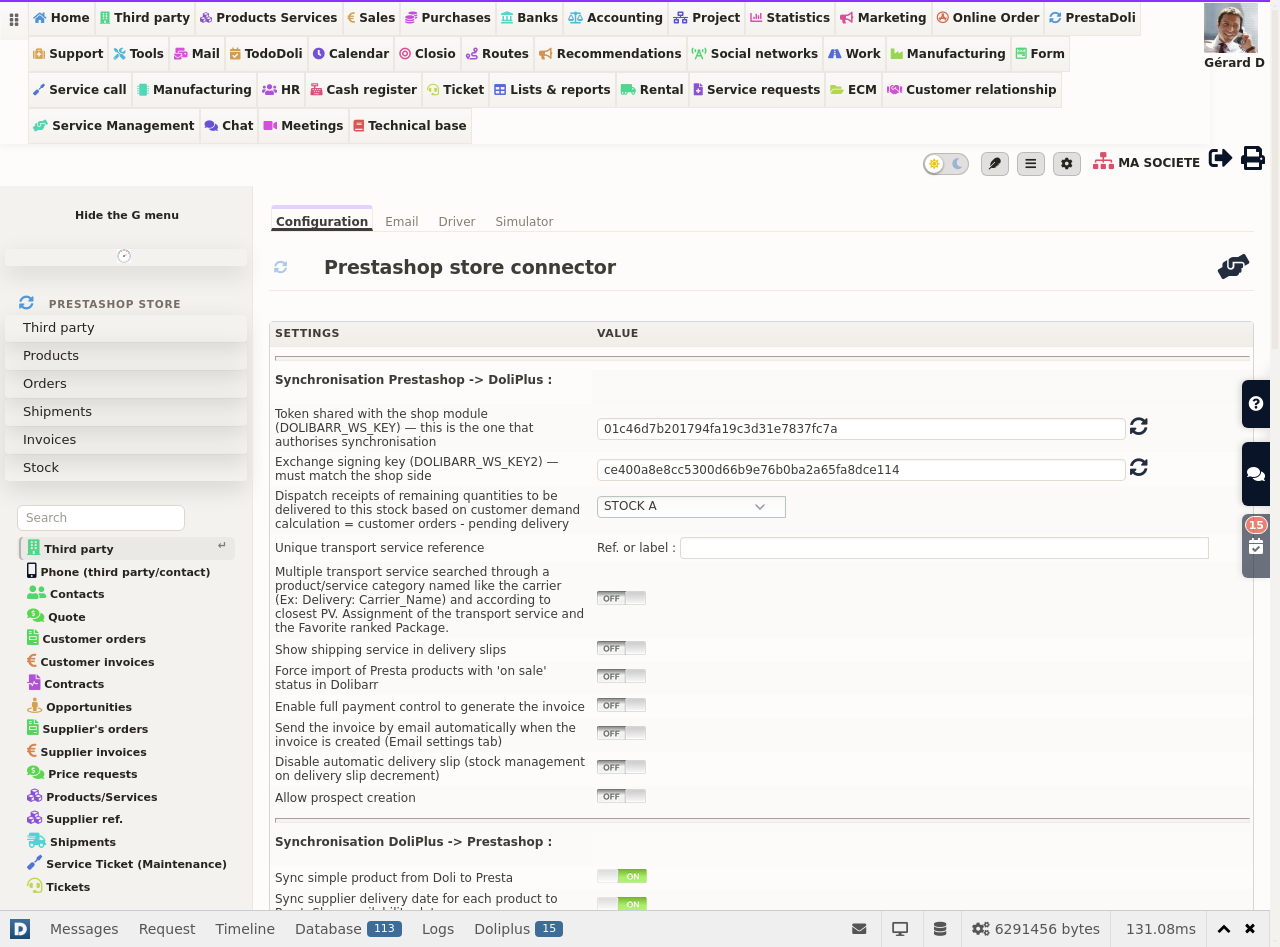
On the DoliPlus side
- First, generate the token and the security key, then save.
- Next, declare your shop: take the template offered, then replace the values with your own (website address, warehouse, price level).
- Finally, choose what you want to synchronise: products, stock, customers, orders, invoices.
On the PrestaShop side
- Download the module provided in the DoliPlus settings, install it on PrestaShop 9, then clear the shop cache.
- Copy the token and the security key into the module settings on the shop side.
- Then enable the PrestaShop web service, and create an access key with rights on products, customers, orders and categories.
- Finally, test the connection. A “rights validated” page confirms that the two tools are talking.
Every message from your shop gets a clear answer
Your shop talks to your back office continuously: a confirmed order, a status that changes, an updated cart. Each of these messages now gets an explicit answer, so you always know what has really been taken in.
- Shop recognised: the order enters DoliPlus and follows its normal course.
- Unexpected shop identifier: the message is flagged immediately, with the value received and the ones your installation expects.
- Your webmaster thus sees in one line what needs fixing, without having to dig.
This clarity matters most on the day something goes wrong. Indeed, a shop that receives a straight answer knows it must try again; your service provider, for their part, immediately has the useful information. As a result, a forgotten setting is fixed in a few minutes instead of being hunted down.
Finally, the shop settings screen goes straight to the point: it only asks for the information that is actually used. In other words, you fill in fewer fields, and each of them has a concrete effect.
Bringing your existing PrestaShop data across
Is your shop already running, with products, customers and orders? The connector brings this data into DoliPlus in one go, at start-up.
You therefore start from a complete catalogue, without retyping. However, this import only runs at installation: afterwards, the daily synchronisation takes over automatically.
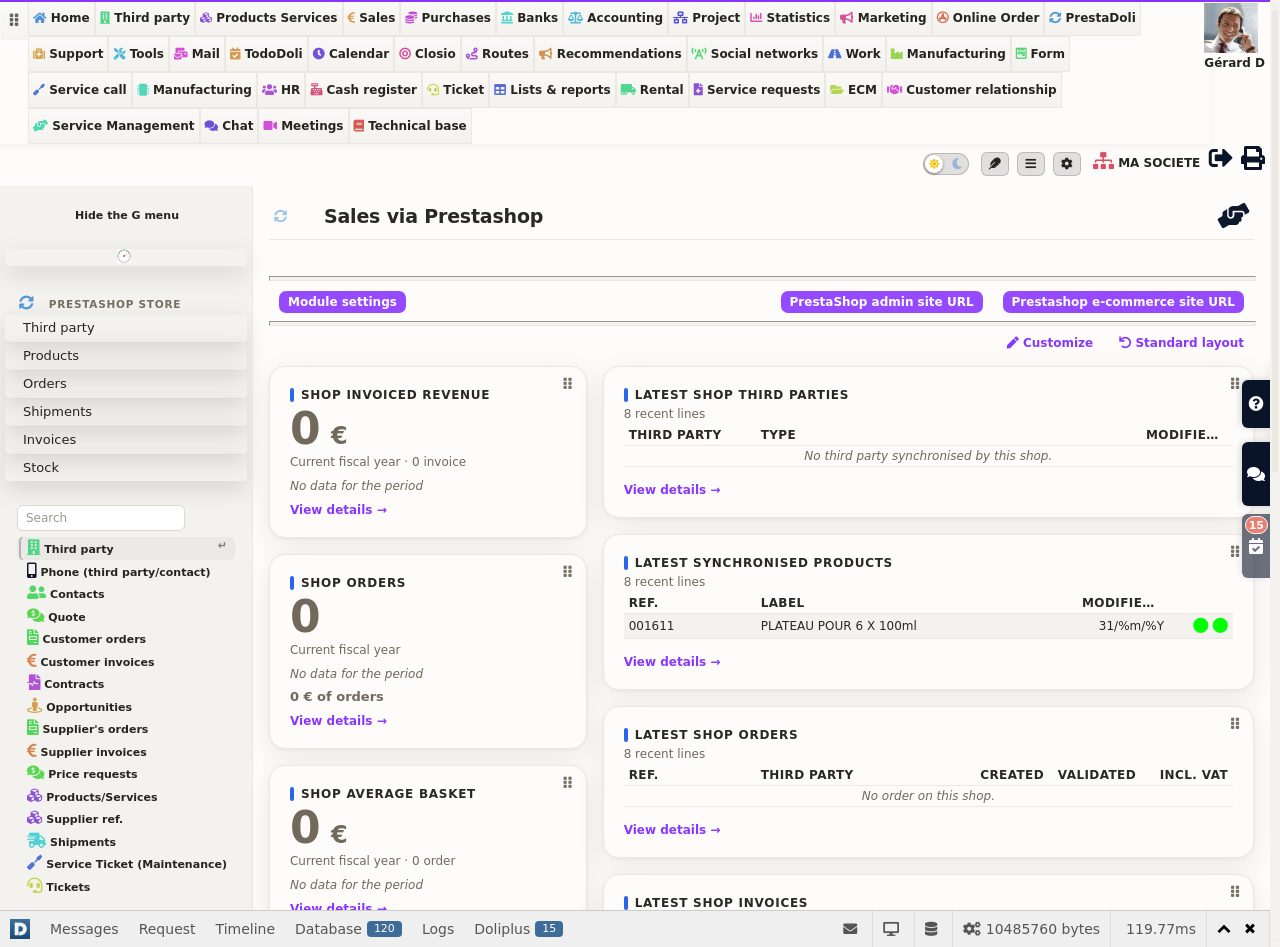
Products, variants and photos
The connector synchronises your product records in both directions. Moreover, it handles variants (size, colour, format), a frequent case in online shops.
First, enter a reference on the main product. Next, DoliPlus generates the variant references on its own, from this prefix. In addition, the first photo of each product comes up into DoliPlus automatically, ready to appear on your documents.
Finally, if your shop handles product returns, they remain processed on the PrestaShop side. You can then offer a discount voucher rather than a refund.
Selling prices, discounts and eco-contribution
You set your prices in one single place. If you use several price levels in DoliPlus, an option simply designates the one to publish on the shop.
Moreover, the connector takes over the discounts of your orders, whether they apply to an item line or to a dedicated line. It also handles the eco-contribution, so that you stay compliant with your obligations.
Stock management and stocktaking
You choose the warehouse linked to the shop. From then on, every receipt or shipment adjusts the quantity online, with no action on your part.
Moreover, a dedicated list gathers all the products synchronised with the shop. After a stocktake, you can force a global stock update to PrestaShop. Finally, a comparison screen sets the shop stock against the DoliPlus stock, with an export available.
Orders, invoices and payments
Every online order comes down into DoliPlus. The connector then creates the customer, the order, the invoice and the related payment. As a result, your accounting stays complete without any data entry.
Moreover, your invoices keep a single numbering for all your sales channels: shop, counter or phone. You can also send the invoice to the customer by email, from a dedicated account. In addition, the connector creates the payment methods automatically.
Finally, the delivery comment left by the buyer ends up in the order note. Your pickers therefore have the right instruction straight away.
Customers, addresses and groups
The connector synchronises your customers and their delivery and billing addresses. First, each order takes the right address, in the right role. Next, you can also push to the shop a customer created offline, to enrich their personal account. In addition, the alias you give each address in your shop (“Home”, “Second home”…) is also copied onto the DoliPlus contact record: you therefore find the right address immediately, even when a customer has several. This label follows the address whatever its route, whether it arrives with an order or during a synchronisation of your customers.
Spotting the right address at a glance in your lists
This alias is not locked away on the contact record. Indeed, you can also display it as a column in your list of contacts and addresses.
It takes two steps:
- First, open the column selector of the contacts/addresses list.
- Next, tick the PrestaShop address alias column.
So “North warehouse”, “Office” or “Town-centre shop” are displayed right next to each address. As a result, you can tell apart the addresses of the same customer without opening one record after another.
This is particularly useful when preparing a delivery or checking a pick-up point. Finally, this column can be filtered like the others: you isolate in an instant all the addresses that carry the same label.
Good to know: the column fills up as you sell. Indeed, each imported order brings the label of both its billing address and its delivery address, without any action on your part.
Automatic discounts by customer group
You also manage PrestaShop customer groups directly from DoliPlus: resellers, wholesalers, VIP customers… First, you create the group and its discount once. Then, you assign it to a customer, or to a whole category of customers, in a single action. The discount reserved for this group then applies automatically in the shop, without retyping a reduction customer by customer.
Delivery notes and restocking
Take a parts shop that sells both from stock and to order. A customer orders two pieces to be ordered and one piece that is available. The connector then acts on its own.
First, it creates the customer, the order, the invoice and its payment. Next, it issues and validates the delivery note for the available piece. In this way, the piece is reserved and the shop stock is updated at once. The order moves to “awaiting shipment”.
Then you order the missing pieces from the supplier. On receipt, DoliPlus puts the expected pieces in a holding stock and moves the surplus to the main stock. Finally, the order becomes “shippable” and a batch process issues the final delivery notes.
Correct a supplier order while your shop keeps selling
A supplier order that has already been validated sometimes needs a touch-up: a line to add, a quantity to adjust after a call from the supplier. To reopen it, DoliPlus briefly puts it back to draft.
During that moment, however, the expected quantities of this order drop out of the calculation sent to the shop. The screen now tells you before you confirm, and leaves you the choice: a “Keep the stock published to the shop during the modification” box keeps the displayed quantities while you make your correction.
You therefore decide case by case. For a touch-up of a few minutes, tick the box: your visitors keep ordering normally while you work. For an in-depth change, leave it unticked, and the shop follows the new content of the order at once.
Several shops, several companies
Do you run several shops? Declare them in DoliPlus, then tell them apart with a short code. A drop-down list then lets you switch from one to the other in the management interface.
Moreover, the connector remains compatible with multi-company management. You therefore run several entities and several websites from a single DoliPlus.
From DoliPlus to your shop
Synchronisation also works the other way round. DoliPlus thus keeps your shop up to date continuously:
- stock is corrected with every receipt and every movement;
- product records are created and updated (reference, description, barcode, price);
- customers and their addresses are synchronised with a simple button, “Sync to Prestashop”;
- an availability date can be sent to the shop for items sold to order.
As a result, your shop always reflects the reality of your management, down to the product and the piece.
Bringing your whole catalogue back into line without opening a single record
Have you reviewed your prices, changed price level or taken over an old catalogue? You do not have to reopen your records one by one.
In the connector settings, the “Driver” tab offers, shop by shop, the “Realign prices and republish the catalogue” line. It works in two steps:
- First, “Preview” lists the items concerned and the prices it would adjust. It changes nothing.
- Next, the run button launches the operation. It carries on by itself, item after item, all the way to your shop.
Only the prices are republished: your shop records (item online or offline, texts, categories) stay exactly as you set them. As a result, your shop displays exactly the prices held in your management software, without any retyping.
Note: items whose price you set excluding tax keep yours, unchanged.
Built for PrestaShop 9.1, and made to last
This new version supports PrestaShop 9.1, the latest generation of the e-commerce solution. Moreover, it takes over and strengthens all the features of the previous versions. So if you migrate your shop, your connection to DoliPlus follows without a break.
Further reading
- The PrestaShop 1.7 connector, the previous version
- Managing product variants
- Stock management in DoliPlus
- The automatic catalogue of products for sale
- The DoliPlus PrestaShop connector: overview
- Shipments to invoice
- The extranet portal: your trade customers reorder on their own — the B2B counterpart of the shop, with each customer’s negotiated prices.
