 on 15 October 2026
 Event notifications: appointments, calls and e-mails on your phone
Event notifications alert you at the right time: an upcoming meeting, an action to take, an incoming call. So you never miss anything, without constantly checking your diary.
What are event notifications for?
Event notifications are powerful efficiency tools. They can be triggered in four situations:
- when a user creates or modifies an event for someone else: the recipient gets a clickable notification;
- when a reminder is scheduled, for example 30 minutes before a meeting;
- when a module triggers an internal event, like an incoming call notification;
- when a new e-mail arrives in the mailbox of a mobile app user.
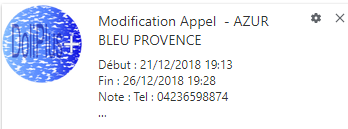
This module is in beta: its behaviour may still evolve.
How notifications work
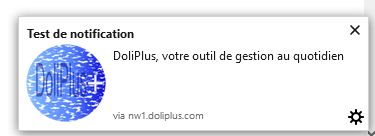
Once the module is configured, a new sub-menu appears under Tools → Additional tools → Notifications. It lets each user authorise their browser to receive DoliPlus notifications.
Additionally, a button tests internal notifications: a message then appears at the bottom right of the page. This lets you verify everything is working.
Scheduling an event reminder
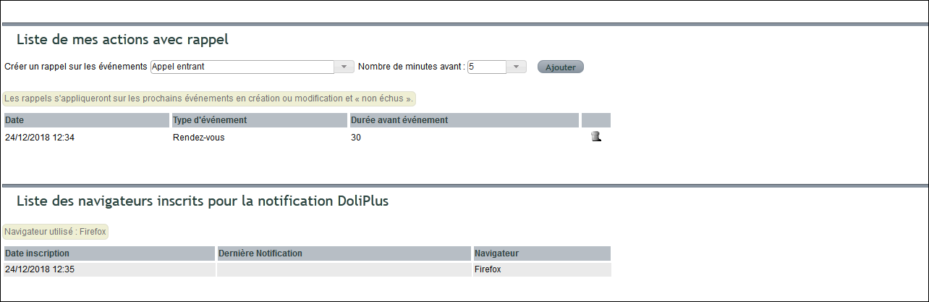
Authorised users can then set their own reminders for upcoming events. If they don’t have the rights, they can request them from an administrator.
You can set several reminders for the same event type, for example 30 minutes and then 5 minutes before each meeting. After each addition, the type, the delay and the user stay selected: just change the delay and click “Add” again.
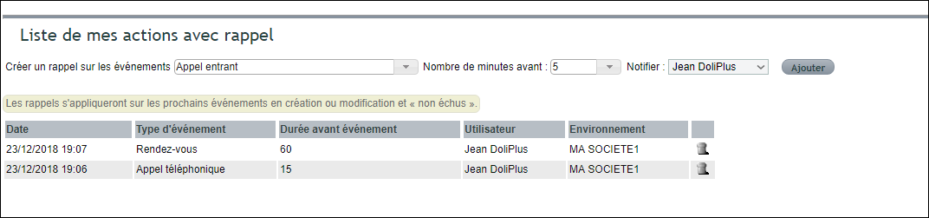
Administrators have a dedicated console. They can assign reminders there and view all users’ reminders.
Configuring the module
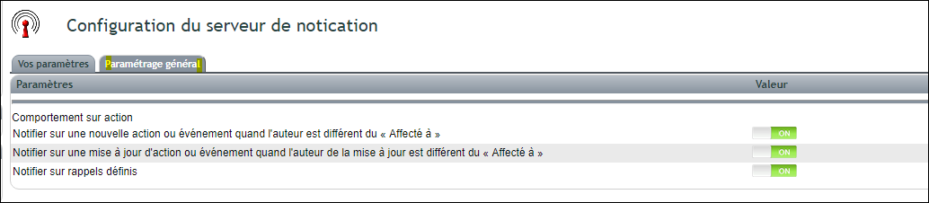
Finally, support activates and configures the module. Administrators then get an additional tab to enable available options.
Get notified on your phone as soon as an e-mail arrives
Are you on a job site, at a customer’s or on the road when an important e-mail comes in? DoliPlusMobi now alerts you on your phone straight away, even when the app is closed.
The notification shows the sender and the subject. Then, a single tap on the notification opens your mailbox directly in the app.

Only useful messages disturb you
DoliPlus checks your inbox every three minutes. Moreover, only unread e-mails trigger an alert: a message you already read on your computer does not disturb you a second time.
Above all, you choose which e-mails deserve an alert. Open the Notifications page, section “New e-mail notifications (phone and webmail)”, then tick one of three choices:
- All new e-mails;
- All, except spam — the default choice: a message flagged as spam by your server, or matched by one of your anti-spam filters, arrives in your mailbox without disturbing you;
- Only known senders — your customers, contacts, colleagues and usual correspondents. An unknown cold caller quietly waits until you open your mailbox.
This choice also applies to the webmail alert on your computer, the pop-up and the “new message” sound: one setting for all your screens. Finally, to block an unwanted sender for good, see the anti-spam filters of the email.
In addition, if several e-mails arrive at once, you receive a single notification that groups them.
Your usual mailbox, Microsoft 365 included
The feature relies on the mailbox already set up in your user record. Therefore, it works with your usual e-mail provider, and also with Microsoft 365 when your company uses it.
Furthermore, your e-mails stay on your mail server: DoliPlus only reads the sender, the subject and the server’s anti-spam marks to build the notification, without changing anything in your mailbox.
On by default, can be switched off at any time
This notification is on by default for every DoliPlusMobi user. To benefit from it, the app simply needs to be installed on the phone with notifications allowed.
If your company prefers to do without it, the administrator switches it off in one click:
- open the Notifications module setup;
- find the line “New e-mail notifications on mobile”;
- click “Disable”.
The same button switches it back on later. Your choice is kept when DoliPlus is updated.
Discover the DoliPlusMobi appWhy enable event notifications?
Constantly monitoring your diary wastes time and focus. Event notifications alert you when needed.
You benefit in three ways:
- no forgetfulness: reminders arrive before deadlines;
- increased responsiveness: incoming calls are signalled immediately;
- smoother teamwork: assigned actions notify their recipient;
- no important e-mail missed on the road: it shows up on your phone.
Learn more about events and tasks
Further reading
- Organising events, tasks and actions
- Your ERP’s daily tools
- DoliPlusMobi: your ERP in your pocket
- DoliPlus built-in e-mail
