 on 5 September 2026
 Document Templates in DoliPlus
Document templates in DoliPlus
The document templates in DoliPlus let you save standard texts once and for all: follow-up emails, commercial terms, meeting minutes, ticket responses, etc.
Then, you can insert them with a single click whenever you open a text editor. This saves time, ensures consistent messaging across the company, and prevents typos.
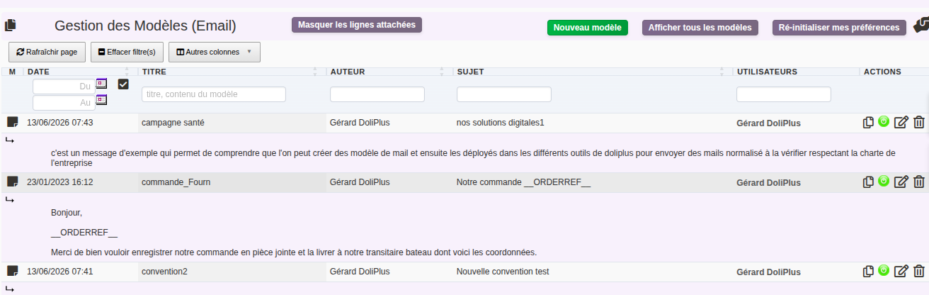
In practice, document templates are managed from the Tools > Document Templates menu. Each template has a unique title, type, author, and a list of authorised users, which controls its sharing.
Different template types
First, the type determines the context in which the template is suggested. Depending on the active modules, you have the following types available:
- Email — body and subject of messages sent from the messaging system;
- Customer or supplier / Contacts — notes and texts linked to customer and supplier records;
- Sales management — quotes, orders, invoices;
- Procurement management — supplier documents;
- Product, Newsletter, SMS, Ticket, Intervention, Training, Notes and Meeting minutes, depending on your modules.
Creating a document template
Creation is simple and quick:
- open Tools > Document Templates, then select the desired type;
- click New template;
- enter a unique and descriptive title (e.g. “Chase unpaid invoice”);
- for an email, also fill in the Subject;
- write the content in the rich text editor;
- finally, designate the authorised users, then save.
Sharing a template with other users
This is the most important feature of the tool. Two distinct fields control the sharing of each template.
Author: the template owner
The Author field indicates who created the template. It is automatically filled with your name. Consequently, only the author — or an administrator — can modify or delete it. Your colleagues can use it, but not edit it: your reference version remains protected.
Users: who can use it
The Users field is the key to sharing. You add authorised colleagues by name. Start typing a name: DoliPlus then suggests a list of active users, and you select the recipients.
- Personal template: if you only select yourself, the template remains private;
- Shared template: add your colleagues, and the template automatically appears in their editor, with no setup required on their part.
Using a template in daily work
Whenever you open a relevant editor (email, note, report), a dropdown menu “Choose a template here” appears. It shows all templates of the right type you have access to: yours and those shared with you.
Then, you select the template, and its content is instantly inserted. You just need to personalise the final details before sending.
To go further, see sending emails via DoliPlus. Plus, email templates work seamlessly with user signatures.
Customise with placeholder variables
Moreover, a template can contain placeholder variables. These are tags automatically replaced with the right information upon insertion: customer name, invoice amount, today’s date, signature…
In other words, you write “Hello [contact name]” just once, and each message uses the correct name. This turns a simple boilerplate text into a truly personalised letter.
Manage and organise your document templates
Finally, the template table offers several handy actions:
- Duplicate a template to create a variant without retyping everything;
- Enable/Disable a template: when disabled, it’s kept but no longer appears in editors;
- Edit or Delete (reserved for the author and administrators);
- Search and sort by title, content, type, author or date.
Permissions, administration and environments
Creation access depends on each user’s rights. Additionally, administrators have a “Show all templates” button. This gives them a complete overview of all company templates from all authors.
This view remains very useful for standardising texts or reusing a colleague’s template. Finally, in multi-company setups, each template is linked to an environment, neatly separating templates between your entities.
To go further
- Standard messages for emails in DoliPlus
- Sending emails via DoliPlus
- User email signatures
- Visit reports with DoliPlus
- Add other documents to your PDF quotes, orders, invoices, letters – DoliPlus – attach additional documents to your quotes, orders and invoices.
