 on 5 September 2026
 Standard email messages in Dolibarr
You often send emails from your business documents. With Dolibarr emails, you can personalise the accompanying message.
This way, each email gains clarity and professionalism. Plus, you save valuable time every day.
Indeed, DoliPlus automatically prepares a standard text for each email. However, this text remains fully editable to suit your needs.
In practice, this message appears whenever you send an outgoing email. For example, from a quote, a customer order or a supplier order.
In other words, you keep control over the tone used. On the other hand, the setting remains simple and quick to apply.
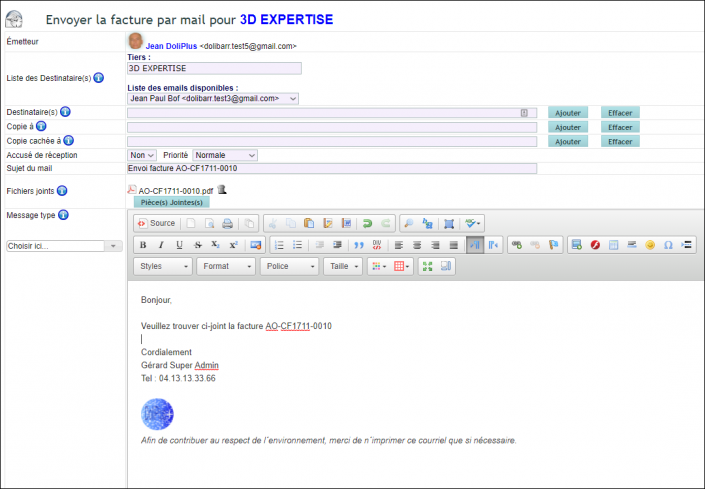
Moreover, you can also adapt this message on a case-by-case basis. To do this, DoliPlus uses text libraries. (Dolibarr Text and Message Libraries chapter)
How to modify the standard Dolibarr email message?
First, open the sending interface from your document. Then, save the message tailored to the order.
This way, you define the body text and the associated subject. As a result, this template will be used for your future emails.
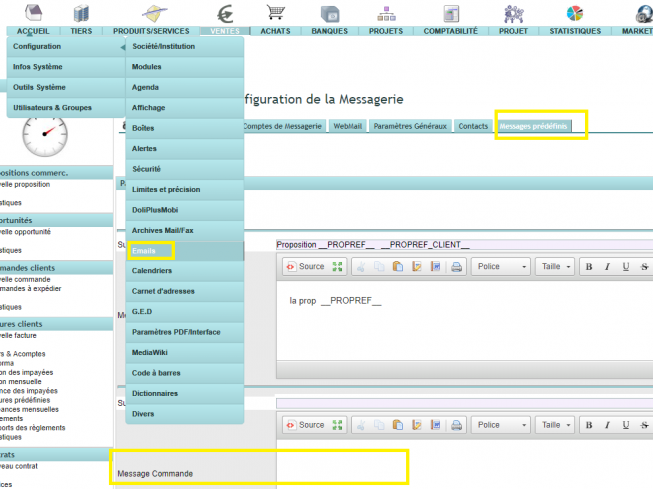
Insert variables in your messages
Additionally, you can insert substitution variables. In other words, DoliPlus replaces these codes with the actual data from the document.
For example, the reference or customer name appears automatically. This is why your messages always stay up to date.
To discover the full list, check out the dedicated summary. Refer to the Dolibarr Substitution Variables Summary chapter
Example message for a quote
Here’s a simple template you can reuse. This way, you can easily adapt the subject and body of the message.
- Subject: Your quote __PROPREF__ __PROPREF_CLIENT__
- Message: Hello, please find attached our best commercial proposal __PROPREF__.
- Closing: We remain at your disposal for any further information.
Finally, you can personalise your emails effortlessly. However, remember to save your template for future use.
