 on 5 September 2026
 Summary of Dolibarr Substitution Variables
- The syntax of variables differs from one application to another, mainly for historical reasons,
- New variables are regularly introduced, depending on new modules, improvements, or customer requests,
For technical reasons unrelated to DoliPlus, it is strongly recommended to copy variables using the keyboard rather than copy/paste, which may or may not work randomly.
Type 1 Variables
Used in:
- Dolibarr message or text libraries – Email templates
-
Standard Dolibarr email accompanying messages
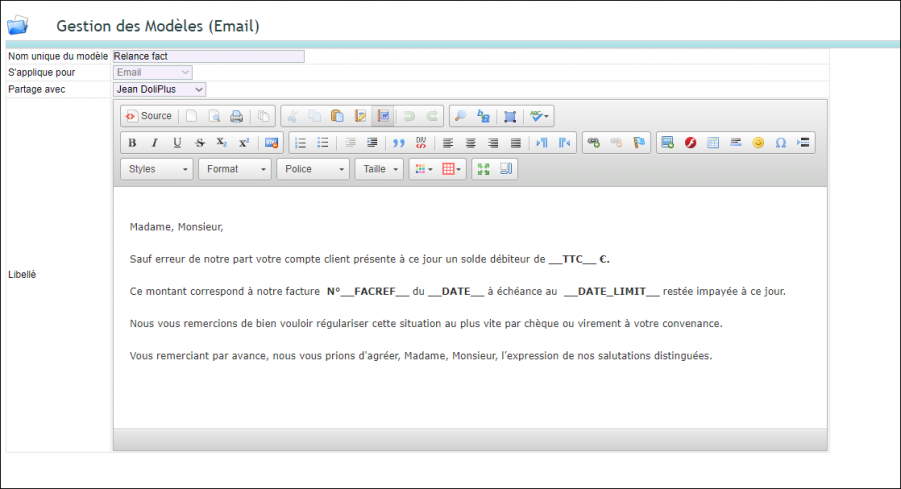
Customer invoice
| __SOCNAME__ | Customer name |
| __FACREF__ | Ref |
| __FACREF_CLIENT__ | Customer ref |
| __FACREF_INTERNE__ | Internal ref |
| __DATE__ | Date |
| __DATE_LIMIT__ | Due date |
| __HT__ | Net amount |
| __TTC__ | Gross amount |
| __TVA__ | VAT amount |
| __REMAIN_TO_PAY__ | Amount due |
It is also possible to use the labels of custom fields with this syntax: (double underscore) CUSTOM FIELD CODE IN UPPERCASE (double underscore), example: __CODE-DE-MON-CHAMP-PERSONNALISE__
Customer order
| __SOCNAME__ | Customer name |
| __ORDERREF__ | Ref |
| __ORDER_CLIENT__ | Customer ref |
| __ORDER_INTERNE__ | Internal ref |
| __DATE__ | Date |
| __DATE_DELIVERY__ | Delivery date |
| __HT__ | Amount ex VAT |
| __TTC__ | Amount inc VAT |
| __TVA__ | VAT amount |
You can also include custom field labels using this syntax: (double underscore) CUSTOM FIELD CODE IN UPPERCASE (double underscore), example: __CODE-DE-MON-CHAMP-PERSONNALISE__
Quote
| __SOCNAME__ | Customer name |
| __PROPREF__ | Ref |
| __PROPREF_CLIENT__ | Customer ref |
| __PROPREF_INTERNE__ | Internal ref |
| __DATE__ | Date |
| __DATE_DELIVERY__ | Delivery date |
| __HT__ | Amount ex VAT |
| __TTC__ | Amount inc VAT |
| __TVA__ | VAT amount |
You can also include custom field labels using this syntax: (double underscore) CUSTOM FIELD CODE IN UPPERCASE (double underscore), example: __CODE-DE-MON-CHAMP-PERSONNALISE__
Supplier quote request
| __SOCNAME__ | Supplier name |
| __SUPPLIERPROPOSALREF__ | Ref |
| __ORDERREF_SUPPLIER__ | Supplier ref |
| __DATE__ | Invoice date |
| __DATE_DELIVERY__ | Delivery date |
| __HT__ | Excl. VAT amount |
| __TTC__ | Incl. VAT amount |
| __TVA__ | VAT amount |
It is also possible to use custom field labels following this syntax: (double underscore) CUSTOM FIELD CODE IN UPPERCASE (double underscore), example: __MY-CUSTOM-FIELD__
Supplier Order
| __SOCNAME__ | Supplier name |
| __ORDERREF__ | Ref |
| __ORDERREF_SUPPLIER__ | Supplier ref |
| __DATE__ | Date |
| __DATE_DELIVERY__ | Delivery date |
| __HT__ | Excl. VAT amount |
| __TTC__ | Incl. VAT amount |
| __TVA__ | VAT amount |
It is also possible to use custom field labels following this syntax: (double underscore) CUSTOM FIELD CODE IN UPPERCASE (double underscore), example: __MY-CUSTOM-FIELD__
Supplier Invoice
__TTC__Incl. VAT amount
| __FACREF__ | Ref |
| __FACREF_SUPPLIER__ | Supplier ref |
| __DATE__ | Date |
| __DATE_LIMIT__ | Due date |
| __HT__ | Excl. VAT amount |
| __TVA__ | VAT amount |
It is also possible to use custom field labels following this syntax: (double underscore) CUSTOM FIELD CODE IN UPPERCASE (double underscore), example: __MY-CUSTOM-FIELD__
Business Opportunity (Lead)
From sending an email from the customer or supplier record via a custom message containing these variables in the subject or body of the message.
| __TIERS__ | Customer or supplier name |
| __TEL__ | Phone |
| __MAIL__ | |
| __ADRESSE__ | Address |
| __CP__ | Postal code |
| __VILLE__ | City |
| __CODE_CLIENT__ | Customer code |
| __REF__ | Opportunity ref. |
| __DATE_CLOTURE__ | Date |
| __HT__ | Estimated amount (excl. VAT) |
You can also use custom field labels with this syntax: (double underscore) CUSTOM FIELD CODE IN UPPERCASE (double underscore), example: __MY-CUSTOM-FIELD__
Customer or supplier
From sending an email from the customer or supplier record via a custom message containing these variables in the subject or body of the message.
| __TIERS__ | Customer or supplier name |
| __TEL__ | Phone |
| __MAIL__ | |
| __ADRESSE__ | Address |
| __CP__ | Postal code |
| __VILLE__ | City |
| __CODE_CLIENT__ | Customer code |
You can also use custom field labels with this syntax: (double underscore) CUSTOM FIELD CODE IN UPPERCASE (double underscore), example: __MY-CUSTOM-FIELD__
Type 2 Variables
Note: Variables are regularly added, this list may not be exhaustive. Please contact us via ticket if an element is missing for your template.
- Word document templates with Dolibarr: add tags between ${}.
- ODT/ODS document templates with Dolibarr: add tags between {}.
Company information
Customer or Supplier Information
- Word document templates with Dolibarr: add tags between ${}.
- ODT/ODS document templates with Dolibarr: add tags between {}.
A list of tags:
company_name : Customer or Supplier company name
company_address
company_zip
company_town
company_country : Customer or Supplier company country (label)
company_country_code : Customer or Supplier company country (code: FR, US, IT…)
company_state
company_state_code
company_phone
company_fax
company_email
company_web
company_barcode
company_customercode : Company customer code
company_suppliercode : Company supplier code
company_customeraccountancycode : Company customer accountancy code
company_supplieraccountancycode : Company supplier accountancy code
company_capital
company_juridicalstatus
company_idprof1
company_idprof2
company_idprof3
company_idprof4
company_idprof5
company_idprof6
company_vatnumber : Customer or Supplier company VAT number
company_note_public : Customer or Supplier company public note
company_note
company_default_bank_iban
Custom fields: company_code-de-mon-champ-personnalisé
User Information
- Word document templates with Dolibarr: add tags between ${}.
- ODT/ODS document templates with Dolibarr: add tags between {}.
myuser_lastname
myuser_firstname
myuser_fullname
myuser_login
myuser_phone
myuser_address
myuser_zip
myuser_town
myuser_country
myuser_country_code
myuser_state
myuser_state_code
myuser_fax
myuser_mobile
myuser_email
myuser_logo
myuser_job
Custom fields: myuser_code-de-mon-champ-personnalisé
Additional Information
- Word document templates with Dolibarr: add tags between ${}.
- ODT/ODS document templates with Dolibarr: add tags between {}.
current_date
current_datehour
current_server_date
current_server_datehour
current_date_locale
current_datehour_locale
current_server_date_locale
current_server_datehour_locale
Document Information (invoice, quote, order, …)
- Word document templates with Dolibarr: add tags between ${}.
- ODT/ODS document templates with Dolibarr: add tags between {}.
object_id
object_ref
object_ref_customer
object_ref_supplier
object_date
object_date_creation
object_date_modification
object_date_validation
object_note_private
object_note_public
object_note
Amounts (numeric data):
object_total_ht
object_total_vat
object_total_localtax1
object_total_localtax2
object_total_ttc
object_total_discount_ht
object_total_vat_x
Amounts (in output language format):
object_total_ht_locale
object_total_vat_locale
object_total_localtax1_locale
object_total_localtax2_locale
object_total_ttc_locale
object_total_discount_ht_locale
object_total_vat_locale_x.x
Specific to quotes:
object_date_end
Specific to orders:
object_date_delivery_planed
Specific to invoices:
object_date_limit
object_payment_mode
object_payment_term
object_source_invoice_ref
object_already_payed
object_remain_to_pay
object_already_payed_locale
object_remain_to_pay_locale
Custom fields: object_code-de-mon-champ-personnalisé
Document Lines
Here’s how to use the line tables for objects (invoice lines, order lines, etc.). You need to create a table in the document and use “begin” and “end” tags to define the table row. This row will be repeated as many times as needed when generating the document.
[!– BEGIN row.lines –] …[!– END row.lines –]
Example
|
Description |
VAT Rate |
Unit Price € |
Quantity |
Discount |
Total € Excl. VAT |
|---|---|---|---|---|---|
|
[!– BEGIN row.lines –]{line_fulldesc} |
{line_vatrate} |
{line_up} |
{line_qty} |
{line_discount_percent} |
{line_price_ht} [!– END row.lines –] |
Next, add the tags of your choice in the rows from the following:
line_fulldesc
line_product_ref
line_product_label
line_desc
line_vatrate
line_up
line_up_locale
line_qty
line_discount_percent
line_price_ht
line_price_ht_locale
line_price_vat
line_price_vat_locale
line_price_ttc
line_price_ttc_locale
line_date_start
line_date_start_rfc
line_date_end
line_date_end_rfc
Special Projects and Tasks
Project {object_ref} from {object_datec}
Description: {object_description}
Private note: {object_note_private}
Public note: {object_note_public}
For Tasks
| Description | Ref | Label |
Start |
Planned | Progress |
|---|---|---|---|---|---|
| [!– BEGIN row.lines –]{line_desc} |
{line_ref} |
{line_label} |
{line_date_start} |
{line_planned_workload} |
{line_progress} [!– END row.lines –] |
ref = {line_ref}
fk_project = {line_fk_projet}
fk_task_parent = {line_fk_task_parent}
label = {line_label}
description = {line_description}
duration_effective = {line_duration_effective}
date_c = db->jdate({line_datec})
date_start = db->jdate({line_dateo})
date_end = db->jdate({line_datee})
fk_user_creat = {line_fk_user_creat}
fk_user_valid = {line_fk_user_valid}
fk_statut = {line_fk_statut}
progress = {line_progress}
priority = {line_priority}
note_private = {line_note_private}
note_public = {line_note_public}
planned_workload = {line_planned_workload}
