 on 25 October 2026
 Leave management software: staff absences and holidays
Leave management software built into your ERP
DoliPlus includes leave management software that simplifies the follow-up of staff leave, absences, public holidays and company closures:
- summary calendars gathering leave, absences, closures and public holidays;
- a personal graphical calendar for every employee;
- a clear approval workflow with email alerts, from the request to the validation;
- automatic leave balances showing the days still available;
- event-based leave types managed through a simple dictionary.
Therefore, you centralise every non-working period in one single place, and each request follows a transparent path. DoliPlus is the enhanced cloud edition of Dolibarr, the open-source ERP & CRM used across Europe.
Summary calendars in the leave management software
First of all, the HR module offers a summary calendar. Indeed, it gathers:
- the leave days,
- the absence days,
- the company closure days,
- the public holidays.
Moreover, each user finds the same information in their own graphical calendar:
- their leave days,
- their absence days,
- the company closure days,
- the public holidays.
As a result, managers see at a glance who is present and who is away, before approving a new request or planning a project.
The team’s annual planning
Menu HR › Leaves-Absences › “Planning”: the whole year at a glance (“Année” view; “Mois” and “Liste” are also available, with “Mois” by default on a phone). It shows everyone’s approved leave and absences (“Congés – First name Last name”, in the colour of the absence type), public holidays and company closures. Requests still pending do not appear on it.
Entering an absence or a leave request
How do you enter a request?
To enter a leave or absence request, you have two entry modes. Both remain configurable according to the granted rights:
- an entry screen from the user card,
- an entry screen from the HR module.
Then an approval workflow, with email alerts, handles the acceptance or refusal of each request.
For leave, the leave management software also displays an automatic balance of the available days. Consequently, employees know their remaining entitlement before they ask, and managers approve with full knowledge.
Requesting leave, step by step
Menu HR › Leaves-Absences › “Create a request” (or the “Create a leave/absence request” button in the “Leaves-Absences” tab of your user card):
- The dates: “Start Date (First day)” and “End Date (Last day)”. Next to each date, choose “Morning” or “Afternoon” to leave or come back at midday. Only working days are counted.
- The absence type: “Congés” (leave) is selected by default. Only this type is deducted from your balance once the request is approved; sick leave (“Maladie”), unpaid absence (“Absence sans solde”) and the other types leave it untouched.
- “Will be approved by”: your manager is suggested by default when they are declared on your user card (“Leave requests” hierarchy). Otherwise, pick the person from the list.
- Add a few words in “Description” if needed, then “Validate”: the request is saved as a Draft.
DoliPlus rejects a request without dates, an end date before the start date, a period that overlaps an existing request or contains no working day, and a request without an approver.
Sending the request to your manager
On the card of the draft request, check the number of days counted, then click “Validate” at the bottom of the card. The “Submit leave or absence request” box asks for confirmation: “Yes”. While the request is a draft, “Edit” corrects it and “Delete” removes it (“Delete leave” right). An approved request, on the other hand, is cancelled (see below): it is the cancellation that gives its days back to the balance.
The request becomes “Pending approval” and your manager receives an email with two buttons, “Approve” and “Reject”. The email is sent from your own mailbox: if DoliPlus shows a sending error, the request is pending all the same; in that case, tell your manager in person. If the manager’s email address is missing from their card, DoliPlus says so (“The validator’s email address is not provided!”).
Approving, rejecting or cancelling a request
The “Approve” and “Reject” buttons only appear to the person chosen as approver, on the card of the pending request. This person opens the request from their “Request list”, which also gathers the requests sent to them for approval, or replies from the email (see below). Editing, submitting or deleting another employee’s request requires the “Create/edit leave for everyone” right.
- “Approve”, then “Yes”: the status becomes “Approved”. For leave, the working days are deducted from the employee’s balance and recorded in the log; the employee receives a confirmation email.
- “Reject”: the “Reason for rejection” is mandatory (“You must select a reason to reject this request.”); it is emailed to the employee. The balance is not affected.
- “Cancel”: the requester or their approver cancels a pending or already approved request, as long as the leave has not started (after that, the button is greyed out: “Leave started”). An approved “Congés” request that is then cancelled gives its days back to the balance; for the other absence types, the balance stays unchanged, as at approval. The employee is notified by email.
A rejected or cancelled request no longer offers any button.
Replying from the email, without logging in
The email received by the manager gives the employee’s name, the period, a “Validation page” link to the card, and two buttons: “Approve” approves the request (balance deducted for leave), “Reject” rejects it with the reason “Rejected by your manager from the request email: please ask them for the reason.”. No DoliPlus login is needed: a “Confirmation” page shows “The request has been : Approved” (or “Rejected”) and the employee is notified by email. The links are signed: they only work for this request, and only while it is pending. The “Notify the validator…” settings (see the configuration) add an alert to this email when the notice period or the balance is not respected.
The request list and your balance
Menu HR › Leaves-Absences › “Request list”: ref., creation date, employee, approver, type, start and end dates, duration and status (Draft, Pending approval, Approved, Rejected, Canceled). The filters at the top of the columns (reference, month and year of the dates, type, status) are applied with the magnifying glass. Everyone sees their own requests there and those sent to them for approval; with the “Create/edit leave for everyone” right, the list shows the whole team’s requests and adds the Employee and Approver filters.
Your balance is shown in the “Leaves-Absences” tab of your user card: “Leave balance: n days”. It is credited each month with the number of days set in the configuration: the credit is added the first time the request list (or the balances) is displayed in the month, and recorded in the log.
Configuring the leave management
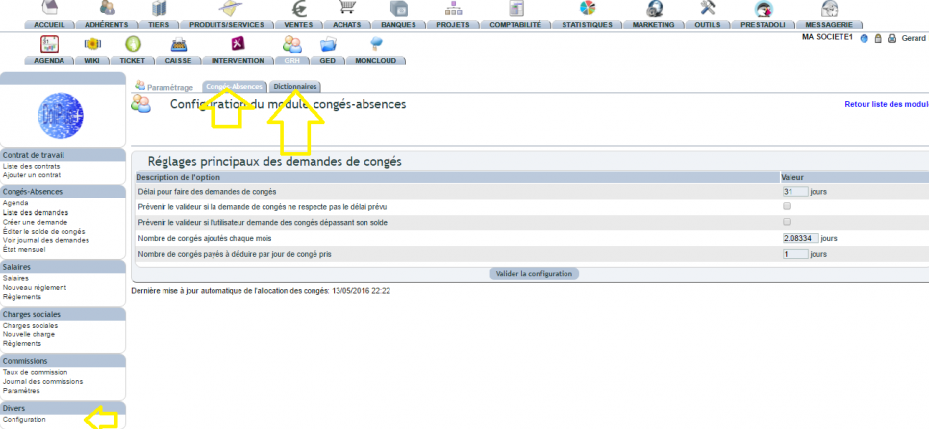
First of all, the configuration is available to an administrator, in the left menu of the HR module.
You then set the event-based leave types in the dictionary of the configuration.
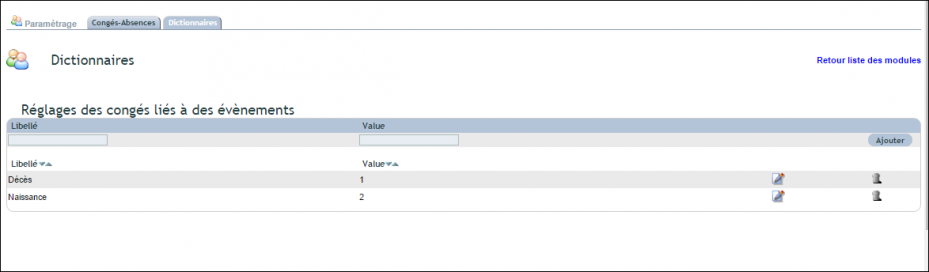
Likewise, you add other reasons or exceptional leave days from this same dictionary.
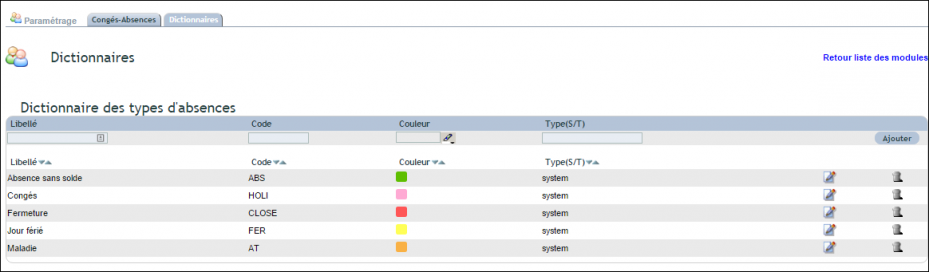
The module settings (menu HR › Miscellaneous › “Configuration”, reserved for the administrator, “Leaves-Absences” tab):
- “Use the alternative hierarchy of the “Leave requests” group”: the manager declared on each user’s card approves their requests. Otherwise, you choose the “Group of people authorized to approve requests”: its members are offered in “Will be approved by”.
- “Deadline for leave requests (days)”, with “Notify the validator if the leave request does not meet the scheduled deadline” and “… if the user requests leave exceeding their balance”: these alerts are added to the email received by the manager; they do not block the request.
- “Number of leave days added each month (days)”: the monthly credit of each employee.
- “Number of paid leave days to deduct per leave day taken (days)”: the coefficient applied to each approved working day.
- “Saturday is a working day counted as paid leave”.
“Validate configuration” saves. At the bottom of the page, you see the date of the last automatic monthly allocation.
The “Dictionaries” tab contains two lists:
- “Event-related leave settings”: a label (Birth, Bereavement…) and the number of days granted. Fill in the first line, then “Add”; the pencil corrects a line. These are the reasons offered for exceptional leave.
- “Leave type dictionary”: “Maladie”, “Congés”, “Absence sans solde”, “Fermeture”, “Jour férié” (sick leave, leave, unpaid absence, closure, public holiday), with their code and their colour on the planning. Add your own types on the first line.
Managing balances, the log and the monthly report
These screens are reserved for people who hold the matching right (“Configure user leave settings”, “View leave request logs”, “Read the monthly leave report”).
Correcting a balance or granting exceptional leave
Menu HR › Leaves-Absences › “Edit leave balance”:
- Exceptional leave (birth, bereavement…): in “Assign exceptional leave to a user”, choose the “Reason” and the “User”, then “Assign this leave”: the days set for this reason are added to their balance.
- Correcting a balance: on the employee’s line, type the new balance in days in “Available” (the new total, not the difference), explain why in “Note”, then click “Edit” at the end of THAT line. The reason is recorded in the log.
The balance log
“View request log” menu: every balance movement, from the most recent to the oldest — date, “Completed by”, “For the user”, description (leave approval, monthly update, manual update and its reason, cancellation), “Previous Balance” and “New Balance”. The arrows next to the year switch to another year.
The monthly report for payroll
“Monthly status” menu: choose the month and the year, then “Refresh”. The list includes every approved leave that starts or ends in the month: ref., employee, start and end dates, number of days. For leave spanning two months, the total of the leave is displayed in each of the two months.
Entering public holidays and annual closures
For an annual closure, simply select the “Closure” type directly on the calendar.
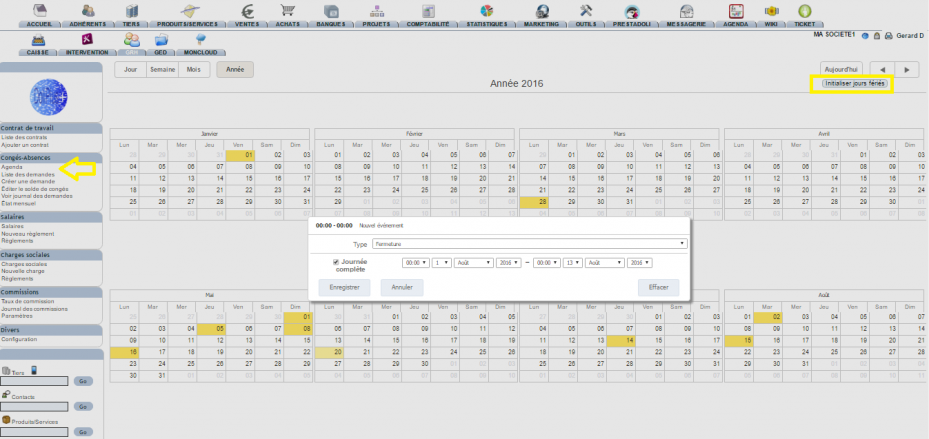
For public holidays, finally, click the button that initialises the calendar over the chosen period. You can then adjust these dates from the HR calendar.
Thus, the whole company shares the same reference calendar, and the leave management software keeps it up to date without double entry.
In practice, on the planning:
- Adding a closure or a public holiday: select the days on the calendar; a “Jour férié / Fermeture” box opens with the type and the “Du” / “Au” (from / to) dates, then “Enregistrer” (save).
- The public holidays of the year: the “Initialize holidays” button adds the French public holidays of the current year (company registered in France) and displays the number of days added.
- Correcting or deleting: click the public holiday or the closure; the same box offers “Supprimer” (delete). Employees’ leave, however, cannot be changed from the planning: you go through their request.
Related Entrées
