 on 5 September 2026
 Sales Team Management
Managing your sales team is simple with DoliPlus. You can prepare meetings, meeting summaries, and sales forecasts in just a few clicks.
Additionally, your sales team stays mobile. They work from a PC, tablet, or smartphone, anywhere with an internet connection. Discover the power of mobile sales.
Why choose Dolibarr + DoliPlus for managing sales team performance?
For greater efficiency, mobile sales teams use Dolibarr + DoliPlus with mobile internet connections and hybrid PCs, tablets, and smartphones. Read more here …
Simplify sales team management
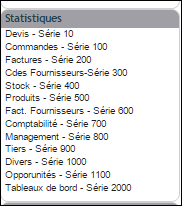
DoliPlus brings together key performance indicators across the entire sales cycle. This way, you can track each salesperson’s activity without manual reporting.
What’s more, these tools are set up in just a few minutes. You can prepare discussion points for a sales meeting right before it starts.
Two dashboards structure sales team management:
- Dashboard 2100 cross-references revenue, margins, and targets. You can drill down from the legal entity to the salesperson, including geographical sales sectors.
- Dashboard 2110 displays a rolling 12-month forecast. It weights revenue based on pending quotes, their success rate, and estimated signing dates.
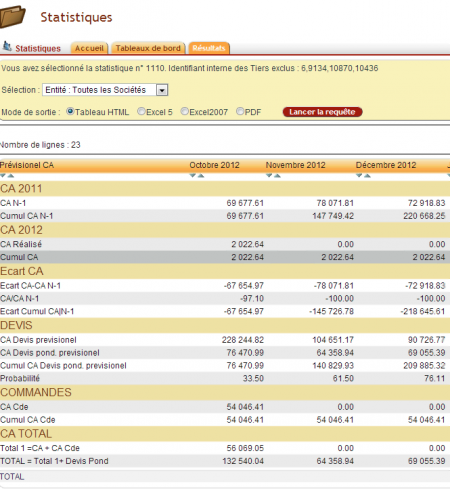
Reports ready for your sales meetings
Beyond dashboards, detailed reports are generated with one click. They can also be exported to a spreadsheet for immediate sharing. You can access:
- the quote status report by status, by manager, by sector, or by project, including unsigned quotes and rejection reasons;
- the revenue forecast based on the estimated completion dates of quotes;
- the appointments and calls by salesperson over a given period;
- the customer and contact records created or modified during the period;
- the visit reports, in summary or detail.
Series 10 reports — pending quotes
These reports display on screen (HTML) or in a spreadsheet, and provide a precise overview of your quotes with a single click:
| Status | Content |
|---|---|
| 10 | quotes, all statuses, by entity and manager |
| 11 | quotes (excluding drafts), by entity, without manager |
| 12 | quotes, all statuses, by entity, manager and project |
| 15 | draft and approved quotes, by entity and status |
| 20 | draft and approved quotes, grouped by customer or supplier and entity |
| 25 | draft and approved quotes, by office or geographical area, date and entity |
| 30 | draft and approved quotes, grouped by author and entity |
| 35 | unsigned quotes, by author |
| 40 | unsigned quotes, closing date and rejection reason, by manager |
| 45 | draft and approved quotes with estimated delivery date — revenue forecast |
The 800 series reports — field activity
Those prepare a sales meeting in just a few minutes. All are also available in spreadsheet format:
| Status | Content |
|---|---|
| 800 | actions over a period, sorted by creation date |
| 805 | actions over a period, sorted by modification date |
| 810 | appointments by sales rep, sorted by appointment date |
| 811 | calls by sales rep, sorted by appointment date |
| 812 | calls by sales rep, with the report |
| 820 · 825 | customer or supplier records over a period, sorted by creation date |
| 821 | same, with the sector |
| 830 | modified customer or supplier contacts over a period, sorted by modification or creation date |
| 840 | modified customer or supplier contacts over a period, sorted by creation date |
| 845 | reports over a period — summary |
| 850 | reports over a period — detail |
Record sales team visit reports

Field activity tracking relies on reports. From a customer or supplier record, the Report tab groups all interactions. You add a new report in one click, then fill in the subject, the type (appointment, phone call, weekly update…), the date, the contact and the project concerned.
The report body is written in a rich text editor. You can also attach documents. Each sales rep thus keeps a complete history of their visits, accessible from any workstation, tablet or smartphone.
When saving, you select a distribution list. DoliPlus then notifies recipients via in-app notification and email, depending on the configuration. The account manager can be automatically added as a default recipient.
Each recipient confirms they have read the report with a simple Yes or No. The author then receives read confirmation in return. This distribution process ensures that field information actually circulates throughout the sales team.
Find and filter field activity
The list of reports appears on the customer or supplier record as a table. You can filter by **date**, **author**, **contact**, **project**, **type** or mailing list, and sort each column. Each note’s details expand on demand, and column display preferences are saved per user.
Set and track sales targets
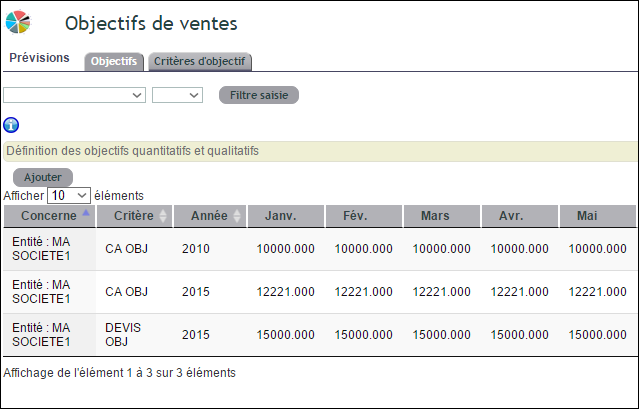
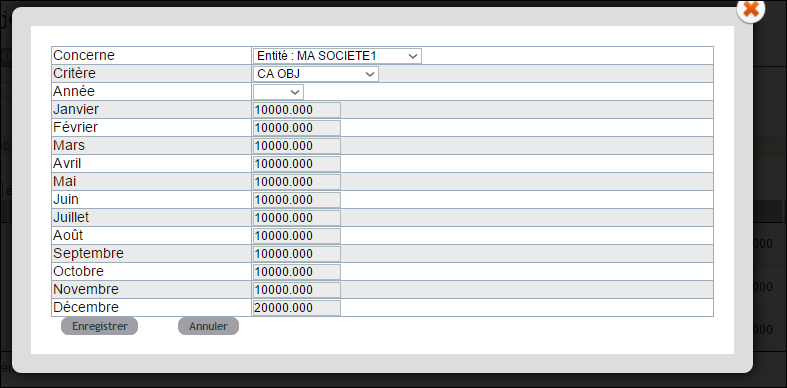
You enter qualitative and quantitative targets per salesperson, sales area, and legal entity. DoliPlus then automatically aggregates them in dashboard 2100.
You can compare actual results against set targets at a glance.
The field sales rep
Managing requires field feedback. For mobile sales reps, the day flows from the customer or supplier record, with no re-entry and no separate tool:
- The appointment starts with the contact. It’s created from the record and stays linked to the customer or supplier, contact, and relevant project — it lives on the job, not in a separate calendar.
- It appears on the phone. Synchronised calendars and schedules and Google Calendar integration bring the appointment where the sales rep actually looks.
- Travel is planned on a map. Geolocation pinpoints customers and prospects, and sales territories divide the area among sales reps.
- The call starts from the record. Click-to-call dials the number from DoliPlus, and the call is logged like the rest of the activity.
- The ERP fits in your pocket. DoliPlusMobi gives access to customers, contacts, and documents from mobile, and lets you upload a file from your phone — the signed order photographed at the customer’s arrives directly in the document library.
- The visit is documented once. The report is entered on-site and shared with the team via the mailing list, as described above.
This continuity feeds the dashboards: appointments, calls, and reports from the 800 series are not re-entered for reporting — they’re a by-product of the sales rep’s work.
Learn more
- Statistics and dashboards
- Acquiring new prospects
- The DoliPlusMobi mobile app
- Synchronised calendars and schedules
