 on 5 September 2026
 Expense reports on mobile: snap the receipt, the line fills itself
Mobile expense claims no longer need manual entry: just snap a photo. With the DoliPlusMobi app, your team photographs the receipt and the expense line fills itself:
- date, amount, VAT rate, expense type and merchant name are read from the receipt by an artificial intelligence — the image is passed to the reading service only for the time of the analysis, then is neither stored nor used to train models;
- just glance over it, then validate;
- works offline, whether in an underground car park or on a train;
- mileage calculates automatically based on the employee’s vehicle;
- each expense shows who paid: the employee or company card;
- once complete, the approval request sends itself to the manager.
In short, expense claims build themselves throughout the week, effortlessly. No more Sunday evenings spent reconstructing a month’s worth of trips.
The real issue isn’t data entry – it’s lost receipts
In most companies, receipts travel in pockets, then glove compartments, before becoming illegible. Between the business lunch and when accounting requests proof, weeks often pass.
The result? Forgotten expenses, employees out of pocket, and accounting chasing paperwork. That’s why entries should happen at point of purchase, not a month later.
Snap the receipt, the line fills itself
This game-changing feature transforms daily work. As soon as you take the photo, DoliPlus reads the receipt and pre-fills the expense: date, actual amount paid, VAT rate, expense category and merchant name.
The pre-tax amount isn’t read from the receipt – the software recalculates it from the paid amount and VAT rate. This keeps figures accurate even with faded or crumpled printouts.
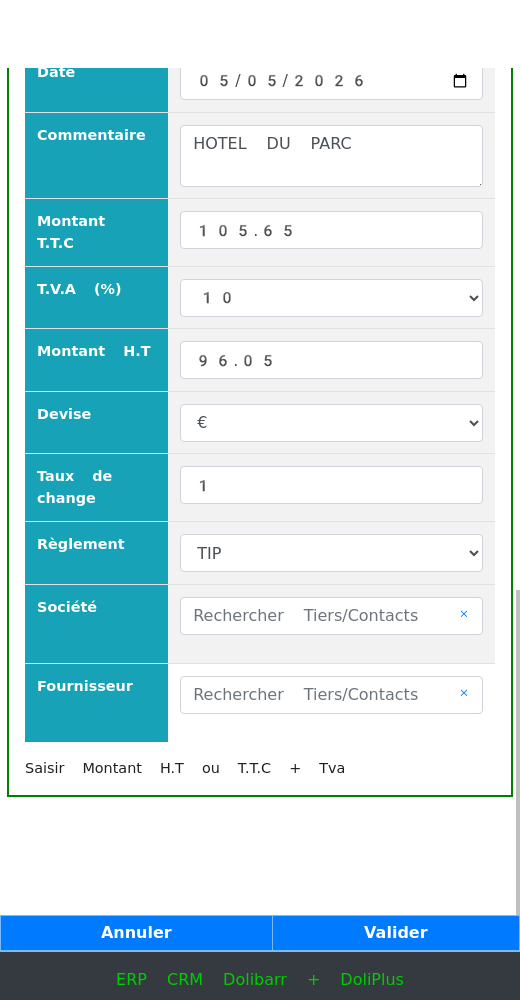
Above, a hotel bill photographed on site: all fields are automatically captured. The employee only needs to check, correct if necessary, then validate. This is precisely what makes mobile expense claims truly fast: data entry becomes a simple verification.
The proof remains linked to its expense line. It also appears in the PDF document sent to the manager, eliminating any risk of forgotten attachments.
Mobile expense claims that work offline
Here’s the second practical difference for daily use. A salesperson on the move doesn’t always have network coverage – yet that’s exactly when expenses occur.
The app stores entries on the phone. When connection resumes, one button sends everything to DoliPlus. If the server rejects a line, it stays on the phone instead of disappearing: no data is ever lost in transit.
Mileage costs calculate themselves
Mileage rates depend on the vehicle and annual distance travelled. This tedious manual calculation happens automatically.
When creating a claim, the app pulls the employee’s vehicle and previous year’s mileage. Thus, the correct rate bracket applies from January’s first trip.
Company card or employee advance? Choose per expense
A single day often mixes both. For example, lunch goes on the company card while parking is paid in cash by the employee.
Payment method is selected line by line, on phone or computer. Thus, the company only reimburses what was truly advanced. See the mixed expenses chapter for details.
What you need to get started
Switching to mobile expense claims only requires a few one-time settings:
- Install the DoliPlusMobi app on your phone: Learn more about installation.
- Ensure the employee has permission to create their own expense claims.
- Enter vehicle details to apply the correct mileage allowance.
- Assign the manager who will receive validation requests.
Approval is effortless: the manager receives a message with the claim and replies directly with yes or no, without even logging into the software.
Next steps
- Expense claims: who paid what, and what’s left to reimburse — the complete process, from allowances to repayment.
- Mobile goods reception — another field task handled from your phone.
- Share files from your mobile — send photos or documents to your workspace.
