 on 24 September 2026
 Electronic invoicing: track the status of every invoice at a glance
E-invoicing goes through an accredited platform, which we don’t develop and which charges for its own service. It also follows evolving regulations. The connection fee, then the monthly subscription, cover the platform’s costs and the work of tracking these changes — this is what allows us to absorb them without coming back to you. Contact us to discuss.
E-invoicing changes how your invoices circulate — and DoliPlus lets you track each one in real time:
- a clear lifecycle, from issue to payment;
- each invoice’s status visible at a glance, on the record and your dashboards;
- a dedicated filter in your invoice lists to isolate pending or blocked items;
- automatic progress updates with zero manual input;
- legal archiving of your invoices, stored for ten years;
- guidance flags when an invoice can no longer be edited or a customer doesn’t pay.
- simple setup: DoliPlus handles nearly everything, you just verify your details;
In short, this guide shows you how to navigate this major change — jargon-free and step by step.
E-invoicing setup: almost nothing for you to do
First, the good news: e-invoicing setup is deliberately simple. DoliPlus handles the technical side — transmission, tracking and archiving. Your only task? Verify your details are up to date.
We designed this onboarding to demand minimal effort. You stay focused on your business while the software handles the rest.
1. Verify your company details
First, open your company settings and check three key details:
- your SIREN — the 9-digit business ID;
- your SIRET — the SIREN plus establishment number (14 digits total);
- your intra-community VAT number.
These three elements identify your business on the network. Therefore, they must be accurate, otherwise the invoice cannot be routed correctly.
2. Enter the SIREN/SIRET for your customers and suppliers
Next, ensure each customer and supplier record includes their SIREN or SIRET. This identifier is what ensures invoices reach the correct recipient.
In other words, a customer/supplier record without this identification number cannot send or receive invoices. In practice, this is the only real preparatory work required.
Good news, however: the SIREN alone is sufficient. Most customer purchase orders display this 9-digit number, while the establishment number (SIRET) rarely appears. DoliPlus uses the SIREN to route invoices and only references the SIRET when already known.
Additionally, if the intra-community VAT number is missing from the record, DoliPlus automatically calculates it from the SIREN. No extra research needed. Start with the number on the order.
Gradual and supported onboarding
You won’t be alone in this process. The transition to e-invoicing begins in the last week of July 2026. We’ve streamlined everything for a smooth, step-by-step switch.
Don’t handle purchases? You may not need to act immediately
If you don’t use supplier invoices (purchases) in DoliPlus, the 1st September 2026 rollout may not apply to you yet. You can approach this change at your own pace.
Delegation mode: choose what you manage
Finally, DoliPlus offers a flexible delegation mode. With it, you decide what tasks you assign to the software — and this choice is easily adjusted in your company settings.
In practice, you can say: “I manage my customer invoices in DoliPlus, but not my supplier invoices”. In this case, DoliPlus handles sending and tracking your sales; however, your purchase invoices won’t appear in the software — they remain managed elsewhere, for example by your accountant.
This is actually a direct extension of the previous point: if you don’t use purchasing features, delegation lets you activate only what you truly need.
This way, everyone progresses according to their workflow. In short, you stay in control: DoliPlus adapts to you, not the other way around.
E-invoicing: A major change for your business
Until now, you’d prepare an invoice and send it directly to the customer by post or email. Now, invoices no longer travel directly: they go through an official platform that delivers them to customers and tracks their lifecycle step by step.
This change is being phased in but will eventually affect all businesses. It serves multiple purposes: reducing fraud, speeding up payments, and simplifying VAT reporting. To learn more about the official framework, visit the tax authority’s e-invoicing portal.
Good news: DoliPlus makes this seamless. You keep creating invoices as before. The software then handles transmission, tracking and archiving. You stay in control without needing to learn new processes.
The lifecycle of an e-invoice
A paper invoice, once sent, told you nothing more. In contrast, an electronic invoice progresses through stages, each with a status. This very thread keeps you informed in real time.
Here are the key milestones, from issue to payment:
- Issued / submitted — you send the invoice from DoliPlus; it’s deposited on the platform.
- Issued by platform — the platform has validated it and taken charge.
- Available / received — the customer receives it on their end.
- Approved or rejected — the customer accepts the invoice, or disputes it with a reason.
- Paid — payment is confirmed and reported.
So at any moment, you know where your invoice stands. Plus, every status change is dated and logged, giving you a complete history.
Automatic pre-send validation
Before an invoice is sent, DoliPlus has it automatically checked by the official platform. This validation ensures the invoice complies with legal formatting, down to the smallest detail.
Two scenarios can occur. If everything is compliant, the invoice is sent normally without any action required. If an element is missing or incorrectly formatted, DoliPlus alerts you immediately before sending, specifying what needs correction.
This prevents the worst-case scenario: an invoice transmitted then rejected days later, requiring urgent fixes. In other words, issues are resolved upfront, calmly, and your invoice is accepted first time.
Factur-X, UBL: the format is the software’s job, not yours
The reform requires a structured format: a file a machine can read, no longer a PDF a human deciphers. The two expected standards are Factur-X (a PDF/A-3 carrying the XML inside, so readable both by eye and by machine) and UBL (XML only).
You have nothing to choose and nothing to install: DoliPlus produces the format expected by the accredited platform and by your recipient, and files a copy in the invoice’s document library for legal archiving. On a submitted invoice, the Download e-invoice (UBL/Factur-X) button gives you the exact file — the one that travelled, not a reconstruction.
Do you have to rename your products for e-invoicing?
No. It is the question that comes up most, and the answer is reassuring: the e-invoice line carries the description of your invoice line, falling back to the product label. Nothing requires your wording to match an outside catalogue, and no bulk update of your product records is needed.
What does matter is that the line be understandable to your customer: this is the text an auditor will read, and the one disputes are settled on. A line reading “Miscellaneous”, or an internal reference such as “ART-0042”, passes technically but defends nothing.
Where to find your invoice status
Tracking is only useful if easily accessible. That’s why DoliPlus displays status where you naturally look, without detours.
On the invoice record
A coloured marker appears near the reference: “Sent”, “Approved”, “Rejected”… So you see the exact status as soon as you open the invoice.
In your invoice lists, both sales and purchases
Your invoice lists display an “E-invoicing” column. Each line shows a coloured badge, without needing to open anything.
This column appears on both sides: in your customer invoices list, as well as your supplier invoices. You track sales and purchases directly from screens you already use.
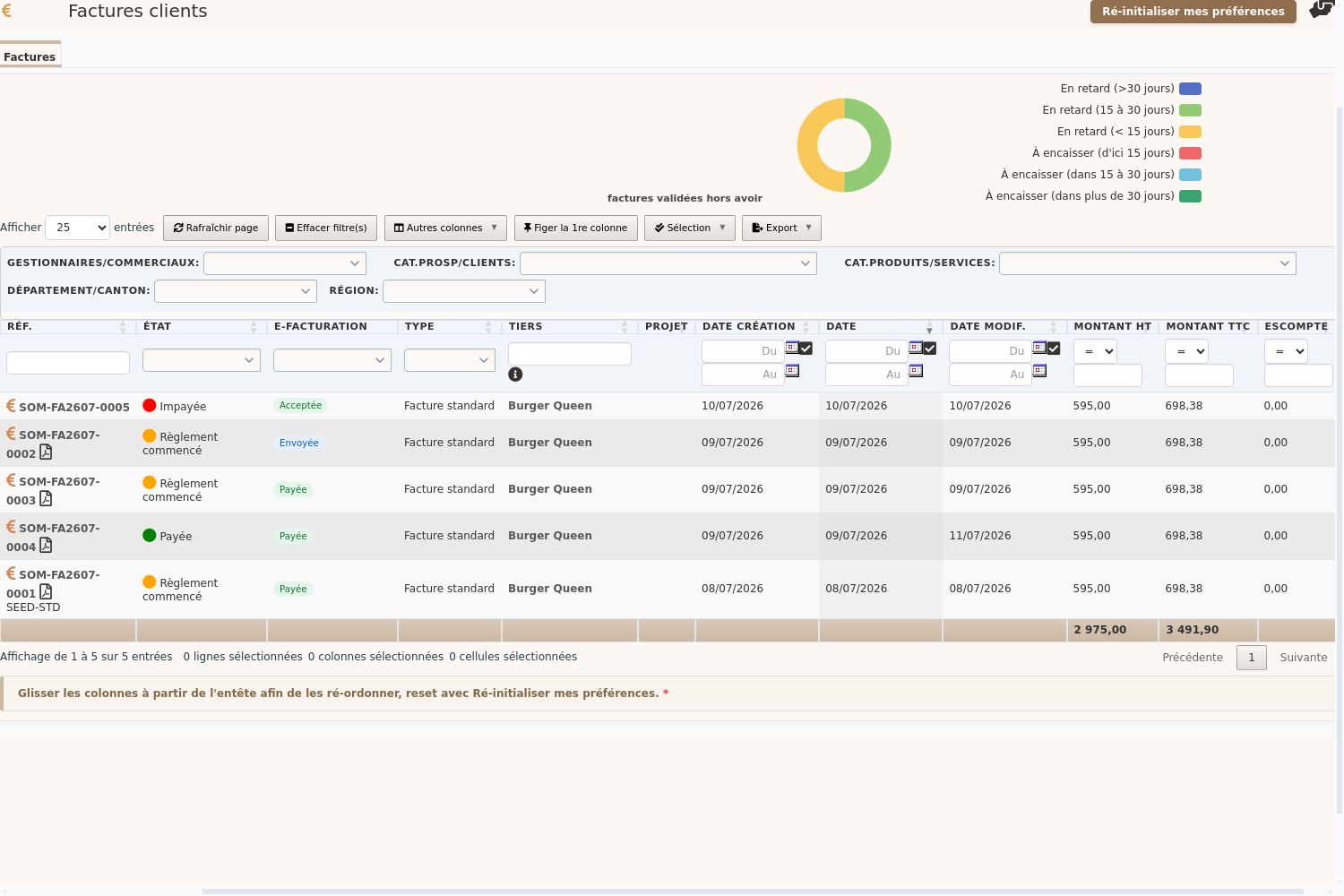
Hover over a badge: a tooltip shows details — the invoice reference on the platform, last exchange date and, if applicable, the rejection reason. Diagnose issues without leaving your list.
On your dashboards
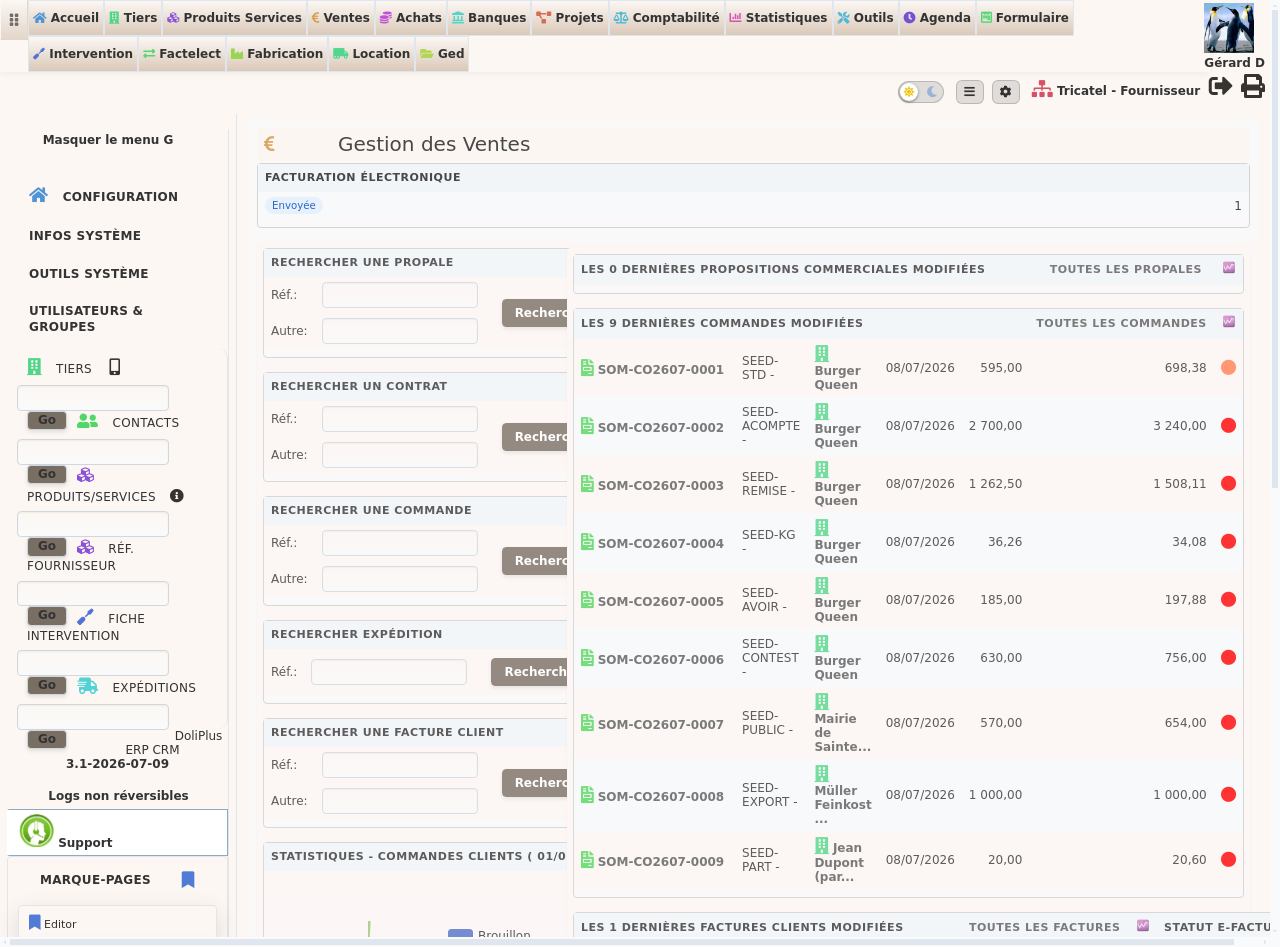
The sales dashboard (and purchases dashboard for supplier invoices) feature a summary box. See volumes per status at a glance.
Each line in this box is clickable. Clicking “Rejected” opens your invoice list, pre-filtered to show rejected invoices. Move from insight to action instantly.
On linked orders
In the associated invoices table of an order, each invoice shows its status. Wherever an invoice appears, its progress follows.
Spot pending items in one click
Tracking invoice status helps. Identifying which ones need attention is crucial. That’s why the “E-invoicing” column includes a filter right below its header.
This filter translates e-invoicing jargon into practical questions. Three filters cover daily needs:
- “Not sent” — shows only invoices awaiting submission. Instantly see pending work.
- “In error” — gathers all blocked items: customer rejections, platform errors, pending retries. Your action list.
- Specific status — “Sent”, “Accepted”, “Paid”… to pinpoint a particular stage.
This filter can also be combined with all others. For example, you can display in seconds all invoices for a specific customer, for the current month, that still need to be sent.
In short, you no longer chase information. You simply ask your list to show you exactly what matters, right when you need it.
Refresh and track progress
Two mechanisms keep your statuses up to date: one manual, one automatic.
First, the Refresh status button on the invoice record queries the platform on demand. Use it when you need the very latest information immediately.
Second, DoliPlus regularly queries the platform in the background. As a result, statuses update automatically, and every change is logged in the invoice’s event history. You always know who did what, and when.
Automatic legal archiving of your invoices
The law requires you to keep invoices for several years. With DoliPlus, this obligation becomes invisible: as soon as an invoice is sent, its legal version is automatically saved in the invoice’s Documents tab.
This document is readable and includes all official data. It’s stored with your backups without any action required. In short, your archiving happens automatically, and you can access it anytime from the invoice.
The reform goes beyond just sending invoices. For certain transactions, particularly B2B services, you must also report when an invoice is actually paid. This is a new requirement, separate from the sending process itself.
Good news: DoliPlus handles this for you. When an invoice is fully paid, the “collected” status is automatically reported with no action required. Plus, an event is added to the invoice’s history so you know who did what and when.
What about partial payments?
Until the invoice is fully paid, nothing is transmitted. In other words, a deposit or partial payment leaves the invoice as “unpaid”, since the “paid” status only applies when the full amount is received. It’s only with the final payment, the one that settles the invoice, that the status updates automatically.
In short, you don’t need to monitor anything extra: record your payments as usual in DoliPlus, and the status update triggers itself at the right moment.
When you pay a supplier
Tracking isn’t just for your sales. You also receive electronic invoices from your suppliers, and the lifecycle works both ways.
So when you fully pay a supplier invoice in DoliPlus, the software automatically notifies your supplier: a “Payment transmitted” status is sent back to them. You don’t need to draft any messages.
It’s the exact mirror of your own invoices. On one side, you mark invoices as “paid” to your customers; on the other, you signal “paid” to your suppliers. In both cases, everything triggers automatically at the time of payment.
As with your sales, a partial payment triggers nothing: the status only updates when the invoice is fully settled. Plus, each transmission is logged in the supplier invoice history, dated and tracked.
In summary, record supplier payments as usual. The rest happens automatically, and your supplier knows immediately when you’ve paid them.
What if the customer doesn’t pay?
The invoice remains valid and due. Non-payment doesn’t cancel it or remove it from the platform. The difference with paper invoices isn’t about debt recovery, but about two new obligations.
1. Report payment status (or lack thereof)
For certain transactions, particularly B2B services, the payment status must be transmitted (“paid”, with its date). Until the customer pays, the status remains “unpaid”. This is precisely what the automatic tracking and Refresh button keep updated. Non-payment is recorded, not erased.
2. Recover, then distinguish two scenarios
First, the “pending” unpaid invoice: the customer might still pay. You can follow up as usual, with reminders, formal notices or legal action. The invoice remains active with “unpaid” status.
Next, the debt that’s definitively unrecoverable. In this case, to reclaim the VAT, simply marking the invoice as “abandoned” isn’t enough. You must issue a corrective document (a credit note) with the legal wording required by Article 272 of the French Tax Code, also submitted via the platform. This is the only way to safeguard your VAT.
Actions that change after submission
Once submitted, an invoice legally binds both your company and the customer. Therefore, DoliPlus locks actions that would break this commitment to protect you. The affected buttons appear greyed out with a hover explanation.
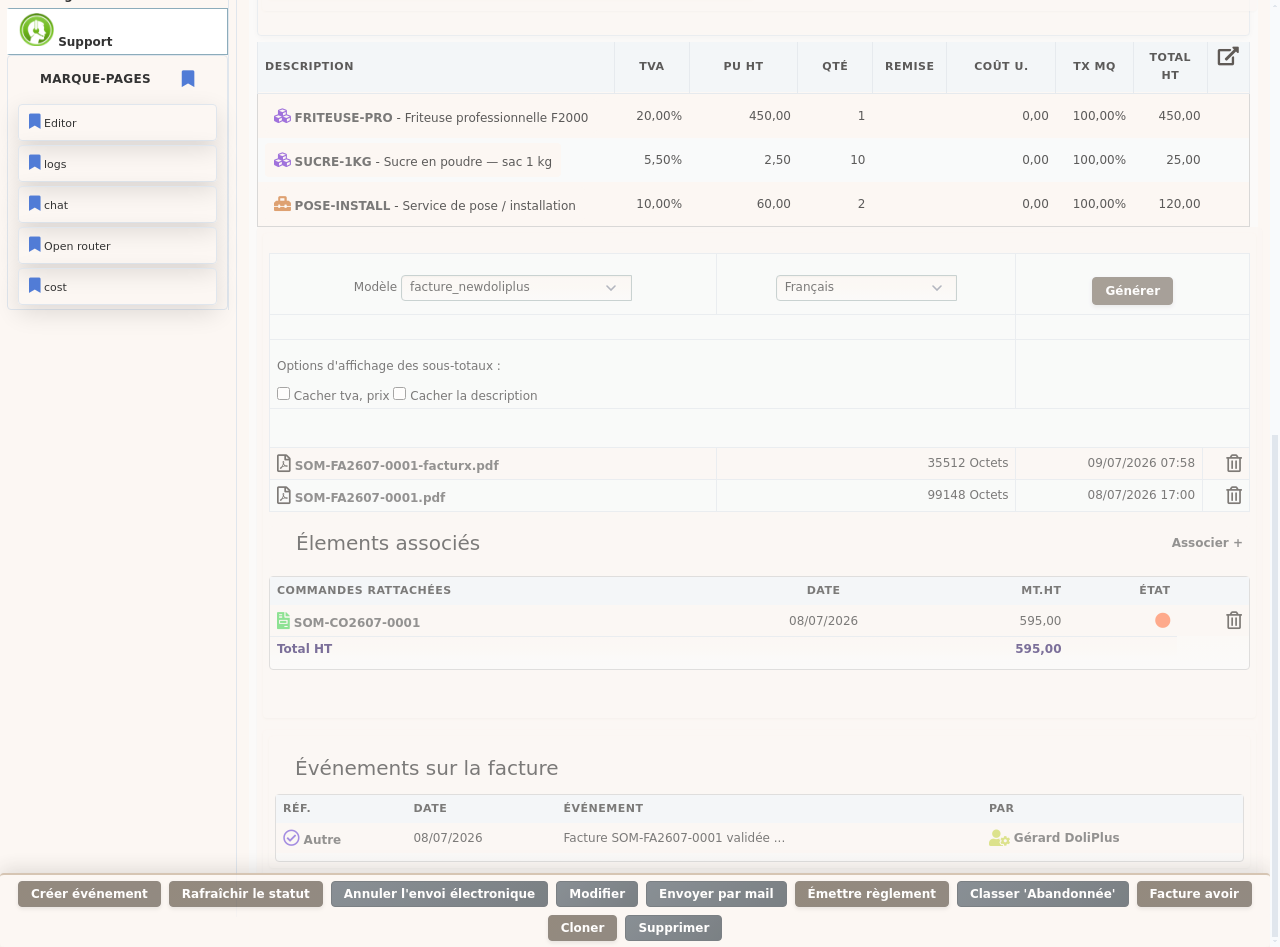
- Edit, Delete and Mark as “Abandoned” — disabled, as a submitted invoice can no longer be modified.
- Send by email — also disabled: delivery to the customer happens via the platform, not email.
- Cancel submission — only possible before platform processing; afterwards, corrections require a credit note.
However, useful actions remain available. You can still record a payment, issue a credit note to correct, or clone the invoice to create a new one. This way, you keep all the right tools, and only those.
Going further
- Customer invoices in DoliPlus
- Credit notes or replacement invoices
- Automated chasing of unpaid invoices
- Supplier invoices in DoliPlus
- Invoicing public bodies: your invoices are sent without Chorus Pro — invoicing public bodies without Chorus.
- VAT e-reporting: declare your foreign operations in one click — VAT e-reporting for your international transactions.
Finally, remember this guide will evolve with the reform. We’ll update it as new features emerge, keeping you confident with e-invoicing.
