 on 24 August 2026
 SIRET number lookup: qualify your French customers in one paste
The built-in SIRET number lookup fills in your customers’ and suppliers’ official French registration numbers straight from the INSEE register. Therefore you qualify your business partners in a few clicks, ready for electronic invoicing:
- paste the number from your customer’s purchase order — 9 or 14 digits;
- the head office comes first, even for an organisation with hundreds of sites;
- a closed establishment appears flagged, so you never pick it by mistake;
- the VAT number is calculated from the registration number;
- no module to enable: one INSEE API key is enough.
In short, qualifying a third party stops being a research task.
Why a SIRET number lookup matters
From 1 September 2026, electronic invoicing becomes mandatory for every business subject to French VAT. Consequently each business customer must be identified by an official number on the invoice.
Good news, though: the SIREN is enough. The SIRET number lookup accepts either one. In practice, purchase orders almost always carry the SIREN, rarely the SIRET. Therefore you can work directly with the number you already have, instead of hunting for an establishment number you were never given.
Start from the number, not from the name
Searching by company name works well for a small business. However, it collapses on a public body or a large group: hundreds of addresses come back, and the head office does not necessarily appear first.
That is precisely why the lookup accepts the number itself. You copy it from the purchase order, you paste it, and DoliPlus does the rest:
- 9 digits (SIREN): you get the company with its head office at the top of the list, plus the total number of establishments it operates;
- 14 digits (SIRET): you go straight to the establishment concerned;
- a closed establishment is flagged as such.
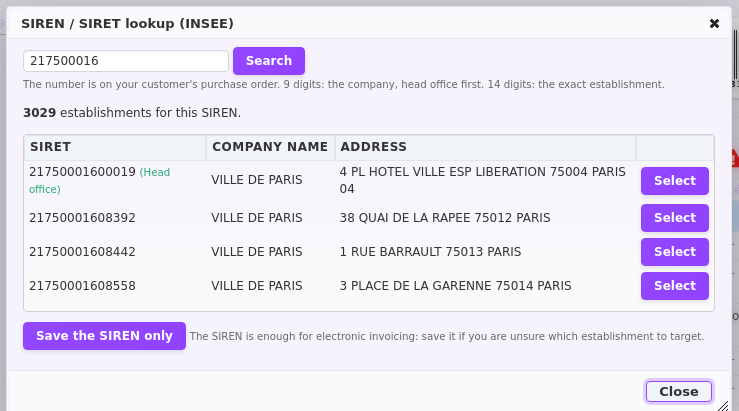
How the lookup behaves on a third-party record
A “Search SIRET” button sits next to the professional identifier on every third-party record. As a result, one click opens the lookup window. Results come from the INSEE Sirene register, so the data is official and current.
Moreover, the button adapts to each situation:
- number missing on a business record: a warning icon flags it next to the button;
- number already filled in: it appears with a verification link, and you can still correct it;
- private individual: no button appears, since these numbers do not apply.
Finally, once you select a result, DoliPlus offers to fill in the intra-community VAT number it calculates from the SIREN. Consequently one lookup completes several fields at once.
Getting your INSEE API key
The lookup relies on the INSEE Sirene API. First create a free account on the INSEE portal, then generate a key. The whole procedure takes about three to five minutes.
- go to the INSEE API portal and sign up, then confirm your e-mail address;
- open the Applications tab and add an application (for example DoliPlus-Sirene);
- open the APIs tab, select Sirene V3, then subscribe with the Default tier;
- back in your application, open Subscriptions and generate the key.
Entering the key in DoliPlus
An administrator does this once, for everyone:
- open Home → Setup → PDF/Interface settings;
- then open the General settings tab;
- scroll to the SIREN/SIRET lookup (INSEE) section;
- paste your key, save, then click Test INSEE key to confirm the connection.
Afterwards, the SIRET number lookup appears automatically on every business third-party record. Besides, no particular permission is required.
Read next
- Follow the status of every electronic invoice you send: See this chapter
- Receive supplier invoices electronically: Read more
Related Entrées
