 on 5 September 2026
 Mobile goods receipt — scan your supplier deliveries with DoliPlusMobi
Mobile goods receipt, straight from the warehouse
Mobile goods receipt transforms your warehouse operations: with DoliPlusMobi, DoliPlus’ mobile app, you can check supplier deliveries phone in hand, right next to the pallet.
No more handwritten delivery notes later typed up at the office. Now, you scan items, confirm quantities, and DoliPlus stock updates instantly.
This way, every delivery is recorded just once, with no double entry or transcription errors.
Built-in barcode scanner using your smartphone
For mobile goods receipt, your phone’s camera becomes a scanning tool. No extra hardware needed.
The app recognises two types of labels:
- Standard product barcode (EAN 13): scanning retrieves the item in the order, highlights the line and pre-fills the remaining quantity to receive.
- Logistics label (EAN 128, found on parcels and pallets): a single scan also fills in the batch number, expiry date (DLC), best before date (DLUO) and even weight or quantity.
In short, a pallet labelled by your supplier is received in one move: scan, check, confirm.
Batches, expiry dates and best before dates: traceability recorded on the fly
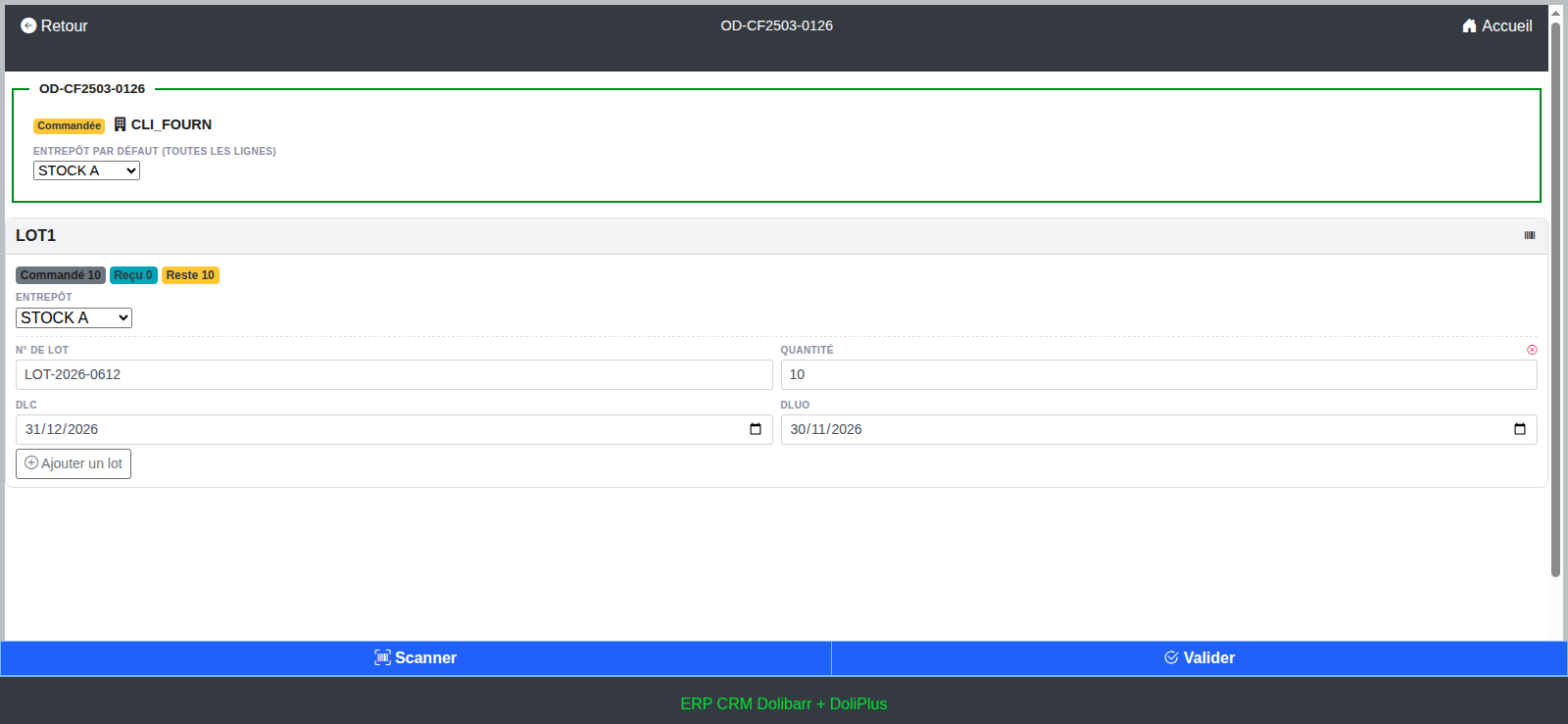
For products tracked by batch or serial number, the entry screen provides dedicated fields: batch number, quantity, expiry date and best before date.
You can also add as many batches as needed for the same item. This is typical when a delivery mixes multiple production dates.
Upon validation, DoliPlus creates batch records, updates stock in the chosen warehouse and keeps a complete movement trail. This ensures your traceability is ready for inspections or batch recalls.
Partial receipt, complete receipt… and room for error
An incomplete delivery is no issue. Simply confirm what has arrived, and the order status changes to “partially received”: the Ordered / Received / Remaining badges keep you updated at all times.
Once the balance arrives, you can receive the remaining items. The order is then automatically settled.
What if there’s an input error? The “Cancel Receipt” button reverses everything: stock levels return to their original state, reverse movements are recorded, and the order status reverts to “in progress”. You start fresh, with no manual intervention needed.
How to process a goods receipt on mobile?
In practice, mobile goods receipts follow five simple steps:
- Open DoliPlusMobi, then tap the Receipt menu.
- Select the supplier order to receive from the list (a search filter helps you find it).
- Tap Scan and aim at the parcel label — or enter quantities manually if you prefer.
- Check the pre-filled warehouse, batches, and dates.
- Tap Confirm: stock is updated instantly in DoliPlus.
Prerequisites and access rights
This feature relies on the Suppliers and Stock modules in your DoliPlus. Additionally, only users with the “receive supplier orders” permission see the Receipt menu in the app: you control who can process receipts.
Finally, the list of orders to receive remains accessible even offline. However, mobile goods receipts require a connection when confirming: this ensures your stock records are always accurate.
Learn more
- Discover the DoliPlusMobi mobile app: View the chapter
- Barcode scanning from your desktop: View the chapter
- Everything you need to know about supplier orders: View the chapter
- Batch or serial number management: Learn more
