 on 5 September 2026
 DoliPlusMobi – Share files from your mobile using the phone’s ‘Share’ function
Looking to share files from your mobile to a centralised space, without cables or complicated steps? Now, the DoliPlusMobi app lets you do this in one simple action, using your phone’s “Share” function.
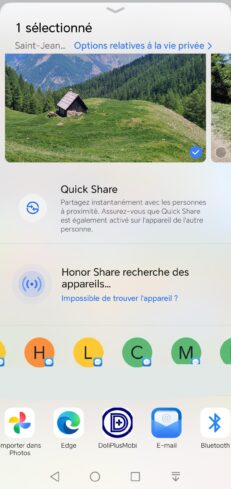
In practice, a photo taken on-site or a document received via message goes straight to your business cloud. This way, the file becomes accessible to your entire team from any device.
What’s more, this shared space has a name: MonCloud. It’s your online document vault, integrated with your DoliPlus management software.
Why send documents directly to MonCloud?
First, the field generates a lot of documents. For example, installation photos, signed forms, or receipts.
However, these files often get stuck in your phone’s gallery. As a result, they get lost or never reach the office.
With this new feature, you avoid this issue. Specifically, you save time and secure your information:
- First, no need to email files to yourself,
- Then, documents are filed in the right place as soon as they’re captured,
- Finally, your colleagues can access them immediately from the ERP.
The process uses the “Share” button you already use daily. So, no new habits to learn.
Before you start
First, install the DoliPlusMobi app on your phone. The share option only appears in the app list if the app is actually installed.
Then, log in at least once to your session.
The three steps
- First, open your photos, files, or camera, then select one or more items,
- Next, tap the “Share” button,
- Finally, choose DoliPlusMobi from the list.
The app then opens to your MonCloud space. The transfer starts automatically. Finally, your files appear in the list, ready to be shared with your team.
Alternative method: upload files from a document library already open in DoliPlusMobi
There’s also a second way to send your documents. As soon as a document library is open in the app, you can upload files directly.
In practice, first open the folder you want in DoliPlusMobi: your MonCloud, the general document library, or a customer or job folder. Then, tap the “Add files” button, marked with the “+” icon.
Your phone then shows your photos and files. Once selected, the transfer starts to the displayed folder.
This way, you choose the exact destination. Specifically, you can file a receipt in the right customer folder, not just at the root of MonCloud.
What documents can you send?
The function supports the most common formats. This way, you cover almost all your daily needs:
- photos and videos,
- audio recordings,
- PDF files,
- Word, Excel and PowerPoint documents,
- OpenDocument formats (.odt, .ods, .odp).
Additionally, a key benefit enhances the whole experience. Indeed, a Word or Excel document uploaded to MonCloud remains editable online, without any installation. In other words, you open and edit the file directly in your browser. To learn more, discover online document editing in DoliPlus.
Securely sharing files from your mobile
Of course, security remains central to the process. First, the transfer uses an encrypted connection to your DoliPlus session.
Next, each file is added to your personal MonCloud space, protected by your credentials. As a result, you always retain full control over your documents.
Going further
Finally, to make the most of this new feature, explore the related chapters:
- DoliPlusMobi, the mobile app for DoliPlus,
- Mapping your personal MonCloud document library on Windows or Mac,
- Document library, electronic document management,
- Editing your Word, Excel and PowerPoint documents online.
