 on 25 October 2026
 Sales pipeline management: track your business opportunities
Sales pipeline management: follow every deal to the signature
DoliPlus includes a dedicated sales pipeline management tool that tracks each lead, from the first contact to the signature:
- a dashboard of all the deals in progress;
- follow-up dates, so no lead is ever forgotten;
- a success probability and a weighted revenue forecast for every opportunity;
- successive quotes for the same deal grouped together;
- custom fields, Excel export and attached documents (document management).
Therefore, you always know where each deal stands, and you steer your revenue forecasts with confidence. DoliPlus is the enhanced cloud edition of Dolibarr, the open-source ERP & CRM used across Europe.
Staging your sales steps with sales pipeline management
DoliPlus provides a dedicated tool to stage your sales steps, from the qualification of the opportunity to the closing of the deal. Thus, each lead moves forward through clear stages that the whole team shares.
In practice, the tool brings you:
- a dashboard to follow the deals in progress;
- follow-up date management, so you never lose a lead;
- a success probability and the calculation of the weighted revenue;
- the grouping of the successive quotes of the same deal;
- custom fields to adapt your sales process (status, family…);
- an Excel export of the data;
- the management of attached documents (document management system).
Creating an opportunity and scheduling its follow-up, step by step
- Menu Sales › Opportunities › “New opportunity”. The owner is the salesperson who carries the deal (you, by default): they are the one who finds it in “My opportunities”.
- In “Internal ref.”, give the deal a meaningful name (“Showroom fit-out”); the opportunity number is set automatically.
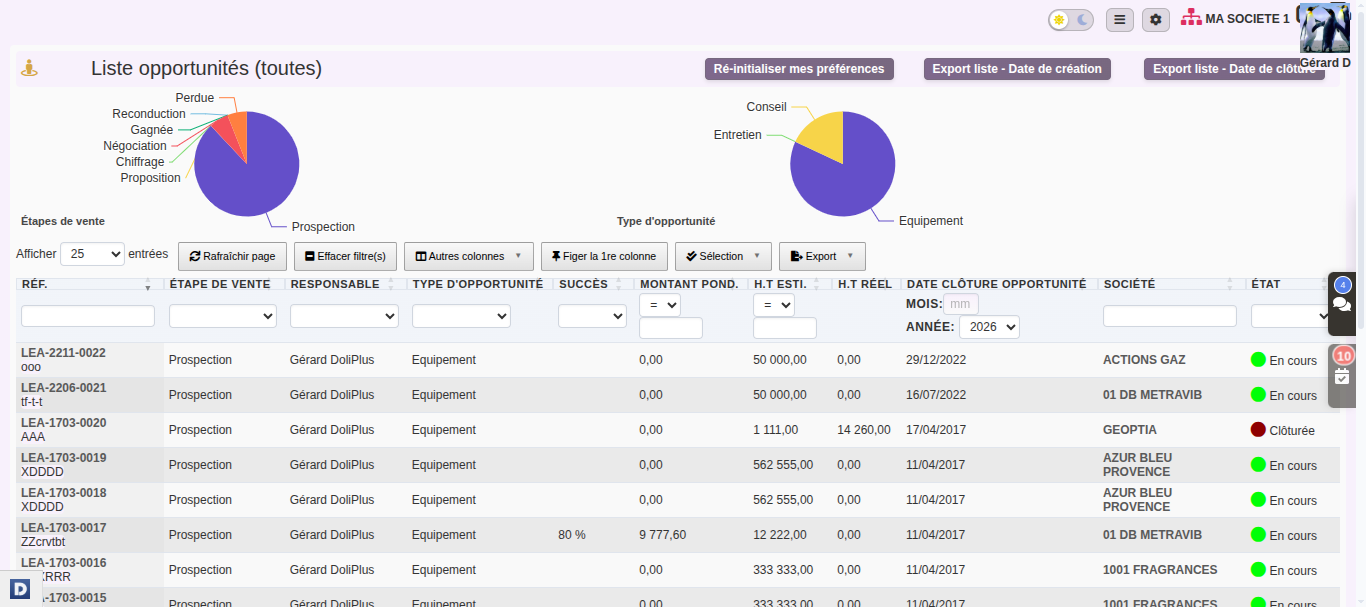
- The sales stage places the deal (“Prospection”, “Chiffrage”, “Proposition”, “Négociation”… up to “Gagné” or “Perdu”); the type classifies it (“Équipement”, “Entretien”, “Conseil”…) for the statistics.
- The customer: type the beginning of the name and choose a customer or a prospect.
- The expected amount excluding tax (mandatory, even if approximate: it feeds the forecast) and the closing date, proposed by default a few weeks ahead (see the settings). A deal that goes past this date without being won or lost moves to “Opportunities (overdue)”.
- “Create”. If a mandatory field is missing, DoliPlus names it at the top of the page and keeps what you entered.
On the record, click “more properties” if needed to see the follow-up date and the probability:
- “Reminder date”: the pencil, then the day and, in “Who”, the person who will call the customer back; “Add” creates an “Opportunity follow-up” event in their calendar, linked to the deal. “No – no follow-up” simply records that no follow-up is planned.
- “Success probability”: the pencil, choose from 0 to 100% then “Edit”. The amount multiplied by this probability gives the weighted amount: your realistic forecast.
Moving the deal forward until it is closed
- Menu Sales › Opportunities: your deals, the most recent first; click the reference of the one that is moving forward.
- “Edit”: choose the new stage (“Proposition” when the quote has been sent, “Gagné” or “Perdu” when the customer has decided), adjust the amount or the closing date if needed, then “Save”.
- The quote is made as usual from the customer’s record. On the opportunity, in “Quote”, choose it (the list only shows this customer’s quotes that are not yet linked) then “Link”. Orders and invoices are linked in the same way, each in its own block: the linked invoices feed the deal’s “Actual net amount”. The small cross detaches a document linked by mistake.
- When the deal is won or lost and its stage updated, “Close”: it leaves your deals in progress. Closing does not change the stage: the stage tells the outcome. A closed deal can still be consulted; “Reopen” puts it back in progress.
Following your deal portfolio
The opportunity list
The Opportunities menu filters the list in one click: “Opportunities (in progress)”, “Opportunities (overdue)” (closing date passed), “Opportunities (closed)”, and the same for “My opportunities”. Each line gives the owner, the stage, the type, the probability (“Success”), the “Weighted Amount” (estimated amount × probability), the “Est. excl. tax”, the “Actual net” and the closing date; the totals are shown at the bottom of the columns. The “Business Opportunities” tab of a customer’s record shows theirs.
The statistics
Menu Sales › Opportunities › Statistics: your pipeline year by year, based on the estimated amounts entered on each opportunity.
- Filter by customer, by “Created by” (the author) or by “Manager” (the owner), then “Refresh”.
- For each year of creation: the number of opportunities, the total estimated amount and the average amount; two pie charts break them down by stage and by type; below, the number then the amount month by month, the current year against the two previous ones.
- Click a year: its month-by-month detail (number, total amount, average amount) opens in a new tab, with your filters; the arrows move from one year to the next.
The dashboard, the contacts and the assistant
The opportunity dashboard
Menu Sales › Opportunities: the “Business Opportunities” area. With the customisable dashboard, it brings together cards — “Opportunity pipeline” (in progress, weighted, won, and the number of deals without a success probability), opportunities by stage and by type (all, or yours), and one card per stage with its deals.
The deal’s contacts
The opportunity’s “Contacts” tab names who is involved: the “Users” line for a colleague (“Commercial à l’origine de l’affaire”), the “Third party contacts” line for the customer’s contacts (“Responsable suivi de l’affaire”, “Responsable suivi du paiement”), then “Add” (“Edit business opportunities” permission).
The assistant’s opinion
If the AI assistant is installed and the analysis is enabled in the settings, the record offers “Analyze with assistant”. An “Opportunity analysis” window gives a “Qualification” (Hot, Warm or Cold), the “Why”, a “Recommended action” and its “Suggested deadline”. Nothing is saved on the opportunity: “Restart analysis” asks for another one, “Create action” (edit permission) places the proposed action in the calendar of the deal’s owner, on the suggested date, and “Close” closes the window.
Why track your sales opportunities?
Without structured follow-up, a promising lead quickly gets lost: a forgotten follow-up, a quote left without an answer, a forecast impossible to keep. That is why this building block of customer relationship management changes the game.
You win on three fronts:
- clear visibility: you see at a glance which deals need a follow-up;
- reliable forecasts: the weighted revenue anticipates your future income;
- teamwork: everyone shares the same view of the leads in progress.
Moreover, since everything stays inside DoliPlus, your opportunities link directly to your quotes, your customers and your projects. Consequently, you avoid double entry and scattered tools. You can also cross-reference them with your sales areas.
Over time, you also build on your data. Indeed, the grouping of quotes and the Excel export help you analyse your conversion rates. As a result, you spot what works, and then you adjust your sales process.
Finally, sales pipeline management is not reserved for large sales teams. For example, a small business uses it simply to list its open deals, set the next follow-up date and never let an opportunity slip away.
Setting up opportunities
Setup › Modules, business opportunities line, the wrench on the right (administrator):
- The reference: the mask builds the reference of each new opportunity (prefix, year, counter); “Edit” saves it, references already assigned do not change.
- The proposed closing date: today plus this number of days, to be set to the usual length of your sales.
- The sales group: only its members are proposed as owners of an opportunity. “Save” applies these two settings.
- Analysis by the assistant: turns the “Analyze with assistant” button of the record on or off (see above).
- Your own fields: the extra attributes tab adds your fields to the record (budget, source…). Opportunity stages and types, for their part, are set in the general dictionary.
Further reading
