 on 7 July 2026
 AI meeting minutes and one-click video meetings in your ERP
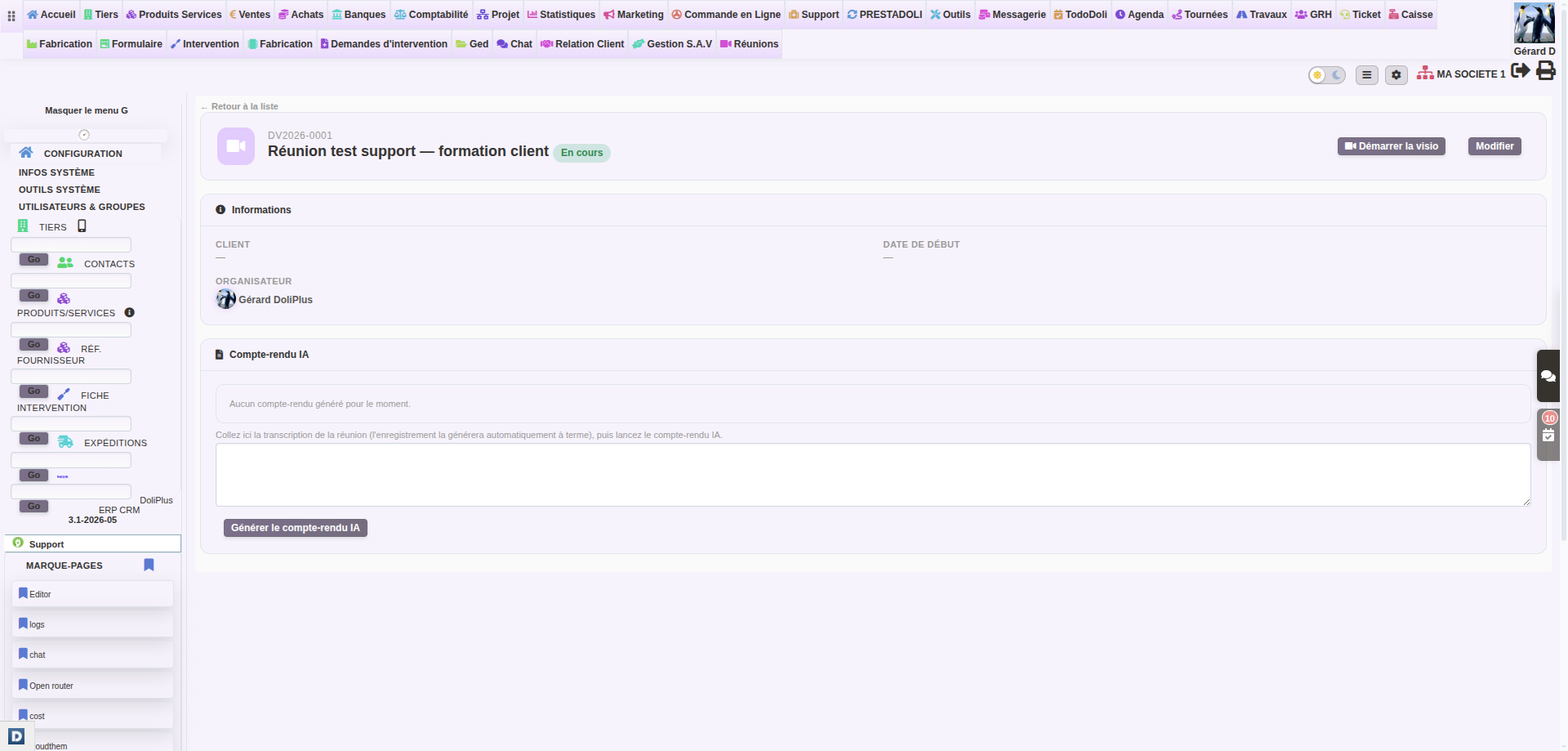
AI meeting minutes, written for you inside your ERP
Your DoliPlus solution turns every conversation into AI meeting minutes, filed where the work happens:
- Video call + minutes — you start an online meeting with screen sharing, then artificial intelligence writes the minutes.
- Audio + minutes — no camera: you dictate the meeting into the microphone, or drop in a file recorded on your phone.
- Guests, straight on the meeting — add a colleague, a whole group or an outside contact, then send the invitations in one click.
- A meeting list that filters, sorts and exports — any past meeting found in seconds.
As a result, you stop juggling a meeting tool on one side and your management software on the other. Above all, every exchange leaves something usable behind: clear minutes, filed on the customer record and in the calendar. DoliPlus is the enhanced cloud edition of Dolibarr, the open-source ERP & CRM used across Europe.
Three concrete situations that change your week
To grasp what AI meeting minutes really bring, here are three situations our users live through.
1. The salesperson coming back from a customer visit
Your salesperson leaves a business lunch. During the meeting, they simply started the voice recorder on their phone.
Back at the desk, they drop the recording onto the customer record: within seconds the minutes are written, the decisions are noted and the actions are listed in black and white. One click turns the minutes into a follow-up task in the ERP. No reminder is ever forgotten again.
2. The remote sales demo
A prospect sits at the other end of the country. You add them as a guest, then send the connection link from the meeting itself.
On the day, you start the video call with screen sharing and walk through the quote line by line. At the end, the minutes carry the points discussed and the next steps.
3. The internal team meeting
In your weekly meeting, you switch on audio capture on your workstation. During the discussion nobody takes notes: everyone genuinely takes part.
When it stops, each person receives the minutes, with the actions clearly identified. Consequently, your meetings get shorter and markedly more effective.
Invite people to your meeting
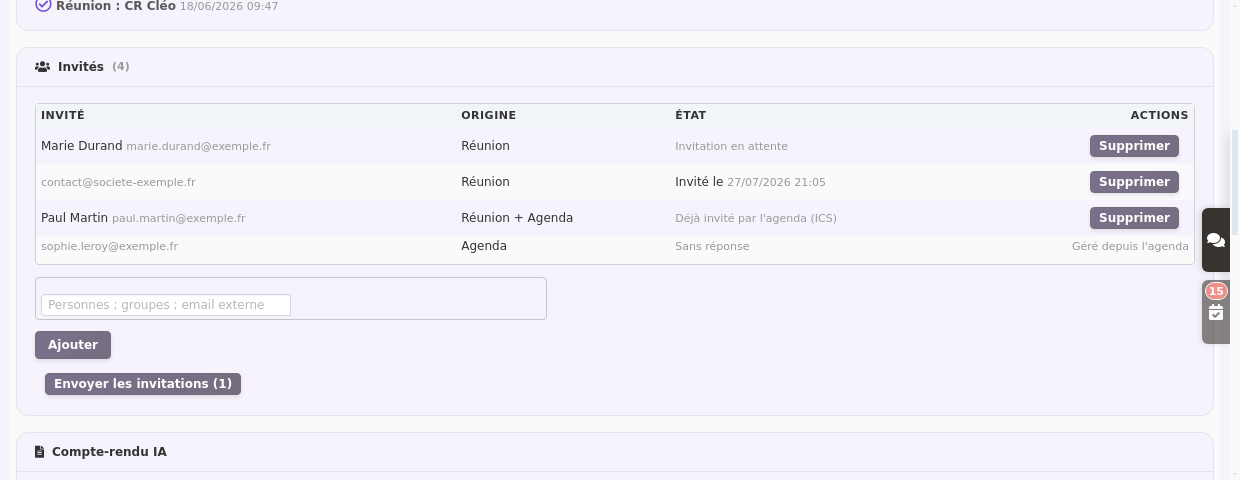
Every meeting now shows its guest list. First you see who is invited; then you complete the list in seconds.
The entry field accepts three ways of inviting:
- a colleague: type the first letters of their name, DoliPlus completes the rest;
- a whole group: all its members are added at once;
- an outside contact: simply enter their email address.
Then the Send invitations button delivers their connection link to each of them. The link stays valid until the day itself, so your guests find it easily in their mailbox.
See at a glance who has been told
The Status column tells you exactly where you stand: invitation pending, invitation sent with its date, or the participant reply.
Besides, the Origin column separates the guests added on the meeting from those coming from your calendar event. Indeed, both lists live side by side: they meet in the same room.
Never two invitations for the same person
One person sometimes appears on both sides: you added them to the meeting, while the calendar invitation had already gone out. DoliPlus spots it and shows “Already invited by the calendar”.
Consequently, sending from the meeting sets them aside: your contact never receives two messages for the same appointment. However, if they leave the event later on, the meeting offers to invite them again.
Jump from the meeting to the calendar event
Finally, the record shows the linked calendar event, with a direct link. One click therefore takes you to the record where the calendar invitation and the participant replies are handled.
If a meeting has no event yet, a button creates it immediately. In other words, your meeting takes its place back in everyone schedule.
For support, training or a sales demo, screen sharing changes everything. Indeed, you show your screen to your contacts and comment live on a quote, a product record or a presentation.
Better still: during the call, you move freely around DoliPlus. You therefore open the right document, scroll through an invoice or a specification, and everyone follows in real time.
Present and discuss a quote or a company document
In practice, you share your screen in a single click, then display the document to discuss. For example, you go through a quote line by line with your customer, adjust a quantity, and the decision is taken together.
You present a brochure, a contract or a plan the same way: every document of your company becomes shared ground for discussion.
Guide your customer step by step (support and training)
Moreover, screen sharing is ideal for assistance. First you show where to click; then you let the user repeat the gesture. Your meeting tool therefore becomes a genuine support channel, with nothing to install.
- your guests join through a simple link, with nothing to install;
- screen sharing stays smooth, even for a detailed document or a spreadsheet;
- the meeting opens in a detached window, so your work carries on beside it.
Start a meeting in one click from the customer record
First, open a customer record or create a new meeting. Then a single click opens the video room. Besides, you choose how the meeting is displayed:
- Detached window — the meeting stays alive in its own window while you move around your management software.
- Full tab — the call fills the screen, in an ordinary browser tab.
You therefore stay tied to the right file throughout: the customer, the project and the related documents are within reach for the whole conversation.
The minutes written automatically after every meeting
This is where AI meeting minutes really stand apart. Thanks to artificial intelligence, the recording turns itself into clear, structured minutes.
Decisions turned into tasks in your ERP
Moreover, the actions decided during the exchange are picked up in the minutes, and you turn them into a follow-up task in a single click — choosing the title and the person concerned. Consequently, nothing is lost between two meetings.
Minutes filed on the customer record and the calendar
Finally, the minutes file themselves on the customer record and in your calendar. You therefore find the full history of your exchanges in one place, with no re-typing.
Add an existing recording and transcribe it
Besides, you can attach a recording made earlier, audio or video, to a meeting. For example, your salesperson captures the conversation with the voice recorder on their phone, then drops the file in by drag and drop.
Then, with one click on “Transcribe”, DoliPlus converts speech into text and writes the minutes. Even a meeting recorded offline therefore enjoys the same automatic filing.
Find a meeting again in seconds
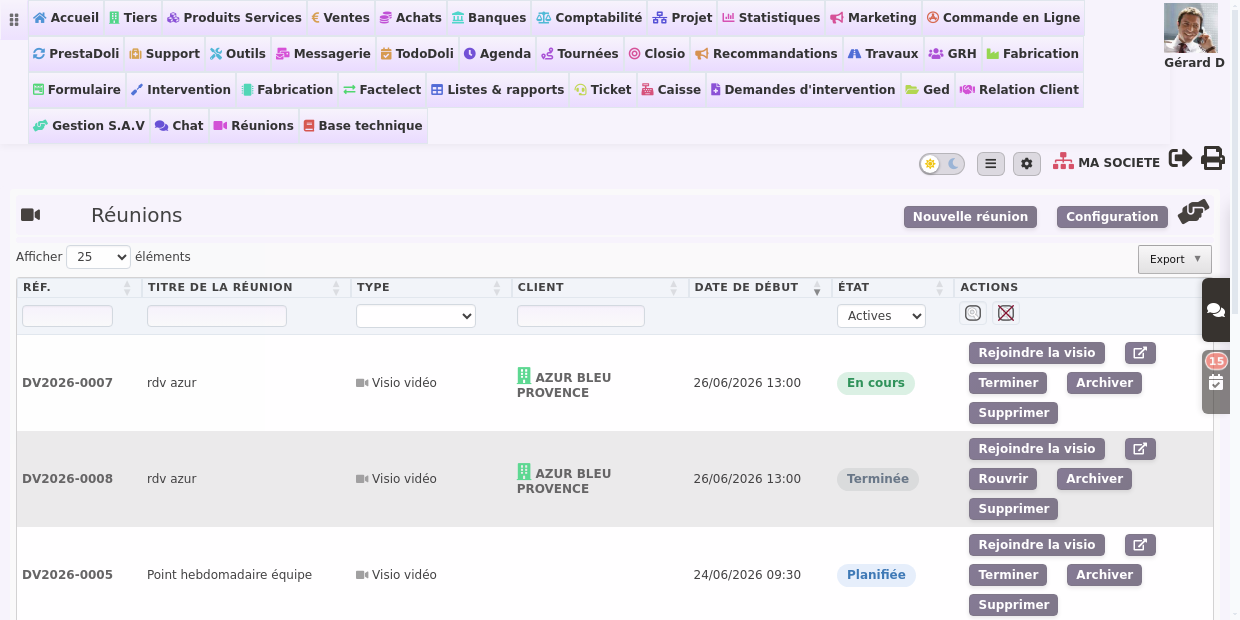
Month after month, meetings pile up. That is why the list now behaves like a real working table.
- A filter per column — reference, title, meeting type, customer and status;
- Sorting on every column — one click on its header;
- An export — to Excel, CSV or PDF, or straight to print;
- An adjustable row count — from 25 to several hundred per page.
Close, archive and find your old meetings
A past meeting is marked “finished” in a single click. Then, once it is no longer useful day to day, you archive it.
By default the list therefore shows only your active meetings. To see the older ones, simply choose Archived — or All — in the filter of the Status column.
Besides, these actions stay under control. Indeed, only the meeting organiser — or an administrator — can edit, close, archive or delete it. Nobody touches a colleague meeting by mistake.
Three plans, from the free version to a sovereign server
DoliPlus offers three plans to suit each need.
- First, a free version lets you try plain video calling, without minutes.
- Then a demonstration plan opens access to the automatic minutes.
- Finally, the full plan runs on a dedicated server, hosted in France.
That last option guarantees the sovereignty of your data and compliance with the GDPR. Your meetings and your minutes therefore stay entirely under your control.
Set up your meeting tool
To switch the feature on, go to the settings page, reserved for administrators. You reach it in particular from the Setup button of the meeting list.
- choose the plan that matches your activity;
- switch on recording and automatic AI meeting minutes;
- finally, adjust the quotas and the retention period.
Further reading
- Shared online calendar in DoliPlus
- Share and manage your company documents
- Setting up the artificial intelligence module
- Meeting reports and their entry screen
- Handling support requests
- Data protection (GDPR) in DoliPlus
Related Entrées
