 on 5 September 2026
 Single-line deposit invoice
The single-line deposit invoice allows you to request a deposit in one line, directly from the customer order. This way, you invoice a percentage of the total without detailing each product.
Create a single-line deposit invoice
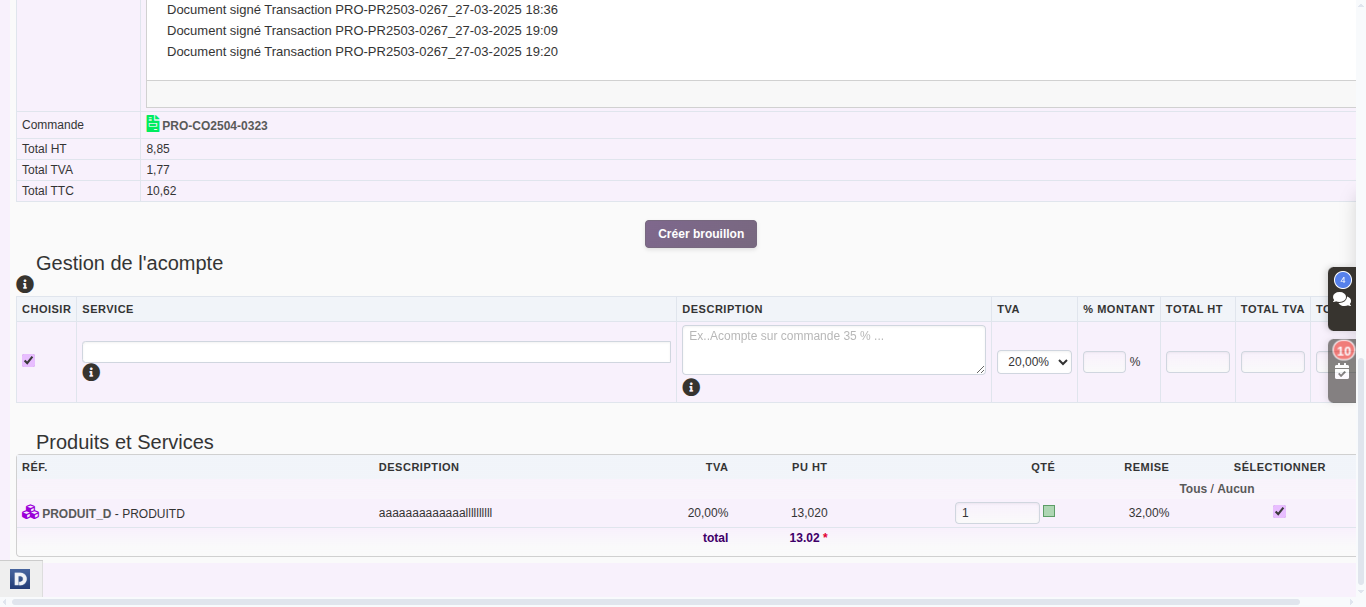
It is created from the customer order in DoliPlus. The new interface then offers two formats: multi-line or single-line, calculated as a percentage.
In practice, you choose the single-line option and specify the desired percentage. DoliPlus then generates a clear deposit invoice with a single line item. It’s as simple as a click.
Single-line or multi-line: when to choose which?
The two formats serve different needs. The multi-line version details the order. The single-line version summarises the deposit in one line.
Choose single-line when you want a short, readable document. The customer sees a clear deposit without the full order details. Conversely, keep multi-line if you need to justify each line item.
Why choose single-line?
Requesting a deposit reassures the seller and commits the buyer. This format makes this step quick and straightforward.
You benefit in three ways:
- instant entry: a percentage is enough, no need to adjust lines;
- a clear document: the deposit fits in one line;
- maintained link: the invoice stays connected to the original order.
Learn more about deposit invoices
Ultimately, this speeds up your deposit requests. You start from the order, set a percentage, and the document generates instantly. Plus, tracking remains clear: a glance shows what’s been invoiced in advance.
To go further
