 on 5 September 2026
 User photo
Your user photo personalises your workspace in DoliPlus. Displayed at the top right of the app, it instantly identifies you. This way, everyone can easily recognise their session.
Adding your user photo
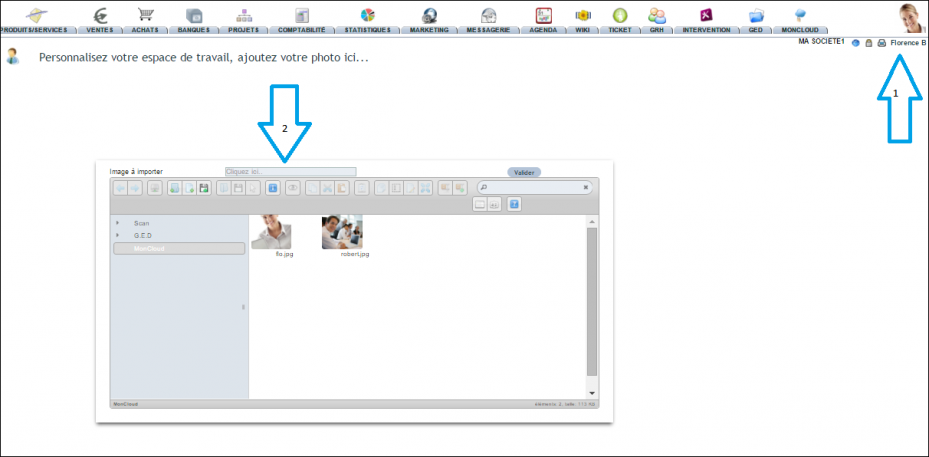
The setup is simple and quick. To add your portrait to the top right of the app, follow these steps:
- click on the image at the top right (on iPad, tap, wait a second, then tap again);
- select a photo larger than 200 × 200 pixels from the server;
- or take a photo directly on a mobile device (iPad, iOS, Android), then confirm;
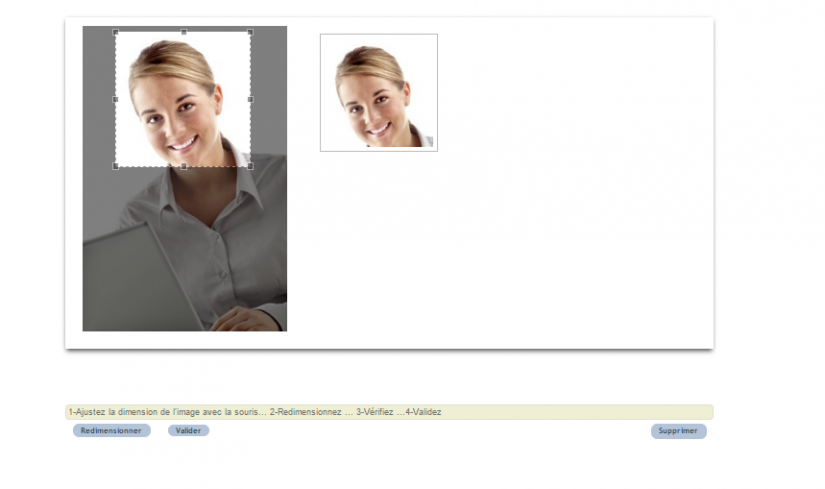
- crop your image and check the preview at the top right of the screen;
- finally, confirm.
Why add a user photo?
A user photo is more than just a visual detail. It offers several daily benefits.
You gain in three ways:
- a visual reference: you check at a glance which account you’re working on;
- a more human space: the interface becomes personal and friendly;
- an identifiable team: portraits help recognise each user.
Thus, the user photo makes DoliPlus more pleasant and clearer to use. It also complements other interface customisation options. Learn more about the new DoliPlus design
This customisation makes perfect sense in a team. When multiple colleagues share the same app, portraits help you navigate. You instantly identify the author of an action or the recipient of a task. As a result, collaboration becomes smoother and more human.
Finally, the setup takes just a moment. Once your portrait is added, it follows you with every login, on desktop and mobile. You enjoy a personalised workspace, with no settings to redo.
Going further
