 on 25 October 2026
 Costing & Quotes – Construction and Trades – DoliPlus
Our construction estimating and quoting tool lets you create work quotes from a price library. Quote quickly and accurately, following your tender structure.
Construction estimating and quoting in DoliPlus
Our solution is tailored for construction and trades professionals. It enables online estimating for standard works using a construction price directory, compatible with BatiChiffrage© libraries.
Key features of our construction estimating and quoting module:
- Create estimates, quotes, invoices and purchase orders with works and labour management;
- Build and organise your own price libraries;
- Handle multiple VAT rates and line/item or global discounts;
- Structure headings and subtotals by chapter;
- Import a D.P.G.F. while maintaining chapter hierarchy;
- Add line markers to track technical specifications;
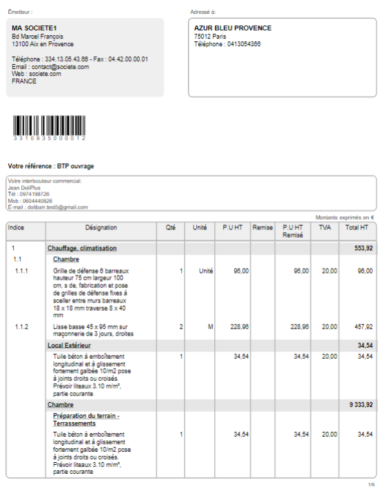
- Generate quotes with integrated VAT certificate and T&Cs;
- Email quotes, share online and collect e-signatures.
Learn more about quote line markers
A complete suite for your construction projects
Our estimating tool integrates with dedicated construction management features:
- Progress invoicing with retention management;
- Site monitoring with photo capture via DoliPlusMobi mobile app;
- Planning and attendance tracking;
- Purchasing, deliveries and stock management;
- Project management for real-time site profitability tracking;
- Timesheets to allocate labour costs per project.
Manage projects end-to-end from estimate to invoice.
Why use a price library for estimating?
Manual estimating risks omissions and pricing errors. Our solution uses a structured price database instead.
You benefit in three ways:
- Faster quotes: reuse works with a few clicks;
- Up-to-date pricing: the library serves as single source of truth;
- Tender compliance: D.P.G.F. imports maintain your chapter structure.
Learn more about site monitoring
Pricing a quote with works, step by step
Works are added to a draft quote or draft sales order: below the document lines, two tabs join those for products and subtotals, “Building Works” (the imported BatiChiffrage library) and “Standard Works” (your own in-house works). Each one depends on its permission (“Use the building construction library”, “Use DoliPlus library constructions”) and on being enabled in the settings.
Set the document margin
On the draft quote, click “Full” at the top of the properties: the “Building works margin” field only appears in the full view (or pin it with its star). Click its pencil, type your rate (for example 25), then “Edit”. This rate is applied to the cost price of every work you add: selling price = cost price × (1 + rate / 100).
It is mandatory for building works: as long as it is 0, DoliPlus refuses to add them and shows the message “Please set the margin to apply to the quote in the upper section”. Note: changing this rate recalculates the selling price of all the works lines of the document; your catalogue products and free-text lines keep their price.
Add a work from the building library
- Below the lines, open the “Building Works” tab.
- Type one or more words in “Keyword search” (the BatiChiffrage library is in French, for example “faience”), then click the green magnifying glass, or browse the chapter tree on the left.
- Each result shows its label, unit, cost price and chapter: click the right line and the tree opens on its chapter.
- In the tree, click the work (“Work description” table): the add panel opens at the top of the library.
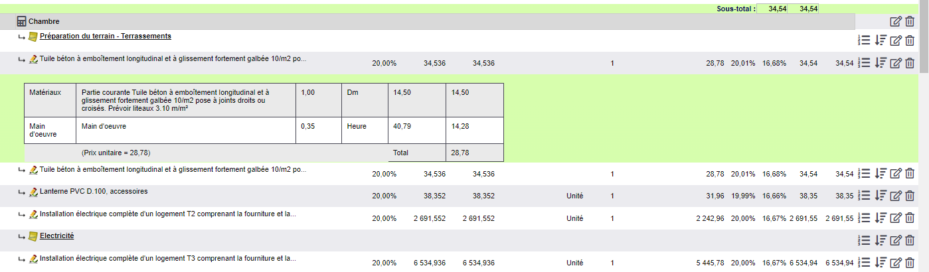
- Type the quantity: the total is recalculated. The price shown is the cost price; “Show details” displays the labour and the materials. “Location” and “Batch” are used to group lines.
- “Add to document”: the line is added to the quote at the cost price plus your margin (€8.16 cost price + 25% = €10.20). The pencil on the line reopens the panel so you can edit it.
The panel’s “Add to Works” button copies the work into your standard library so you can adapt it (permission “Add a construction to DoliPlus library”).
Create and add your standard works
Your in-house works are created directly from a draft quote or order, in the “Standard Works” tab: on the left, the tree of your categories (“Search by chapter”); on the right, the keyword search and the “Add a standard work” button.
- “Add a standard work” opens a blank work: enter its code, description, quantity, unit and unit price.
- “Classify the standard work in the category”: choose its category (mandatory).
- The detail lines (the price breakdown for one unit): a “Labor” line and a materials line are suggested by default. At least two are required, including one for labour and one for materials or equipment. The type of each line is chosen from the list (your types of labour, equipment, materials, service, product, work); “+ Add a line”, “+ Product saved” and “+ Service saved” complete the breakdown.
- “Save” stores the work in your library (permission “Edit a construction in DoliPlus library”); DoliPlus tells you what is missing (“Missing title”, “Missing category”, “Detail line without Labor”…).
- Once the work is saved, “Add to document” inserts it into the quote (“Work added to document”).
To reuse an existing work: click its category in the tree or search for it, click it, check the “Margin” field, then “Add to document”. The selling price equals the breakdown total × (1 + margin / 100); the document margin, if set, takes precedence over the panel margin (suggested by default according to the settings). The panel of a saved work also offers “Duplicate” and “Delete” (permissions “Add a construction to DoliPlus library” and “Delete a construction from DoliPlus library”).
On the order and the invoice
The same tabs and the same margin field are available on the draft sales order. The invoice has no works tabs: it takes over the lines of the order or quote it comes from, with their breakdown, and shows the margin as read-only. When the order is created from the quote and then the invoice from the order, the breakdown of each work and the margin follow. On a validated document, the breakdown can still be viewed but can no longer be edited.
Read the labour and supplies breakdown
On a quote or order priced with works, the “Work” box at the bottom of the record totals the hours (“H” column) and the amounts per type of labour, materials and equipment. Click an amount: the line-by-line breakdown for that type opens in a new tab (label, quantity, unit, unit price, total excl. tax, then the number of lines and the total). “Export” outputs it to Excel, CSV or PDF, so you can order supplies or schedule your teams.
Organising your works libraries
Sort standard works into categories
Products › Services › “Works” menu: the tree of works categories, with the number of works in each (the “Book Categories” button in the “Standard Works” tab also leads there).
- “New category”: give it a name (“Bathroom”), a colour and a description; “Add to” places it under another category. “Add this category” takes you back to the tree.
- Click the category name: at the bottom, the list of the works it contains, which you can export (Excel, PDF…). “New subcategory” splits it up; “Edit” changes its name, colour, description or parent category.
A work is placed in a category from its panel, in the quote (“Classify the standard work in the category”). Note: deleting a category also deletes the works it contains.
Update the BatiChiffrage library
Administrator only: Products › Services › “Works Config.” menu, “Building Import” tab (visible when the building library is enabled).
- Upload the “.xls” Excel files exactly as BatiChiffrage supplies them, without renaming or merging them: click “Click here to choose an import file”, drop your files into the file browser that opens, then double-click the one to import. The calculated price columns of the workbook are not imported.
- “Check the file”: nothing is imported yet. The preview shows the first 300 lines, chapters then works with unit, supplies and labour time.
- “Validate” runs the import in the background and replaces this book in the library; otherwise click “Cancel”.
The “BatiChiffrage list” tab shows the whole imported library (code, chapters F1 to F7, label, unit, supply price, labour time), with a word search: this is where the “Building Works” tab of quotes draws from.
Configuring the works module
Products › Services › “Works Config.” menu (administrator), “Settings” tab:
- “Use the Building library” and “Use the standard DoliPlus library”: each one displays its tab in quotes and orders. “Import a BatiChiffrage Excel quote from the ECM of the quote” adds the import to the quote’s ECM tab.
- The BatiChiffrage cost price coefficients: “General expenses coefficient applied to the supplies amount – (FG_SUPPLY)”, “Overhead cost coefficient applied to labor – (FG_MO)”, “Hourly labor rate €/hour – (THM)”, “Payroll expenses – (CS)”. The cost price of a work equals supplies × FG_FOURNITURE + labour time × THM × (1 + CS / 100) × FG_MO; the “Hourly cost price” line shows this calculated hourly cost.
- “Default VAT” for work lines, and “Default profit margin on selling price” suggested in the standard works panel.
Click “Save”: the values shown in the fields are only applied to calculations once saved.
The “Dictionaries” tab contains the “Type de main d’oeuvre” dictionary: each type (site manager, team leader, plant operator, labourer, HGV driver…) has its code, its label and its “Hourly rate”. These are the choices and rates offered in a work’s breakdown, and therefore the cost price of your quotes. The types supplied have no rate: fill them in. The top line adds a new one (“Add”); the pencil corrects a rate, and the toggle disables a type without affecting existing works.
Further reading
