 on 5 September 2026
 Column to index quote and order lines
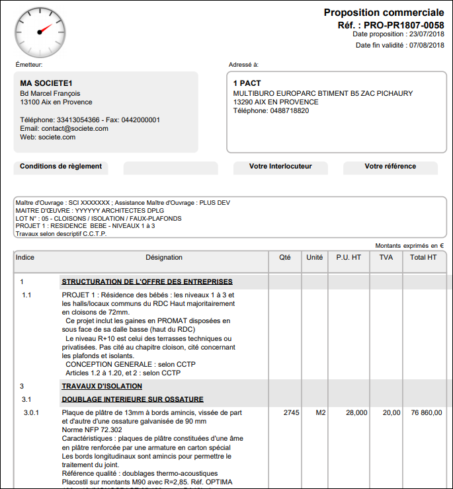
The line indices on quotes let you number each line to link it to a tender chapter. This way, your construction quotes follow the CCTP structure exactly.
What are line indices on quotes for?
In construction, tenders are organised by chapters, according to a CCTP. To respond clearly, these indices add a reference to each line. This way, you direct the reader to the right chapter in the file.
As a result, your quote is easy to cross-check with the tender file. Your clients and project owners can navigate it immediately.
Activating line indices on quotes
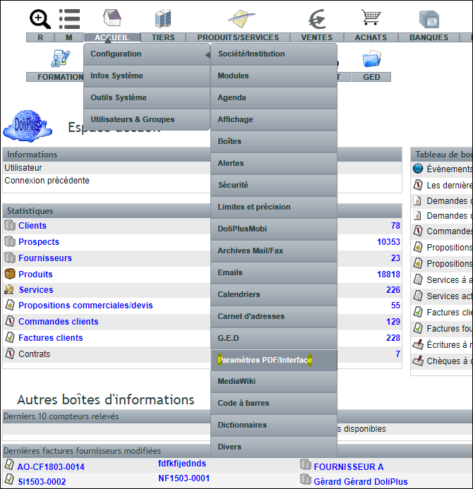
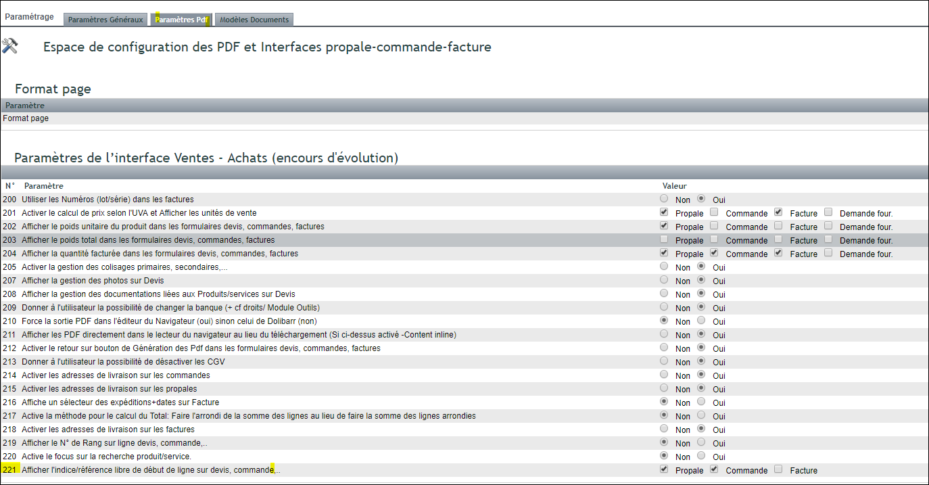
Activation is done through settings. First, go to the PDF/Interface settings. Then, enable the options for parameter 221. Finally, adjust the width of the index column on the PDF.

Entering indices daily
Data entry is then quick and intuitive:
- you manually enter your indices, line by line;
- a double-click clears the content of a filled box;
- the Enter key saves the entry directly;
- the Tab key moves through the index column.
This way, these references are filled in effortlessly, even on long forms. You save time while staying precise. You can also combine them with construction quote pricing.
Ultimately, line indices on quotes save valuable time on public tenders. Your offer matches the tender structure, line by line. As a result, the project owner can analyse your quote easily.
To go further
