 on 5 September 2026
 VAT Rounding Rules and TTC Calculation Methods
The VAT rounding rules explain why a total including VAT may vary by a penny depending on the calculation method. DoliPlus applies clear rules for fair and compliant invoices under French VAT regulations.
Let’s see where this discrepancy comes from, then how to choose the right method.
Two methods for calculating the total including VAT
Take an invoice with two identical lines in a country that rounds to two decimal places:
| Line | Excl. VAT price | VAT | Exact VAT | Rounded VAT |
| Product alpha | 1,24 | 10 % | 0,124 | 0,12 |
| Product beta | 1,24 | 10 % | 0,124 | 0,12 |
From there, two ways to calculate the total exist:
- Method 1 — sum the already rounded lines: VAT = 0,12 + 0,12 = 0,24, so total incl. VAT = 2,48 + 0,24 = 2,72.
- Method 2 — round the sum: VAT = (1,24 + 1,24) × 10 % = 0,248 → 0,25, so total incl. VAT = 2,48 + 0,25 = 2,73.
Why the one-penny difference
Both methods give 2,72 vs. 2,73 here. The difference is just one penny, but it grows with the number of lines.
Most importantly, the issue doesn’t come from how you round (nearest, up, or down), but from rounding itself. In other words, a small discrepancy is unavoidable.
Which VAT rounding rule to choose
The choice depends on your country:
- the Method 1 is DoliPlus’s default mode: nothing to do, it’s also the simplest for accounting;
- the Method 2 is enabled via option #217 (Configuration → PDF/Interface settings) for the rare countries that require it.
In most cases, stick with Method 1. Indeed, with Method 2, the total VAT no longer matches the sum of the lines, which complicates accounting.

Supplier invoices
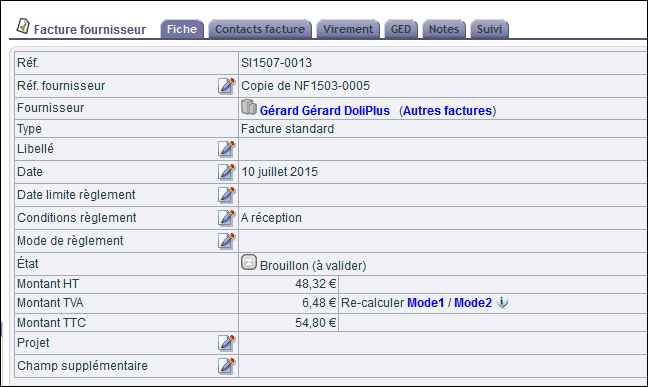
For supplier invoices, DoliPlus offers an alternative calculation method directly in the console, with immediate effect. This allows you to adjust your invoice to match the one sent by your supplier, down to the penny.
Note: for sales invoices, changing the calculation method only applies when adding a new line.
Further reading
