 on 5 September 2026
 Stock projection: know when a product will run out and order in time
Stock projection helps you anticipate inventory changes based on customer and supplier orders:
- See when each product will run out, day by day or week by week;
- Differentiate between current stock (S mode) and actually sellable stock (C mode);
- Track batches and expiry dates for perishable goods;
- New: same-day supplier receipts are immediately counted in opening stock.
This way, you order at the right time and sales are never blocked by unexpected shortages.
What is stock projection for?
Stock projection visualises how your quantities will evolve over time for a product list. More than just a snapshot of theoretical stock, it answers key inventory questions:
- What will my stock value be on a given date?
- Considering expiry dates, how much will remain sellable?
- What’s the trend for this product?
This feature is not included in the standard package.
The stock projection table
The table lists products meeting either condition: positive stock, or at least one customer/supplier order in the period. Fixed left columns show descriptions and opening stock. The observation period scrolls horizontally on the right, by day or week.
DoliPlus uses planned delivery dates from validated orders. Header filters can narrow or reset the table. Stock projection then offers two viewing modes.
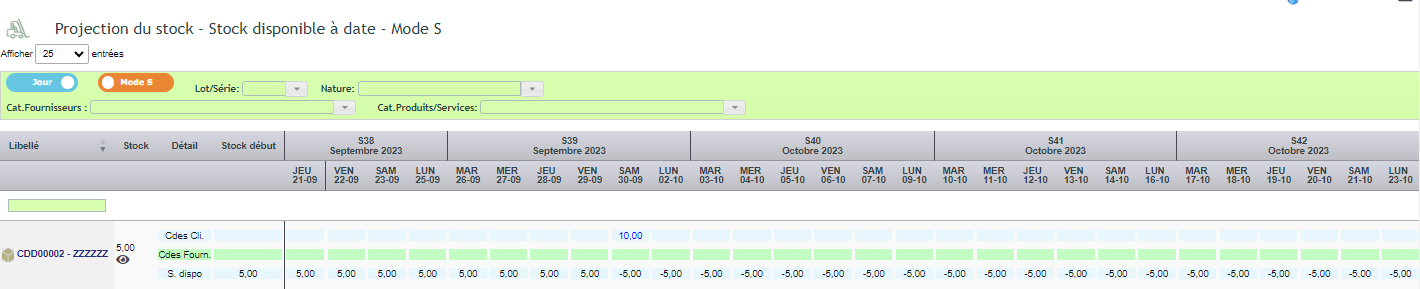
Date-specific stock (S mode)
S mode shows estimated stock value on a given date. For example, a product with 5 in opening stock and an order due 30/09 drops to -5 on that date.
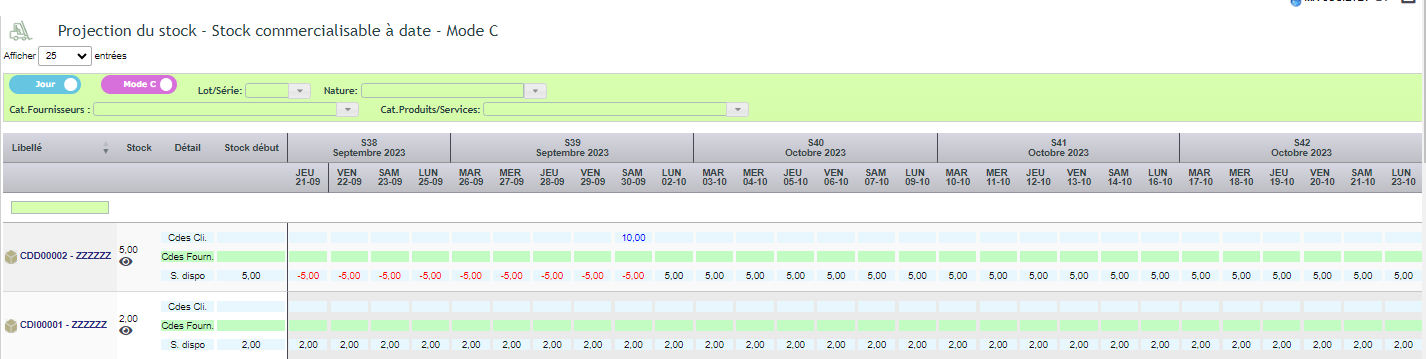
Sellable stock (C mode)
C mode goes further. It accounts for lead times defined per product, supplier, or globally. Future orders are anticipated: sellable stock shows what you can actually commit to sell while respecting your delivery times.
New: same-day receipts count immediately
Received a supplier order this morning? The “Opening stock” column in C mode now reflects this immediately. Goods received in your warehouse in the morning no longer show as “to be received” – displayed availability matches what’s physically on shelves.
Previously, same-day receipts were only deducted the next day. Daily availability could appear inflated as the same stock was counted twice. This is now fixed – your figures stay accurate all day. Plus, the “Supplier orders” column details now show same-day receipts for instant verification.
Which dates are used. Projection is based on
planned delivery or shipping dates for both customer and supplier orders. Only
validated orders are included.
Perishable goods handling
Stock forecasting also manages batch-tracked products with expiry dates (DLC or DLUO). To do this, you enter an average expiry period for each product. DoliPlus then anticipates actual availability based on the product lifecycle. An additional line also displays available batches for the period.
For a batch-tracked product with an expiry date — DLC or
DMD/DLUO — you can enter an average expiry period per product.
DoliPlus then anticipates, based on the product lifecycle, the stock availability on a given date and the portion
actually marketable.
Why forecast your stock?
Stock running out without warning can halt your sales. Stock forecasting turns this uncertainty into decision-making support.
You benefit in three ways:
- No more stockouts: you see shortages coming in advance;
- Timely purchasing: orders are triggered on time;
- Clear visibility: you track product trends item by item.
Learn more about goods receipts
To go further
