 on 5 September 2026
 Microsoft Office 365 Connectors: Your emails now archive themselves
The Microsoft Office 365 connectors link your Microsoft 365 subscription to DoliPlus without any manual data entry:
- Your Outlook inbox opens directly in DoliPlus, with access to your customer address book.
- Emails auto-archive against the relevant customer record — even from Microsoft-hosted mailboxes.
- Your Outlook calendar stays two-way synced with DoliPlus.
- Your OneDrive space becomes a document library drive.
In practice, you get a complete customer history on their record: emails, appointments, documents. No copy-pasting, no passwords to maintain.
This connector links DoliPlus to a third-party tool. It requires a setup fee and monthly subscription — this lets us track changes in the external tool without additional charges. Contact us to discuss.
How Microsoft Office 365 connectors benefit you
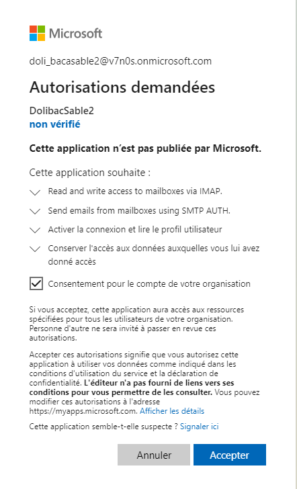
For years, software connected to email with just a username and password. Microsoft phased out this method. Access now relies on regularly refreshed security tokens.
As a result, traditional email protocol access no longer works. This is exactly what Microsoft Office 365 connectors solve: restoring seamless, lasting connectivity without requiring your team to manage yet another password.

Email connector: Your Outlook inbox inside DoliPlus
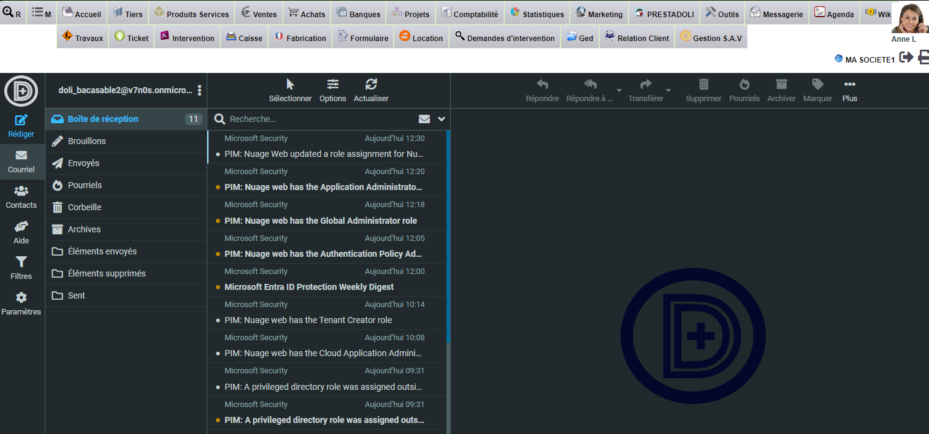
Once connected, your integrated inbox becomes fully functional:
- Send emails directly from standard screens (customers, quotes, orders…);
- Access the built-in webmail with its tools: document library links, customer address book, email templates, spam filters.
Access to DoliPlus email
What this connection method involves
To read your messages, you log in to Microsoft 365 from your browser, then complete two-factor authentication. The browser then remembers this access.
However, your DoliPlus session remains tied to a single Microsoft account. To use a different account, you must first log out of the current one. Similarly, the integrated email system does not support multiple Microsoft identities simultaneously.
Automated sending: other modules
Some processes send messages from an address not linked to a specific person. For these cases, enable the SMTP AUTH + TLS method in Microsoft: automated sending remains compatible with DoliPlus.
Email archiving: Microsoft Office 365 connectors take over
Automatic email archiving previously required a mailbox accepting password-based connections. For Microsoft 365 subscribers, this method no longer exists.
Now, archiving uses the same secure channel as other Microsoft Office 365 connectors. In other words, your exchanges are automatically linked to the correct customer, even if your archive mailbox is hosted by Microsoft.
Key point: this switch requires no action from your Microsoft admin. It reuses the authorisation already granted when setting up the email connector. On the DoliPlus side, simply selecting the “Collection mode” in the Archives module configuration is enough to switch.
The full procedure—mode selection, collected folder, message handling after archiving, unrecognised senders folder, connection test—is all in one place: automatic archiving of incoming and outgoing emails. This is also the page opened by the help button on the Archives screen.
Calendar connector: your synced appointments
This tool creates DoliPlus events on the user’s primary Outlook calendar in real time. It also works the other way: it detects changes made in Office 365 and updates DoliPlus accordingly.
By default, an event created in Office 365 uses the first synced action type, as defined in the calendar settings.
Current limitations:
- No recurrence management;
- No file attachments;
- No categories.
To learn more, see synced calendars and schedules.
OneDrive connector: your documents where you need them
This connector adds a new drive to DoliPlus’s document management system. You can access your OneDrive space in read/write mode without leaving your ERP. A double-click opens the document directly in Office 365.
Further reading
- Your integrated email—the DoliPlus webmail
- The DoliPlus email server
- Automatic archiving of incoming and outgoing emails
- Electronic document management (ECM)
