 on 5 September 2026
 DoliPlus Email Server
Introduction
This chapter covers only the specific service offering:
- DoliPlus Mail Server
The term BAL used in this chapter stands for Mailbox.
The DoliPlus mail server is based on standard IMAP (incoming) and SMTP (outgoing) protocols. You use it daily via the built-in Roundcube webmail, styled with the “doliplus” skin.
Moreover, the webmail opens directly from DoliPlus without re-entering your credentials (automatic login). It handles multiple accounts (multi-account IMAP/SMTP).
You also benefit from advanced features: address book, out-of-office auto-replies, and predefined response templates. Finally, an AI-powered writing assistant (AICompose) includes a spell checker.
For full details on webmail management, see the article Webmail Roundcube.
Direct access to the DoliPlus mail server
Roundcube webmail is integrated with DoliPlus: it opens directly from your interface’s mail menu with automatic login (no need to re-enter credentials).
Thus, you access the mail server directly from DoliPlus. There’s no separate external address to remember. The webmail automatically detects your IMAP/SMTP accounts and displays your mailboxes.
For creating new accounts or changing passwords, simply open a ticket in your DoliPlus interface.
After migrating your mail server
Read this chapter carefully.
Archives
Reminder: Mailbox size is limited to 10 GB.
Depending on mailbox size, periodic archives may have been created.
Typically, archived mailboxes carry the suffix -YYYY or .YYYY, where YYYY represents the archive year.
Additionally, you can access email accounts from DoliPlus via remote account access.
Finally, archiving is an additional service available on request.
Create a remote account access
To add remote access to an email account, follow these steps.
First, check if the option is enabled.
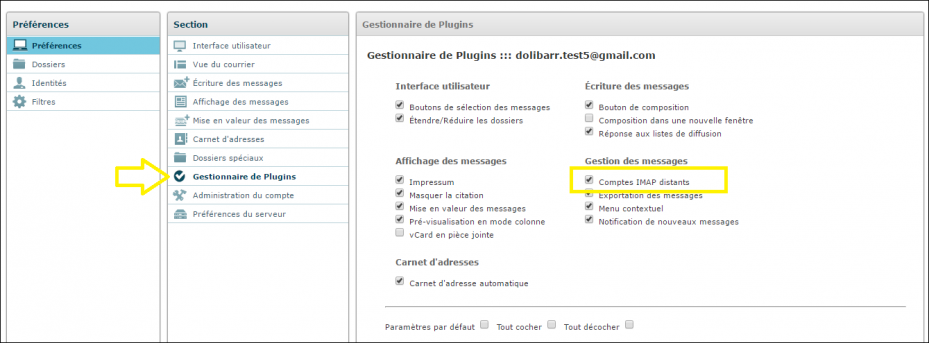
If your email provider is not in the list of preconfigured IMAP hosts (Gmail, Outlook/Office 365, OVH, Orange, Free, SFR, Gandi, iCloud, Yahoo…), open a support ticket in DoliPlus. Then, provide your email server details. We will then add them to the list of supported accounts.
For your email server hosted by DoliPlus, select the “cloud” host (mail.nuage-web.fr).
However, a Gmail or Google Workspace mailbox requires prior authorisation on Google’s side before it can be linked. The full procedure is detailed in the article Gmail Mailbox Accounts.
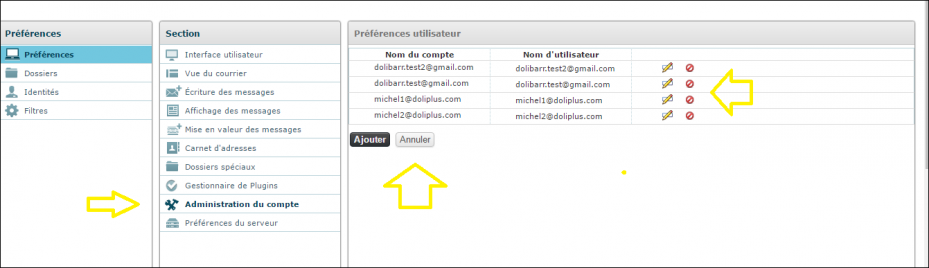
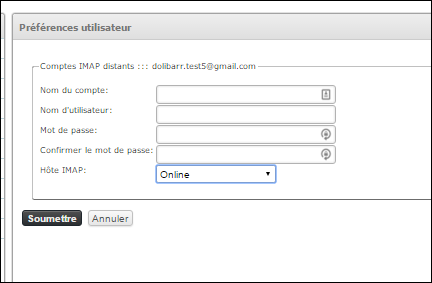
Special Case File Matching
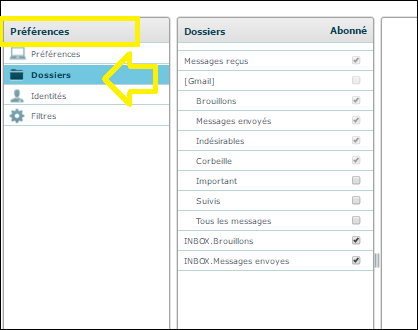
Important: Configure the link between your case files and shortcuts in special case management. This allows the software to save a copy of sent messages in the designated outbox.
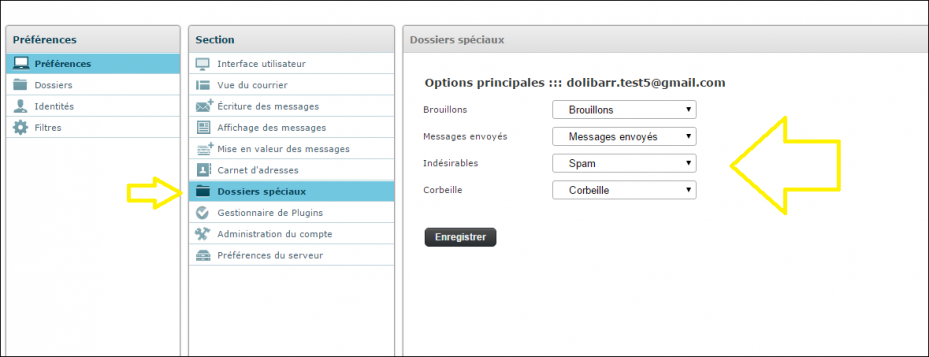
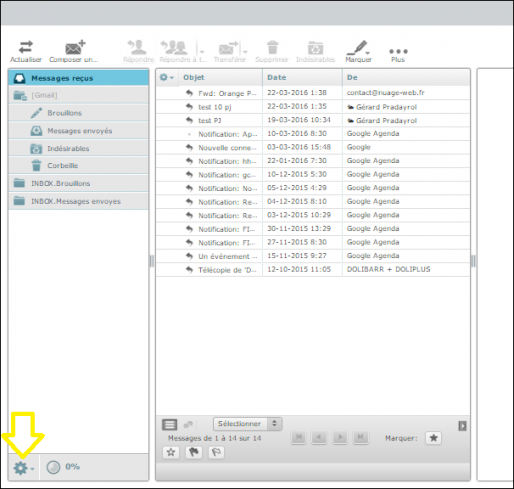
Enable Case File Display
After a transfer, you may need to select the case files to display again.
Two shortcuts are available. Then, activate the case files in the list (tick the checkbox).
Email Backup
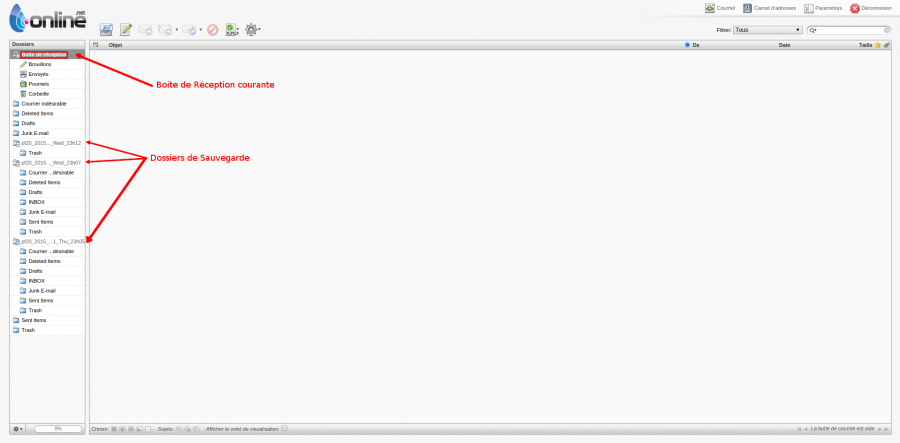
Unfortunately, there is no standard email export format. That’s why we provide access to your backed-up emails via a dedicated webmail backup service.
Our support team will share the link to this backup webmail when setting up the service. Additionally, you can open a ticket in DoliPlus if needed.
Then, log in using your usual email address and password.
Additionally, you can access your inbox and backup folders.
► Finally, to restore your old emails, simply drag and drop them from your backup folders to your inbox.
Access your email from mobile devices
Here are the settings to use for your tablets or smartphones. This allows you to configure email reception (IMAP) and sending (SMTP).
IMAP (Incoming)
Server: mail.nuage-web.fr
SSL Port: 993 (SSL/TLS: Yes) Authentication: Yes
Username: your full email address. Password: your inbox password.
————————————–
SMTP (Outgoing)
Server: mail.nuage-web.fr
SSL Port: 465 (SSL/TLS: Yes) — or Submission Port 587 (STARTTLS)
Authentication: Yes
SMTP Service Limitations
- No more than 5 simultaneous SMTP connections,
- No more than 200 emails per hour,
- No more than 1,000 emails per day per domain,
- Maximum email size of 10 MB (including attachments)
