 on 25 October 2026
 Cash register software regulations in DoliPlus
Cash register software regulations impose strict rules when you handle payments from private individuals. DoliPlus helps you stay compliant effortlessly.
What do cash register software regulations require?
You’re affected in one specific case. Namely, if you process payments from private customers through either the Invoice module or Point of Sale module, while being VAT-registered (not under the exemption threshold).
In this situation, cash register regulations apply to your DoliPlus installation.
For full details, refer to the official website: economie.gouv.fr.
How to enable compliance module in DoliPlus?
First, go to module configuration. Then activate the “Immutable Log” (BlockedLog) module if available. Otherwise, contact us: we’ll enable it on your installation.

Warning: once activated, this module cannot be disabled. Finally, you must obtain a compliance certificate confirming your technical and legal conformity.
How to get a publisher’s certificate?
Publishers have two options:
- issue a certificate;
- issue a compliance statement.
We provide an annual downloadable statement, renewable each year. This is also when you should download the archive, as explained in the next section.
To do this, go to the left menu, click “Immutable Logs” then the Certificate tab. Complete required fields, sign, then generate your annual downloadable statement.
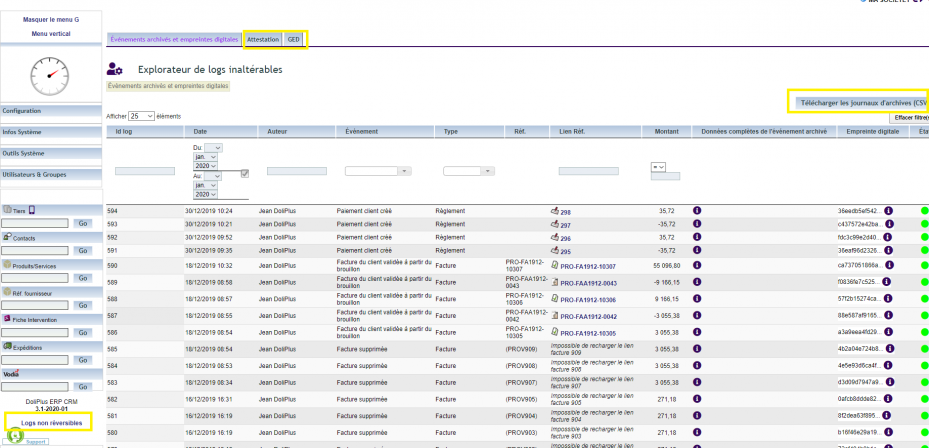
Archived events and fingerprints
The “Archived Events and Fingerprints” tab provides dedicated tools to browse or extract immutable logs.
DoliPlus generates and archives these logs in real-time for every recorded action. They remain stored locally in a dedicated table.
You can export this archive and save it to external media. Some countries like France require this annually.
These logs cannot be purged. Any fraudulent modification leaves an invalid fingerprint that’s immediately detectable.
Viewing the log and exporting its archive, step by step
- The “Non-reversible logs” link, at the bottom of the left menu, opens the log: every invoice validation, every payment… is recorded there with the date, the author, the amount and a fingerprint that chains it to the previous one.
- Filter by period, by event or object type, or by amount to find the trace of a specific invoice or payment.
- The “Status” column tells you, line by line, whether the fingerprint still matches; an alert would point to data changed outside DoliPlus: in that case, let the DoliPlus team know.
- For the archive, enter the start date and the end date, then click “Download archive logs (CSV)” and confirm: the CSV file is filed in the document management, with a summary file of the errors if any errors are detected. This is the file to hand over in the event of an inspection.
The “Certificate” tab provides the publisher’s certificate.
Occasionally you may need a clean database, for example after testing. In this exceptional case, support can reset your database. Warning: this will delete all your data.
