 on 5 September 2026
 Delivery Addresses
Delivery addresses allow you to ship your goods to locations other than your customer’s billing address: warehouse, site, store, or secondary location. DoliPlus manages them throughout the sales process, from quote to dispatch.
Delivery addresses on customer orders
Two operating modes exist:
- Recommended for customers: specific management of delivery addresses. You can edit them from:
- the customer or supplier record,
- the quote record,
- the customer order record,
- the dispatch record.
- Using Contact/Address.
In the customer order, use the type « Customer delivery contact ».
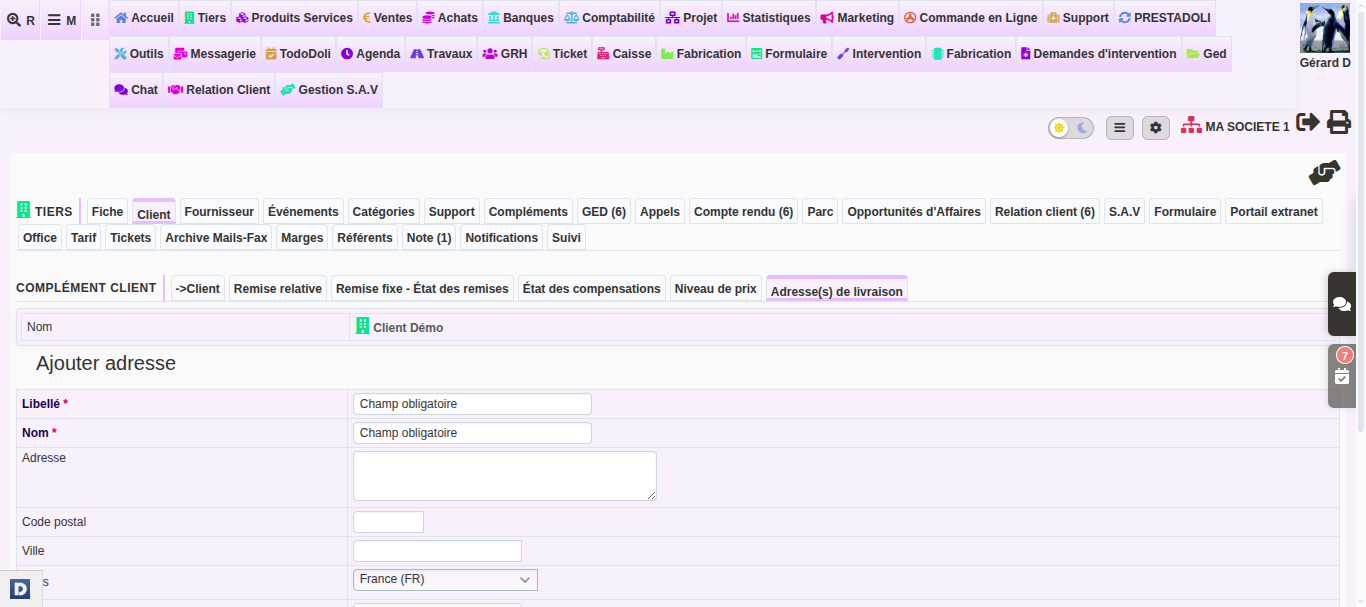
Additionally, a list of all delivery addresses is available in the menu PRODUCTS/SERVICES → Dispatch → Delivery Address(es). Learn more about dispatch and delivery
Delivery addresses on supplier orders
Only one method exists in supplier orders: use the type « Supplier delivery contact ».
Additional options to configure
Enabling delivery addresses in interfaces and PDF documents is configured from Home Menu → Configuration → PDF/Interface Settings:
| No. | Description | Section |
|---|---|---|
| 214 | Enable in order interfaces | Interface (Series 200) |
| 215 | Enable in quote interfaces | Interface (Series 200) |
| 218 | Enable in invoice interfaces | Interface (Series 200) |
| 115 | Display under recipient on PDFs | PDF (Series 100) |
| 116 | Display instead of sender on PDFs | PDF (Series 100) |
For the full list of options, refer to the chapter PDF/Interface Settings.
What are delivery addresses for?
Many customers receive their goods elsewhere than at their headquarters. A customer may have multiple stores, an ongoing construction site, or a separate warehouse. In these cases, this prevents any shipping errors.
In practice, you benefit in three ways:
- reliable shipments: the correct address appears on the delivery note and the PDF;
- time savings: the address is selected in one click, without re-entering it for each order;
- consistency: the same address flows from the quote to the shipment.
This system streamlines your entire logistics chain, without complicating order entry.
