 on 5 September 2026
 Custom Letter Editor – Voice Recognition Software
DoliPlus’s mail editor includes a voice recognition software: you dictate your documents by voice, then generate them as PDFs in one click. This way, you write faster, whether from a computer or a tablet.
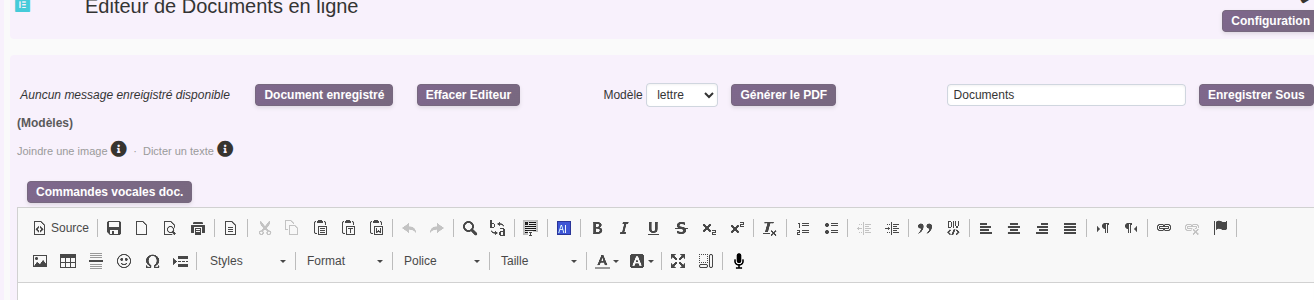
A mail editor integrated with DoliPlus
DoliPlus Office complements your desktop editors (Word, LibreOffice…). It lets you create text documents — with images and tables — directly in DoliPlus. You can then generate them as PDFs.
Its main advantages:
- You can use it on the go, on a tablet or smartphone, without installing an app.
- DoliPlus saves each document in HTML format in the database.
- You can edit it online at any time.
- PDF generation is instant. A new version replaces the previous one.
- You write faster thanks to a library of text snippets (Tools → Templates for…).
- You can dictate your mail by voice from Chrome, Edge or Safari, on PC, Mac or Android (activation required).
Today, the Office tab is available from:
- the Product record — for example, to edit technical documentation;
- the Commercial Proposal record — for example, for highly detailed proposals, consultant-style;
- the Customer/Supplier and Contact record — for example, for standard letters, document sending or complaints.
What you no longer need to do
Writing a letter in a separate software, then manually attaching it to the right customer, wastes time and often leads to misfiling errors. The Office tab eliminates this step.
You gain in three ways: **automatic filing**, with each document stored in the document library of the relevant record; a **professional look**, with headers, footers, and revision indices managed for you; and **reliable tracking**, with the final PDF remaining linked to the original customer, quote, or project.
Your letter templates and technical documentation remain available to the whole team, without having to reformat them each time.
The publisher’s header and custom fields
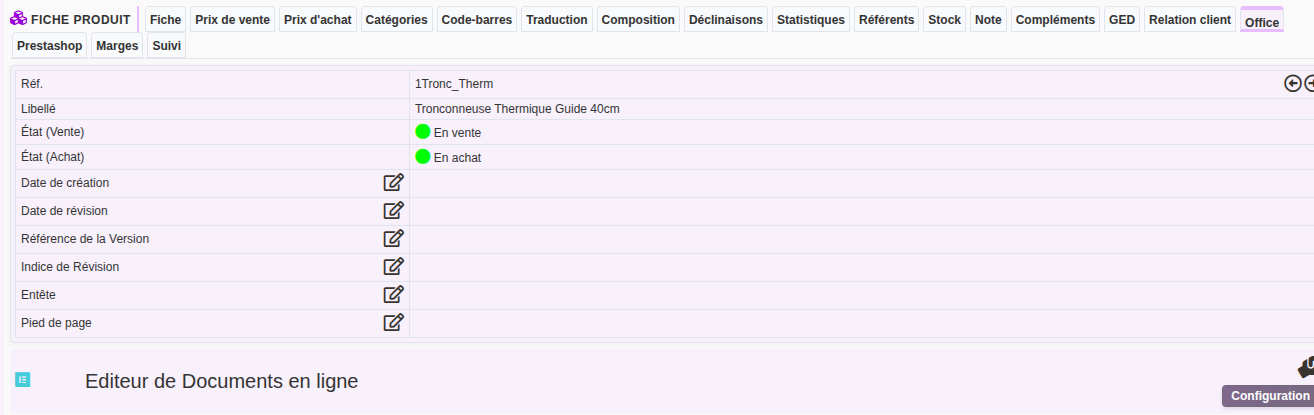
First, the header identifies each document. You can enter:
- the creation date and revision date;
- the version reference and revision index;
- the header and footer.
Additionally, the editor settings allow you to add your own fields to the form. Then, DoliPlus retrieves their values at print time, using variable substitution.
The text snippet library
Save time by reusing pre-recorded text. When calling a snippet, DoliPlus applies variable substitutions, so the imported text arrives pre-filled.
Note: if a misalignment appears on the first line, start the template with a blank line followed by a line break.
Edit headers and footers in a dedicated area. Here too, variable substitution applies.
Then, DoliPlus uses these areas when generating the PDF. If left blank, the tool applies a default header and footer.
How to use from the product record
- Go to the product record.
- Select the Office tab.
- Open an existing document, or create a new one by calling snippets from the library.
- Use the dual-function button: if the selection area is filled, the document loads; if empty, the editor clears.
- On loading, the file name displays for saving.
- Generate the PDF. If the document is not saved, DoliPlus assigns a temporary name “temp”.
- Then, find the document in the ECM tab.
Tip: Save your document regularly. If you get disconnected, any unsaved changes will be lost. For a new document, name it first (no extension), then save.
Format text with the editor
The editor includes standard word processing features. The main ones are:
- remove formatting;
- paste from Word — essential to avoid unpredictable results;
- select all;
- insert images from the public folder;
- insert a page break;
- switch to full-screen mode;
- edit tables;
- add a link in the PDF.
Add a snippet to the library
- Open the Tools menu.
- Select “Product Templates”.
- Add or edit a snippet.
- Apply the “Product” filter.
Substitution variables
Depending on the module linked to Office (product, quote…), you can use variable substitutions at two points: when calling a text from the library, and when printing the body, header, and footer. Additionally, any extra field you create becomes a reusable variable.
Syntax: ${variable}
For reference, here are the variables linked to modules. Some have a more technical use: seek advice before using them.
Office: ${datec} (creation date) · ${dater} (revision date) · ${version_doc} (version reference) · ${version_indice} (revision index) · ${page} (page/group)
Products / Services: ${accountancy_code_buy} · ${accountancy_code_sell} · ${barcode} · ${btpunit} · ${country_code} · ${description} · ${duration} · ${id} · ${label} · ${libelle} · ${note} · ${pmp} · ${price} · ${price_base_type} · ${price_min} · ${price_min_ttc} · ${price_ttc} · ${ref} · ${stock_reel} · ${table_element} · ${tva_tx} · ${weight}
Quote: ${propal_ref} · ${propal_ref_client} · ${propal_remise} · ${propal_remise_percent} · ${propal_remise_absolue} · ${propal_total} · ${propal_total_ht} · ${propal_total_tva} · ${propal_total_localtax1} · ${propal_total_localtax2} · ${propal_total_ttc} · ${propal_socid} · ${propal_fk_project} · ${propal_modelpdf} · ${propal_note} · ${propal_note_public} · ${propal_statut} · ${propal_statut_libelle} · ${propal_datec} · ${propal_datev} · ${propal_date} · ${propal_datep} · ${propal_fin_validite} · ${propal_date_livraison} · ${propal_date_relance}
Quote follow-up contact: ${client_name} · ${client_address} · ${client_cp} · ${client_city} · ${client_firstname} · ${client_lastname} · ${client_civilite}
Customer/Supplier record: ${company_name} · ${company_email} · ${company_phone} · ${company_fax} · ${company_address} · ${company_zip} · ${company_town} · ${company_country_code} · ${company_country} · ${company_web} · ${company_barcode} · ${company_vatnumber} · ${company_customercode} · ${company_suppliercode} · ${company_customeraccountancycode} · ${company_supplieraccountancycode} · ${company_juridicalstatus} · ${company_capital} · ${company_idprof1} · ${company_idprof2} · ${company_idprof3} · ${company_idprof4} · ${company_note} · ${company_firstname} · ${company_lastname} · ${company_civilite}
Dictate instead of typing
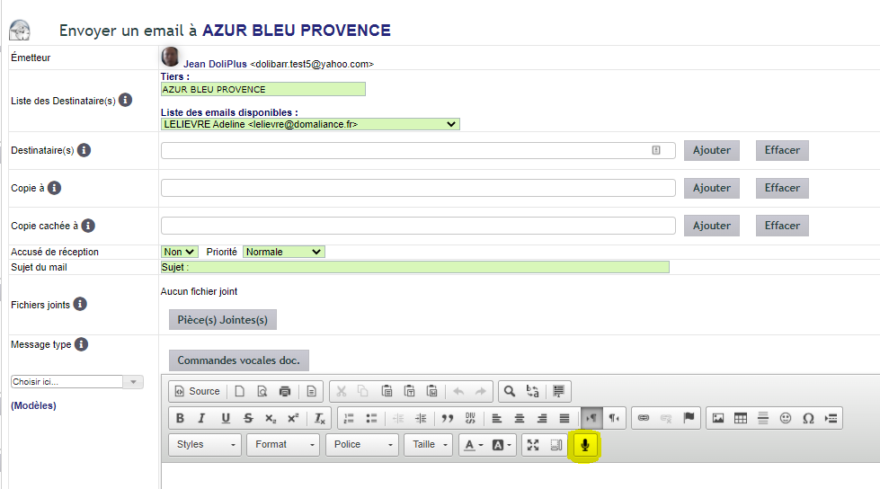
A long letter is dictated faster than typed. The editor features a microphone button in its toolbar: one click, you speak, the text appears.
You can even control formatting by voice — say “command new paragraph”, “command line break”, “command undo” or “command redo”.
Supported browsers
The button appears in Google Chrome (Windows, macOS, Linux), Microsoft Edge (Windows) and Safari (macOS, iPhone, iPad).
On Firefox and Opera, it doesn’t appear: these browsers don’t provide speech recognition services. This isn’t a setting to adjust — use your operating system’s dictation instead, explained below.
Windows 10 and 11 dictation
Windows includes its own speech recognition, working in all browsers, including those without the button. It’s not enabled by default: first run Microsoft’s initial setup, then activate it with Windows + S.
macOS dictation
Same principle on Apple devices: the system dictation works in any DoliPlus field. Follow Apple’s guide for dictating messages and documents on Mac.
Limitations
PDF and HTML are two very different formats. Office accepts HTML and CSS as input, then converts them to PDF using its own parser.
As a result, the PDF output may sometimes differ from browser rendering, as the engine only supports a subset of HTML and CSS specifications. We continuously improve these conversions.
Learn more
- Word document templates
- Substitution variables
- Custom fields
- Pasting an image in the text editor — paste an image directly into the editor.
