 on 5 September 2026
 DoliPlus login page security is enhanced
DoliPlus login page security gets stronger
Login page security is the first barrier between your business data and malicious actors. Indeed, bots constantly scan the internet, attempting thousands of password combinations on management software login screens. That’s why DoliPlus now strengthens your access protection with two complementary mechanisms: a puzzle-style captcha and automatic blocking of repeated attempts. This keeps your workspace secure without burdening your team’s daily workflow.
A simple puzzle for you, impossible for bots
The system is deliberately user-friendly. After three incorrect password entries, the login page displays an image with a puzzle piece to drag into place. Humans complete this action in seconds – whether using a mouse or touchscreen. Automated programs, however, can’t solve it because the correct position remains server-side. Plus, a new image generates with each attempt, eliminating brute-force guessing.
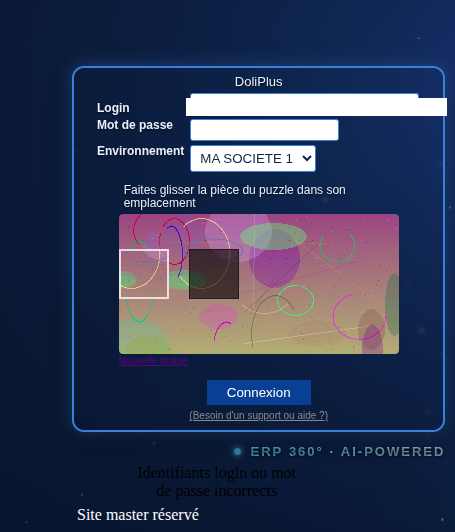
Automatic blocking of repeated attempts
The puzzle already deters most bots, but login security goes further. If ten failures occur within fifteen minutes from the same source, DoliPlus temporarily blocks access. A clear message displays the lockout duration – fifteen minutes by default. This renders mass password-guessing attacks practically useless.
Additionally, every failed attempt logs in DoliPlus’ connection journal. Administrators can review complete histories and easily spot suspicious patterns.
Enabling login page security
This protection is activated with just a few clicks from the admin account. First, open the Configuration menu then go to the Tools settings area. Next, locate the “Login page security” section. Three settings are available:
- Number of failed attempts before displaying the captcha puzzle (three by default);
- Number of failed attempts before blocking the source (ten by default);
- Monitoring and blocking window duration in minutes (fifteen by default).
Finally, click Save. Login logging is automatically activated at the same time – no further configuration is needed.

What changes for your teams day-to-day
Nothing – and that’s intentional. Your team members enter their credentials as usual and never see the puzzle. Moreover, a successful login resets the counter: a simple typo won’t trigger any inconvenience. In short, only bots and unwanted visitors encounter the captcha and subsequent blocking. The login page security works silently in the background for you.
Going further
- Other workspace protections like automatic logout: View chapter
- DoliPlus’s new design, including the login screen: Learn more
