 on 5 September 2026
 Security information
Automatic disconnection protects your session when you leave your workstation unattended. DoliPlus then logs out the account after a period of inactivity that you define.
Automatic disconnection for inactivity
The automatic disconnection delay is set in the admin console (Home → Configuration → Security). It corresponds to the allowed inactivity time before the system closes the session. Additionally, this delay refreshes with each action.
Let’s take a concrete example. The delay is set to 7200 seconds, or 2 hours.
- You log in at 8:00 AM.
- You no longer use your session until 9:55 AM.
- You resume at 9:55 AM: the session will then close due to inactivity at 11:55 AM (9:55 AM + 2 hours).
In other words, as long as your breaks are shorter than the delay, the system won’t log you out.
Still, remember to close your session when you leave your workstation. To do this, you can either:
- close your browser;
- click the padlock in the top-right corner of your application.
Your forms wait for you for two hours
Every DoliPlus form — a customer record, a quote, an email template — carries an invisible signature that the server checks when saving. This signature prevents an external site from writing to your space without your knowledge while you’re logged in.
It remains valid for two hours. You can start entering data, open another tab to check a price or stock level, browse several records, then return to save: your work will be saved as normal. The number of pages viewed in between doesn’t matter.
Managing your passwords properly
Automatic disconnection alone isn’t enough. A strong password remains your first line of defence. Use a different, robust password for each online account. That way, if one is compromised, the others stay secure.
The CNIL and ANSSI provide guides for creating a secure password (CNIL’s guide, ANSSI’s guide). Here’s an excerpt.
What makes a “good” password?
A good password is first and foremost long enough: at least eight characters. Then, it combines at least three types of characters from the four available (uppercase, lowercase, numbers, and special characters). Finally, it has no connection to its owner (name, date of birth, etc.).
How to create a secure password?
Mnemonics help create a complex password. For example, take the first letters of a phrase. So, “A savvy internet user is worth two” becomes 1Ud’Iaev2.
To strengthen it, apply these rules:
- use uppercase for names (e.g., User);
- keep punctuation marks (e.g., ’);
- write numbers as digits (Un becomes 1).
Finally, change your password regularly.
Bitwarden: a free vault for your passwords
Following these rules becomes tricky when managing dozens of accounts. Fortunately, a password manager solves this issue. We recommend Bitwarden, a reliable and trusted tool.
In practice, Bitwarden works like a digital vault. You store all your passwords there, then lock the vault with a single key: your master password. This way, you only need to remember one code.
This vault offers three clear benefits:
- it generates long, unique passwords with one click;
- it autofills your login forms, on desktop and mobile;
- it syncs your access across all your devices, securely.
A more secure login page
On its side, DoliPlus also enhances the security of your login screen. First, a visual puzzle appears after multiple failed attempts. Then, an automatic lock stops repeated bot attacks.
In short, your software and strong passwords work together. One blocks automated attacks, the other keeps your credentials unbreakable.
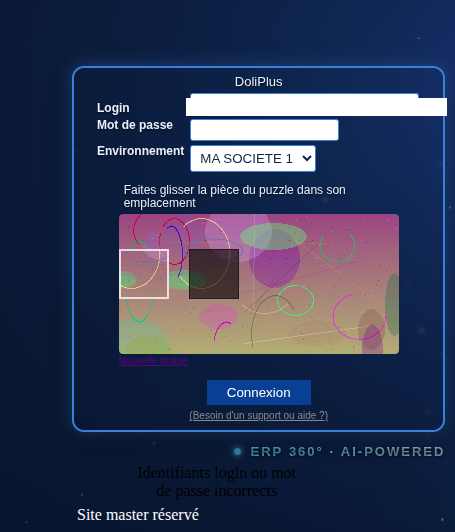
To learn more about this protection, check the dedicated section: DoliPlus login page security.
Learn more about DoliPlus server security
