 on 5 September 2026
 Customise PDF Documents
Your Dolibarr + DoliPlus Pack lets you customise the quote, order and invoice interfaces, as well as PDF outputs.
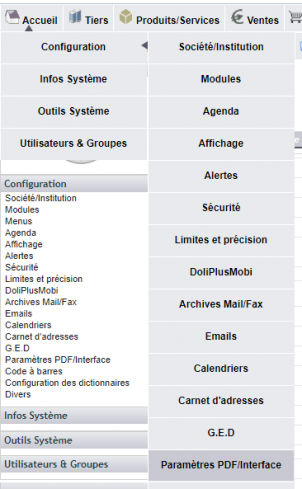
Configuration is accessible via Menu -> Configuration -> PDF/Interface Settings.
The Quote, Order, Invoice Interface Settings group lets you adjust the interface behaviour.
For example:
- Displaying sales units in quotes, orders and invoices enables weight or volume management if products are properly configured.
- Displaying photo management in quotes lets you select product record images from the document library to print under the item.
The following three groups let you modify PDF appearance.
- PDF Settings
- Other PDF Settings
- PDF Output Colours
For example, you can customise border colours and text colour.
You can also add a watermark using a PDF uploaded to the template management folder for quotes, orders and invoices.
Note:
For multi-entity configurations, each entity must be set up. The “Duplicate this configuration” button speeds up this process.
Customise PDF documents: where your details come from
Have you moved, or changed phone number or logo? Before you customise PDF documents, note that your details come from three separate places, each to be updated:
- the header (name, address, phone, logo) uses your company record: Setup → Company/Institution;
- the cheque payment notice, at the bottom left of invoices, uses the bank account chosen in the invoice setup, under “Offer payment by check payable to and mailed to”. The name and address printed are then those of that account’s owner: so edit “Account owner address” on the bank account record;
- the free text at the bottom of the page uses the “Additional mention on invoices” setting, in the same invoice setup.
After a change, regenerate the invoice PDF: a document already produced does not update itself.
PDF viewing in browser and printing
Option 210 lets you
- Disable document viewing in the browser and always download them (except on mobile devices – rarely used).
- Or view documents in the browser’s PDF viewer – see tips below
Option 211 forces DoliPlus’s built-in PDF viewer instead of the browser’s. Useful as no browser settings are required, though print quality may be lower depending on the browser. In this case, download the document for printing.
Systematic download

Display via browser settings

Display via DoliPlus

Tips for configuring your browser’s PDF viewer:
Firefox: https://support.mozilla.org/fr/kb/desactiver-lecteur-pdf-integre#firefox:win10:fx71
Chrome: https://support.google.com/chrome/answer/6213030?hl=fr
