 on 5 September 2026
 Automated workflows
Setting up automated workflows for quotes, orders, and invoices
To simplify the process of converting a quote into an order and then an invoice, or directly into an invoice, you can set up automated workflows.
These workflows update the status of the documents involved, making tracking easier.
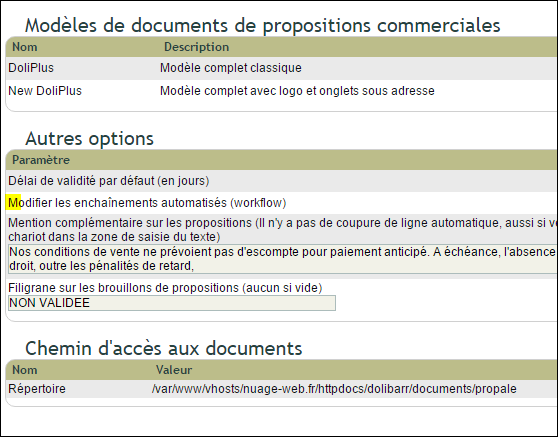
In DoliPlus, automated workflows are configured from the administration console of the commercial proposal, order, or invoice.
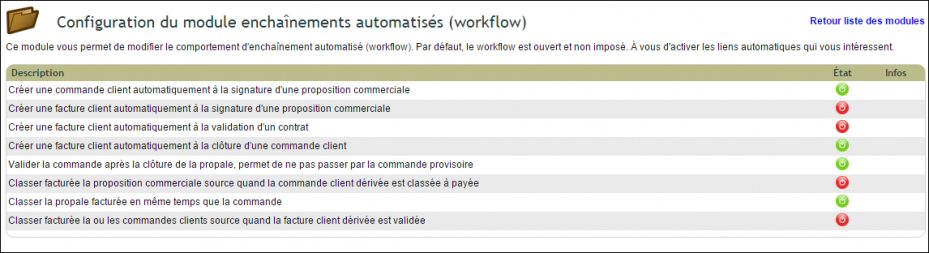
Below is an example:
| Action | Result | Status |
| Commercial proposal* | —- | Validated (Open proposal) |
| Commercial proposal → Close with status → Signed for invoicing | Order created with final number | Commercial proposal: Signed (for invoicing)
Order: Validated |
| Order → Close → Signed for invoicing | Invoice created with provisional number (PROV). (Security if order is reopened later) | Commercial proposal: Signed (for invoicing)
Order: To be invoiced Invoice: Draft |
| Invoice → Validate | Invoice status updated | Commercial proposal: To be invoiced
Order: To be invoiced Invoice: Unpaid |
| Invoice → Process payment | Action on pending invoices for payment.
If full payment and the checkbox is validated on: Automatically mark standard and replacement invoices as “Paid” when fully paid. |
Commercial proposal: Invoiced
Order: Processed Invoice: Paid |
*(Note: Commercial proposal = Quote)
