 on 25 October 2026
 Employee records software: contracts, payslips and HR files in one place
Employee records software: every HR document in one place
Your DoliPlus solution includes employee records software that gathers what is scattered today across folders and mailboxes:
- employment contracts, payslips and HR documents on a single record;
- staff and external contractors handled the same way;
- custom fields, so the form matches YOUR payroll practice;
- a reusable signature, shared with the other modules;
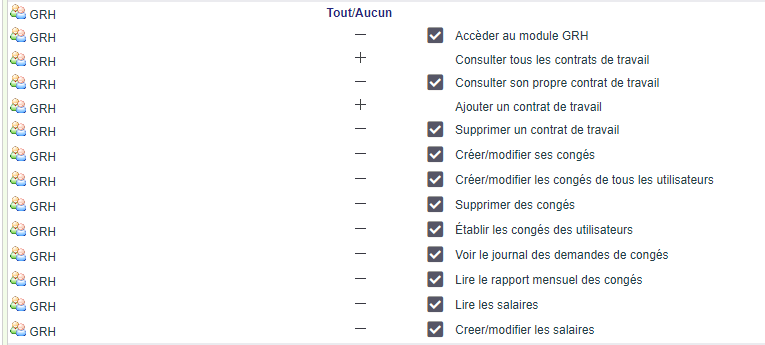
- read and write rights fine enough to keep HR data confidential.
As a result, an employment contract is found in seconds instead of being hunted for. DoliPlus is the enhanced cloud edition of Dolibarr, the open-source ERP & CRM used across Europe.
Bring your employee records together
Looking to keep employment contracts, payslips and HR papers in one place? DoliPlus gathers them on a single record, reachable in a few clicks.
You therefore build the list of contracts for employees and external contractors alike. Every document stays stored and available to the people you authorise.
Besides, fine-grained rights limit who may read and who may write. Your HR data stays confidential.
The HR module home page
The HR menu opens on a dashboard when the KPI module is enabled: the “Active employment contracts”, “Leave to approve”, “Leave by status” and “Latest leave requests” cards and, for those who may view all contracts, “Latest employment contracts”. Without the KPI module, the HR menu opens the contract list directly.
Create and sign an employment contract
To open a file, fill in the form provided. You then add custom fields to cover whatever else you need to record.
A “signature” tab stores a generic signature. That signature is reused by the other modules — field service or rental, for instance.

Access to the document space follows the same read and write rights. You therefore decide who sees every file, who sees only their own, and who may add one.
Finally, a list view shows the form fields alongside your custom fields, each in its own column.

Creating the contract, step by step
- Menu HR › “Contracts”: the contract list (status “Active” or “Closed”, ref., last name and first name, third party, contract type, start and end dates).
- In the left menu, click “Add a contract” (“Add an employment contract” right).
- The employee: choose them among the users. For an external contractor, choose their third party and then their contact instead; the “Create and link an external user account” box then gives them access to DoliPlus (leave it unticked for an employee).
- The contract type (“Indefinite term”, “Fixed term”, apprenticeship, vocational training, temporary, external) and the start date are mandatory. When you have them, also record the end date, the signature dates (employee, management), the pre-employment declaration and the medical examination.
- “Validate contract”: you return to the list. Click the reference to reopen the contract; “Edit” and “Delete” (“Delete an employment contract” right) are at the bottom of the card.
Having the employee sign on screen
On the contract, open the “Signature” tab. First write the name under the frame (“Last name, first name, job title” field: it is printed at the bottom of the signature), then have the employee sign in the “Sign above” frame, with a finger or the mouse — typing the name afterwards erases the drawing. “Clear” starts again, “Save” keeps the signature, which then appears at the top of the tab. It is reused on the documents that require the employee’s signature (field service and rental forms). Store the signed contract in the ECM tab of the contract.
Completing an employee’s HR record
On a user’s card, the “Contracts” tab gathers their HR record:
- “Position/Job title” and “Manager” (the person who approves their leave), editable with their pencil.
- Pay and costs: “Average hourly rate” (used to calculate the time spent on projects), “Average daily rate”, “Salary” (gross monthly), “Salary (supplement)”, “Weekly working hours”, “Accounting code”.
- Bank details: “IBAN”, checked when saved (a wrong IBAN is rejected with a message), and “BIC/SWIFT”.
- At the bottom, the employee’s “Work contract list”: click a reference to open the contract.
The pay and bank lines are only displayed to the employee themselves (“View their own employment contract” right) and to people who hold the “View all employment contracts” right. To edit them, the “Add an employment contract” right is also required.
Further reading
Employee records software works together with the other HR bricks of DoliPlus:
- the user record, which holds the details of each colleague;
- leave and absence management;
- expense reports.
For the legal background, see the definition of an employment contract on Wikipedia.
